27 Oct 2026 · Canvas · 24 min
I spent a week building a spinning Earth in Jetpack Compose
A postcard folds into a paper plane and lands on a turning globe, drawn on a Compose Canvas.
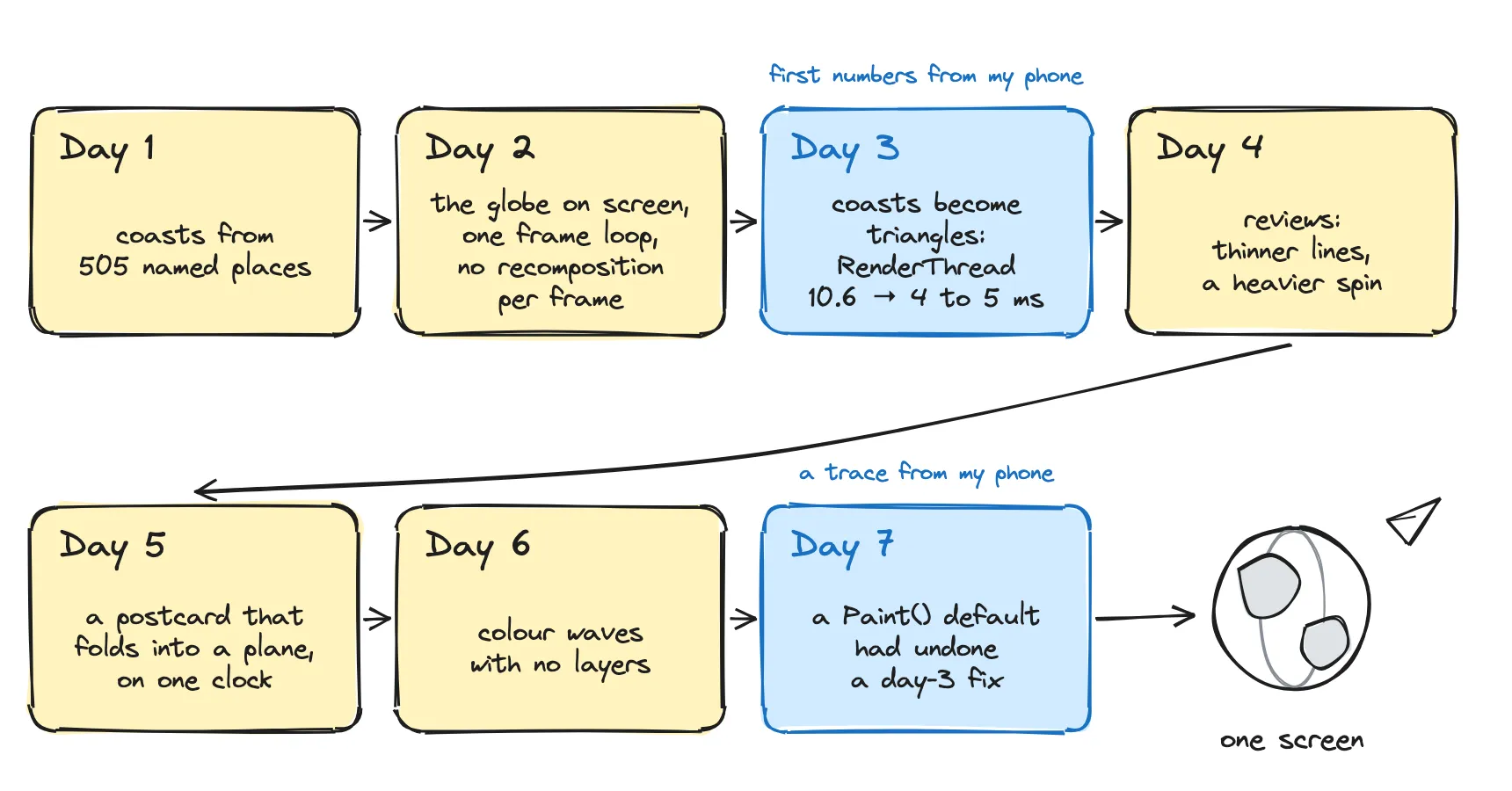
The whole clip is one Compose screen, with no images, no SVG and no Lottie files. I built it over seven days in a row. This is that week, written like a diary: one entry for each day, with the code and the numbers.
On the last day, the screen looked finished. Then a trace showed that my phone was uploading a texture of about 700 by 700 pixels to the GPU, on every frame. A Paint default had undone a fix from day three.
If you animate or draw in Compose, three things here may save you time:
- how to animate a whole screen without recomposing it on every frame
- how to draw moving lines cheaply
- which
Paintdefault to check
Day 1: Rules and a coastline
Today, before the first line of Kotlin, I set four rules for this screen:
- Draw it on the Compose Canvas.
- Make it as fast as I can.
- Avoid recompositions that are not needed.
- Measure it on my own phone, which runs Android 13.
Two more rules come with all my Canvas work. Every shape must be one that a person could write by hand, so nothing is traced or loaded from map data. And nothing counts as done until it has been reviewed for motion, art, code and UX.
The look is minimal on purpose, with a cartoon feel: black lines, pale grey land, a white sea and a flat grey night side, on a cool off-white page. A plain look is also cheap to draw. It needs one ink colour, flat fills and no textures.
Almost every tuned number in the code is a named constant, and most of them have a KDoc that explains the value. Even the page colour has one:
/** The page: a neutral off-white with a breath of blue. A warmer one read as an old app's sepia. */
private val Page = Color(0xFFF5F5F7)
Then came the coastlines. Drawing them without map data sounds hard for a whole globe, until you notice that a coastline is mostly a list of places that already have names. So each coast is a list of landmarks, in order:
place("Miami", 25.9f, -80.1f),
place("Jacksonville", 30.3f, -81.4f),
place("Charleston", 32.6f, -80.3f),
place("Cape Hatteras", 35.2f, -75.5f),
place("Cape May", 38.9f, -74.9f),
place("New York", 40.6f, -73.8f),
place("Cape Cod", 41.7f, -70.0f),
Read from the top down, the list is a drive north along the east coast of the US. In all, there are 505 landmarks across 23 coasts: the continents, 13 islands, Greenland and Antarctica (drawn as ice), and three inland seas. Most of them come from a JavaScript prototype of the globe, made before any Kotlin, where the coastline was also typed in as coordinates. Each point got the name of the place or the stretch of coast it marks.
A list of points is a polygon, and a polygon looks measured, not drawn. Each landmark becomes a 3D point on a sphere of radius 1. Two steps then turn each ring of points into a cartoon coast. First, a curve passes through every landmark: a centripetal Catmull-Rom spline, sampled every 0.9 degrees. The centripetal kind matters at straits, where two landmarks sit close together and an ordinary spline would make a small loop. Second, a [1 2 1] filter smooths the curve. It replaces each point with the sum of its two neighbours and twice the point itself. The weights 1, 2 and 1 add up to 4, so the new point lies about four times too far from the centre. After each pass, every point is put back onto the sphere. The filter runs 14 times:
/** Runs the [1 2 1] filter [passes] times, putting each point back on the sphere after every pass. */
private fun rounded(p: DoubleArray, passes: Int): DoubleArray {
    var src = p
    var dst = DoubleArray(p.size)
    val n = p.size / 3
    repeat(passes) {
        for (i in 0 until n) {
            val a = 3 * ((i + n - 1) % n)
            val b = 3 * i
            val c = 3 * ((i + 1) % n)
            for (k in 0..2) dst[b + k] = src[a + k] + 2.0 * src[b + k] + src[c + k]
            normalize(dst, b)
        }
        val swap = src
        src = dst
        dst = swap
    }
    return src
}
Fourteen passes spread a sharp cape over about 5 degrees, and that is what makes a coast look drawn. Small islands get fewer passes, or Sri Lanka would be rounded into a dot.
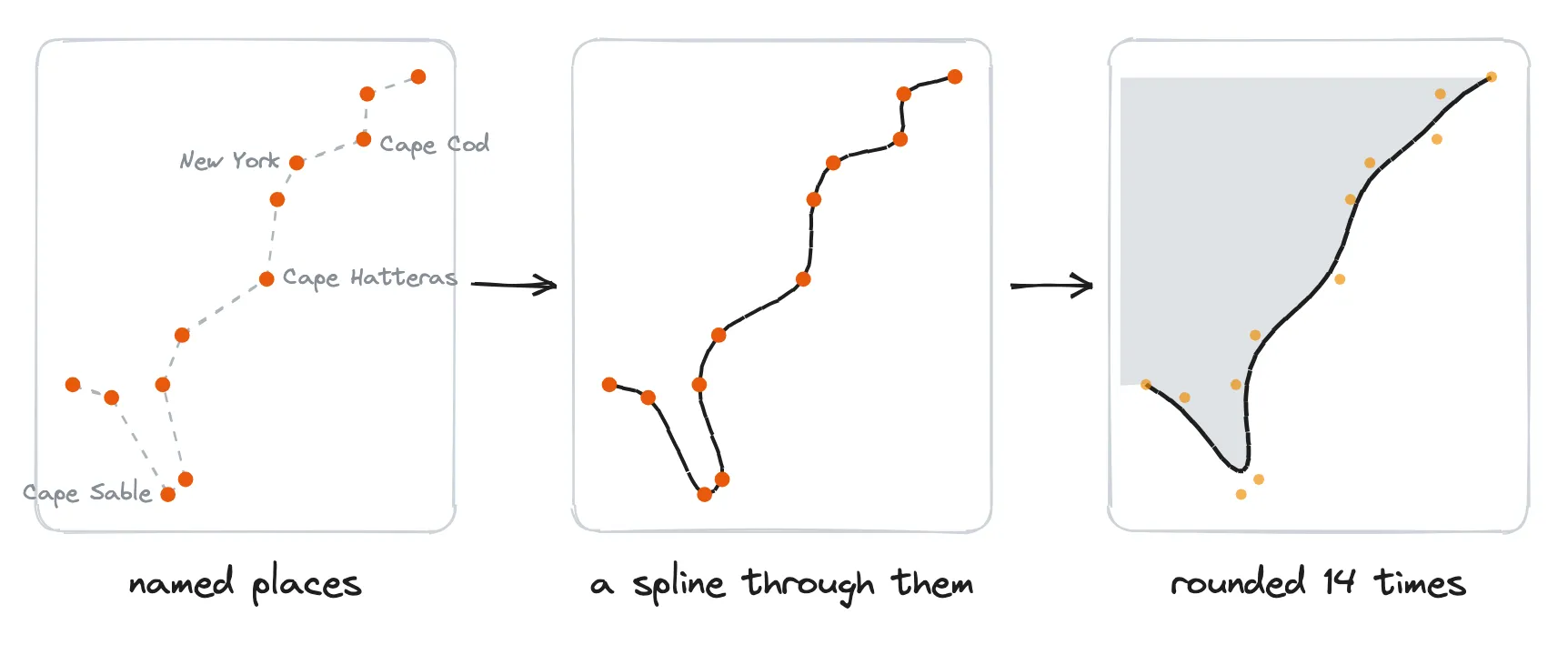
With the spline’s samples, the whole world comes to about 2,400 points. They are built once per process, so each frame only has to project them onto the screen. For now, the world is only numbers. Tomorrow, it has to become a picture.
Day 2: A ball on a flat screen
Today the numbers became a picture. The globe is drawn the way you see a ball from far away, without perspective. This is called an orthographic projection. The globe’s pose is a 3×3 matrix, built from the longitude that faces you, the latitude you look from and a 20-degree tilt of the axis. Projecting a point takes three dot products:
fun right(x: Float, y: Float, z: Float): Float = m[0] * x + m[1] * y + m[2] * z
fun down(x: Float, y: Float, z: Float): Float = -(m[3] * x + m[4] * y + m[5] * z)
fun depth(x: Float, y: Float, z: Float): Float = m[6] * x + m[7] * y + m[8] * z
A point with a positive depth faces you. The hard part is the rim, the outline of the globe. When Africa reaches the rim, its grey fill has to stop there. Its black outline, though, must not follow the rim. If it did, the two lines would lie on top of each other and make a thick black band.
HorizonClip solves this. It walks along each coast, keeps the stretches that face you, and finds the two points where each stretch crosses the rim. The coast line, the black stroke along a coast, is drawn only along those stretches. The fill, though, is closed along the rim. Every coast runs anticlockwise, so its land is always on its left. That tells the code which way to go around the rim. Where a coast leaves the near side, the fill follows the rim to the point where the coast comes back. That takes one arcTo for each gap.
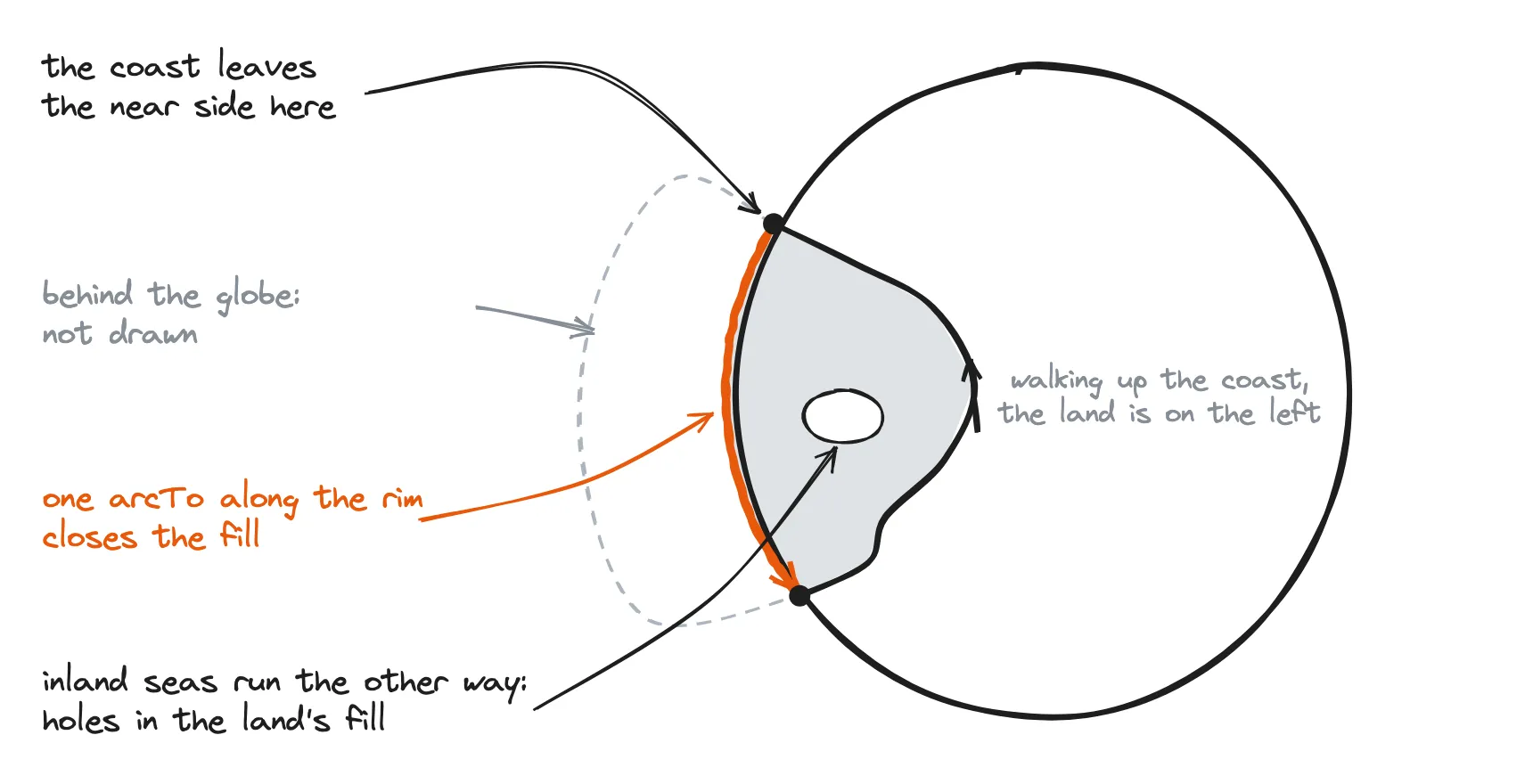
The three inland seas run the other way, clockwise. Android fills a path with the non-zero winding rule, so a ring that runs against the land around it cancels that land out. The seas become holes in the land, with no fill of their own.
Then the globe had to move. You can spin it with a finger. A drag up or down tilts the view towards a pole, and a rubber-band effect holds the tilt back. When you let go, a damped spring brings the view back, with about 3% overshoot.
While anything moves, the screen changes on every frame, and my third rule allowed no needless recompositions. So one loop moves the Earth. TripStage.play is launched once from a LaunchedEffect, and it runs for as long as the screen is there. (This is the loop’s final version. On day two it moved only the Earth. The lines with trip and feel came on day five, with the postcard and its haptics.)
suspend fun play(feel: (TripBeat) -> Unit) = coroutineScope {
    val scale = coroutineContext[MotionDurationScale]
    if (scale != null) launch { snapshotFlow { scale.scaleFactor }.collect { wake() } }
    var last = 0L
    var resting = false
    val tick: (Long) -> Unit = { now ->
        val dt = if (last == 0L) FIRST_STEP else ((now - last) / NANOS_PER_SECOND).coerceAtMost(MAX_DT)
        last = now
        val motionScale = scale?.scaleFactor ?: 1f
        val busy = trip.step(dt, motionScale, motion)
        trip.takeBeat()?.let(feel)
        val moving = motion.step(dt, motionScale)
        frame++
        resting = !busy && (!moving || earthOutOfSight())
    }
    while (isActive) {
        withFrameNanos(tick)
        if (resting) {
            bell.receive()
            last = 0L
        }
    }
}
On each frame, the loop moves the trip and the Earth forward by the time since the last frame. That time is capped at a twentieth of a second, so a slow frame or a return from the background never makes the globe jump. The tick lambda is created once, outside the loop, so no frame allocates a new one.
The values that change on every frame, like the trip’s clock and the Earth’s longitude, are plain fields, not Compose state. The loop changes only one piece of state on every frame: a frame counter.
var frame by mutableIntStateOf(0)
    private set
Only the draw code reads frame. Compose’s own Canvas composable is just a Spacer with a drawBehind modifier. This screen does the same thing with drawWithCache, a draw modifier that can also build objects once and keep them. Here it is, shortened:
Spacer(
    Modifier
        .fillMaxSize()
        .drawWithCache {
            val layout = stage.layoutFor(size.width, size.height, ...)
            val sheet = stage.sheetFor(layout, this, layoutDirection)
            val address = stage.addressFor(layout, words, measurer, this)
            val art = TripArt(layout, buffers, sheet, address, ...)
            onDrawBehind {
                stage.frame
                with(art) {
                    drawTrip(stage, ...)
                }
            }
        }
)
The line stage.frame, on its own, does nothing but read the state. Compose remembers in which phase each piece of state was read. This one is read only while drawing, so a new value causes just a redraw. Nothing recomposes, and nothing is measured again. Everything above onDrawBehind (the layout, the postcard’s paper and the measured text) is built once. drawWithCache builds it again only when the size changes, or when state read in that block changes: here, the insets or the city.
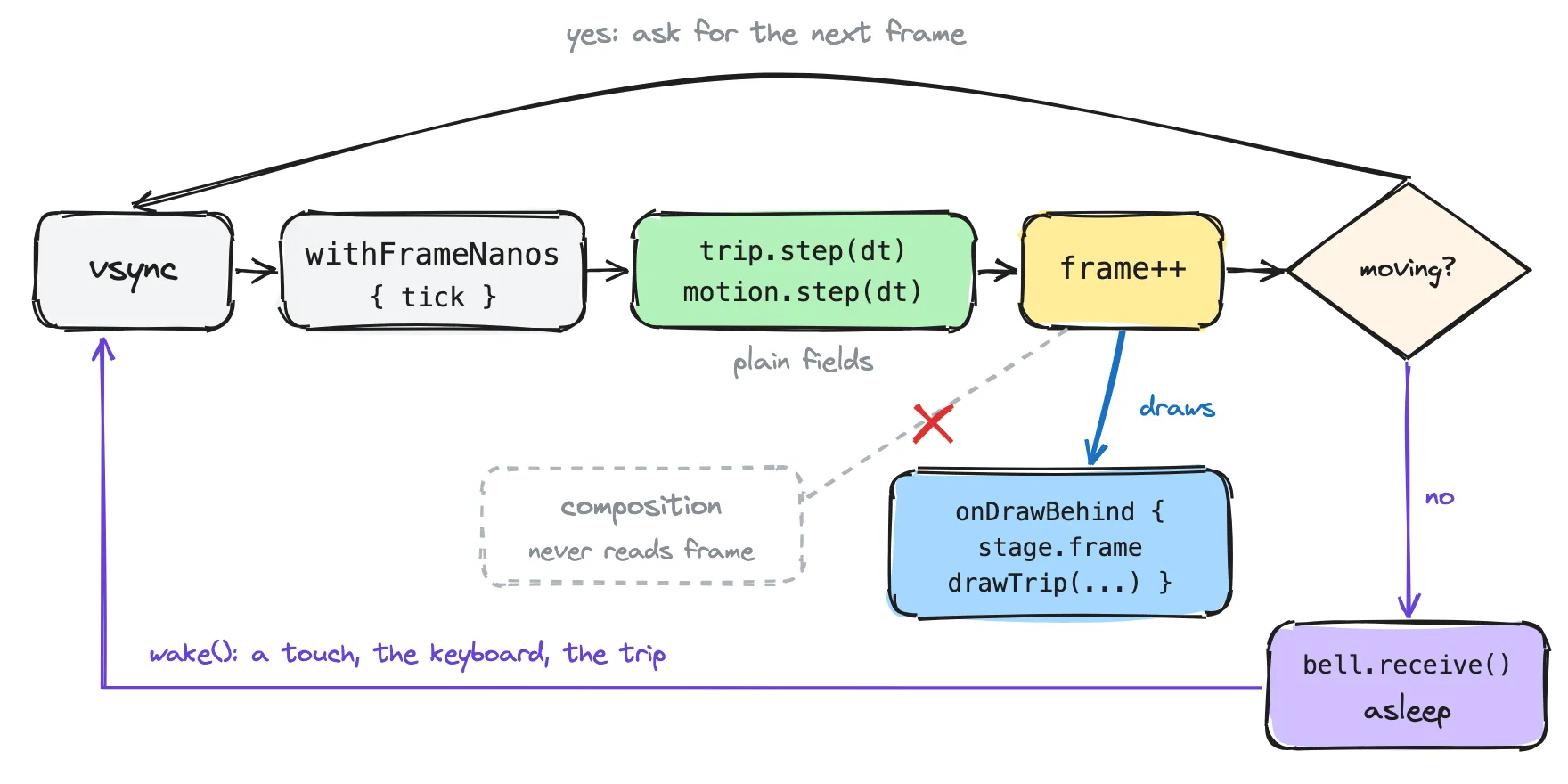
When nothing moves, the loop stops asking for frames. It waits on a conflated Channel, which holds at most one wake-up call. The channel is called bell, and anything that needs the screen to move again rings it:
private val bell = Channel<Unit>(Channel.CONFLATED)
...
fun wake() {
    bell.trySend(Unit)
}
A touch, the trip or the keyboard calls wake(), and until one of them does, the loop asks for no frames. The keyboard is on that list because of the postcard from day five: while you write, the keyboard can hide the Earth. Then the loop sleeps, and when the keyboard closes, the Earth has to move again. The loop also reads MotionDurationScale from its coroutine context. If you turn animations off in the system settings, the Earth no longer turns on its own, and every animation jumps to its end. When you turn them back on, snapshotFlow wakes the loop.
Now the globe turns on its own, and a finger can spin it and tilt it. Tomorrow: the first measurements on my phone.
Day 3: The phone’s first verdict
For the first time, the globe was measured on my phone. I used Claude to run the benchmarks, but the strategy was mine:
- Measure on my own phone.
- Back every claim about speed with numbers from
dumpsys gfxinfo framestats. - Allow no memory allocation in any code that runs on every frame.
The phone ran at 60 Hz, so each frame had 16.7 ms. The number that mattered most here was the RenderThread’s time. The RenderThread is the thread that turns each frame’s drawing into work for the GPU.
The first change was a small one. Every edge of the land and the ice lies under a coast line or under the rim, so smoothing the edges of the fills was wasted work. The fills got a Compose Paint with isAntiAlias set to false instead.
Then each part of the drawing was switched off in turn, to see what it cost. The biggest cost came from something thin: the black coast lines, drawn as stroked Paths. With them, framestats showed the RenderThread at 10.6 ms per frame. Without them, it took 5.5 ms. The frame still fitted in 16.7 ms, but half of the RenderThread’s time was spent on the coasts alone.
A stroked Path that changes on every frame is expensive in Skia, the graphics engine under Android’s Canvas. Most likely, Skia draws it on the CPU into a coverage mask the size of the globe and uploads the mask to the GPU each time. A coverage mask is a greyscale image that records how much of each pixel a shape covers.
So the coasts became triangles. Each line is a strip four vertices wide: a solid core and a one-pixel fringe on each side that fades to transparent. The fringe does the anti-aliasing, the smoothing of the edge. The GPU does this smoothing while it blends the vertex colours across each triangle, so no mask is needed.
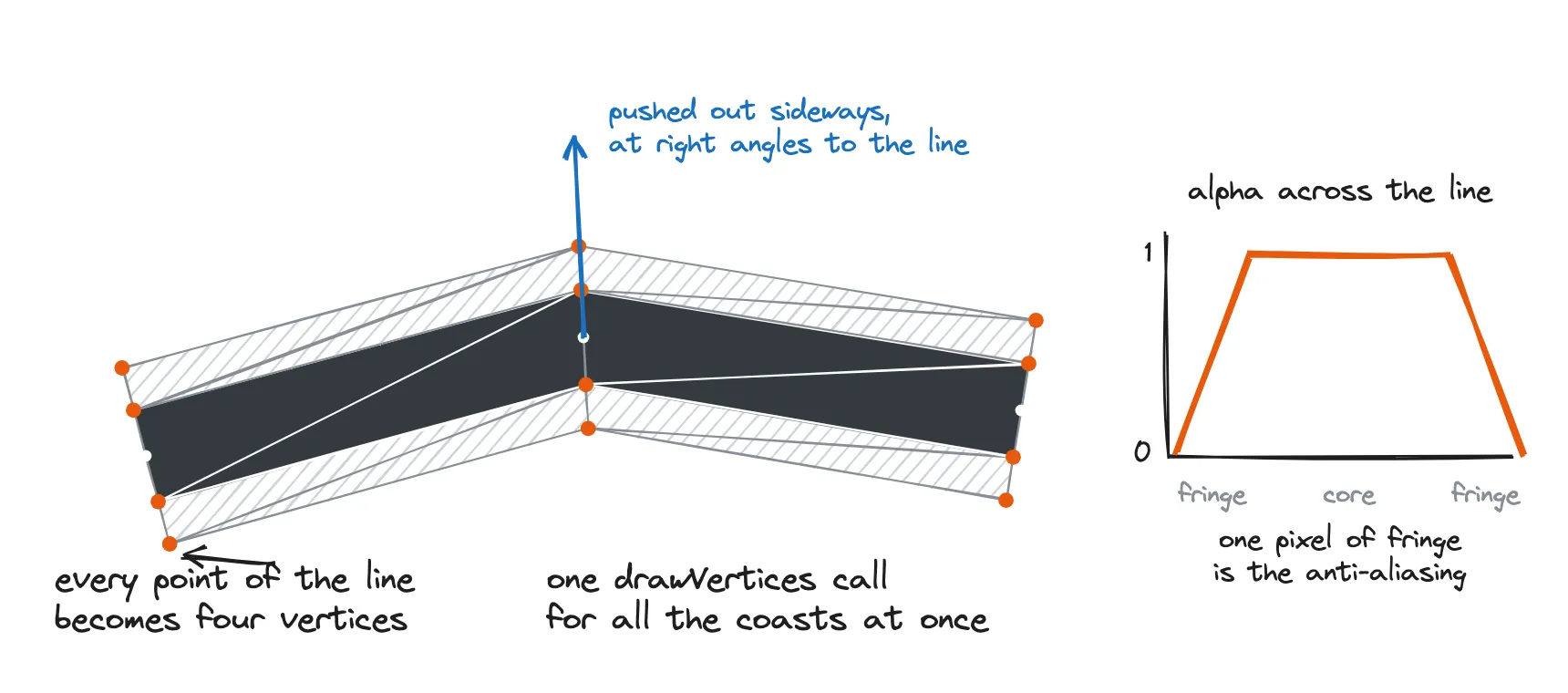
For each point, the code takes the direction from the point before it to the point after it. Turned by 90 degrees, that direction becomes (nx, ny), the way to push the vertices out sideways. Two vertices go at the edges of the core, and the other two go one fringe further out (shortened):
val tx = xs[next] - xs[prev]
val ty = ys[next] - ys[prev]
val length = sqrt(tx * tx + ty * ty)
if (length > MIN_CHORD) {
    nx = -ty / length
    ny = tx / length
}
...
vertices[v++] = px + nx * (core + fringe)
vertices[v++] = py + ny * (core + fringe)
vertices[v++] = px + nx * core
vertices[v++] = py + ny * core
vertices[v++] = px - nx * core
vertices[v++] = py - ny * core
vertices[v++] = px - nx * (core + fringe)
vertices[v] = py - ny * (core + fringe)
The outer two vertices get fully transparent ink, and the inner two get the full ink. Triangles then join each point’s four vertices to the next point’s. Every coast adds its vertices, colours and triangle indices to the same three arrays, so one call draws all of them:
fun draw(canvas: android.graphics.Canvas) {
    if (indexCount == 0) return
    canvas.drawVertices(
        android.graphics.Canvas.VertexMode.TRIANGLES,
        vertexCount * 2, vertices, 0,
        null, 0,
        colors, 0,
        indices, 0, indexCount,
        paint,
    )
}
This is drawVertices from android.graphics.Canvas, the Android canvas under Compose. Inside a Compose draw block, drawIntoCanvas gives you Compose’s Canvas, and its nativeCanvas property is that Android canvas. Compose has its own Vertices class too, but it is built from lists and copies them. The Android call takes plain arrays, which the code refills on every frame without allocating anything. In the next runs, the RenderThread took 4 to 5 ms, about the same as with no coasts at all.
Day 4: What the reviews found
Day four belonged to the reviews, because of my rule from day one: nothing is done until it has been reviewed. Each review was an AI agent with one job: motion, art, code or UX. They measured recordings and read the source.
The motion review studied how the globe moves. Three of its findings were about the spin. First, a spin was capped at 720 degrees per second, so a fast flick could lose most of its speed the moment the finger let go. Second, after a flick, the globe kept spinning too long, so it felt floaty instead of heavy. Third, the land under your finger slid behind it. It moved at about nine tenths of the finger’s speed in the middle of the globe, and at less than half near the rim, where the surface turns away from you and moves less on screen for the same turn.
Now a flick keeps its full speed. Then the speed that the flick added dies away, and the spin from a harder flick fades faster: at 720 degrees per second, about half of the added speed is gone in a quarter of a second. The spin from a medium flick lasts about two seconds. The speed is not added up frame by frame. It comes from the exact solution of an equation, written in the KDoc of settled:
/**
 * Lets the part of a spin above the Earth's own pace die away over [dt] seconds. It decays with
 * time constant [SPIN_SETTLE] and an extra drag that grows with speed:
 * du/dt = -(u / SPIN_SETTLE)(1 + |u| / DRAG_SPEED). This is its exact solution, so a long
 * frame never overshoots and the decay is the same at any frame rate.
 */
private fun settled(excess: Float, dt: Float): Float {
    val e = exp(-dt / SPIN_SETTLE)
    return excess * e / (1f + abs(excess) / DRAG_SPEED * (1f - e))
}
To stop the land from sliding, the finger’s movement is now divided by how fast the surface under it moves on screen. Over most of the globe, the land now moves with your finger. Near the rim, the correction is capped so that a finger still turns the globe at a sane speed, but there the land falls behind.
The art review found a flaw in the look itself. Where a coast line ran close to the rim, it merged with the rim’s line into a black slab. Ink on a real ball looks thinner where the surface turns away, so the lines now get thinner with depth, down to 15% of their width at the rim.
The code review checked the bytecode with javap and found no allocation in any per-frame path. It also found a problem with the numbers themselves. Within one run, and for the same content, the RenderThread’s time jumped between two levels, about 2.6 ms and 5.4 ms, every hundred frames or so. Most likely, the CPU was changing its speed. So when you compare two builds, they have to take turns.
The last check of the day was on a release build of the globe. While the globe spun on its own, the UI thread took 3.5 ms per frame to record the drawing commands in a debug build, and 1.9 ms in release. So for the UI thread, only a release build gives numbers you can trust. The RenderThread, which the day-three numbers measured, showed no steady difference between the two builds. In release, ten seconds of idle spinning and eleven seconds of dragging and flicking ran without a single late frame.
Day 5: A postcard that turns into a plane
The Earth worked. Now I wanted a story around it. You write a message on a postcard that has a stamp. When you press Send, the card is trimmed to a plain sheet and folded three times, like real origami, into a paper plane. Then the plane flies down a long arc to the city you chose. My phone was not available today, so the trip took shape on an emulator.
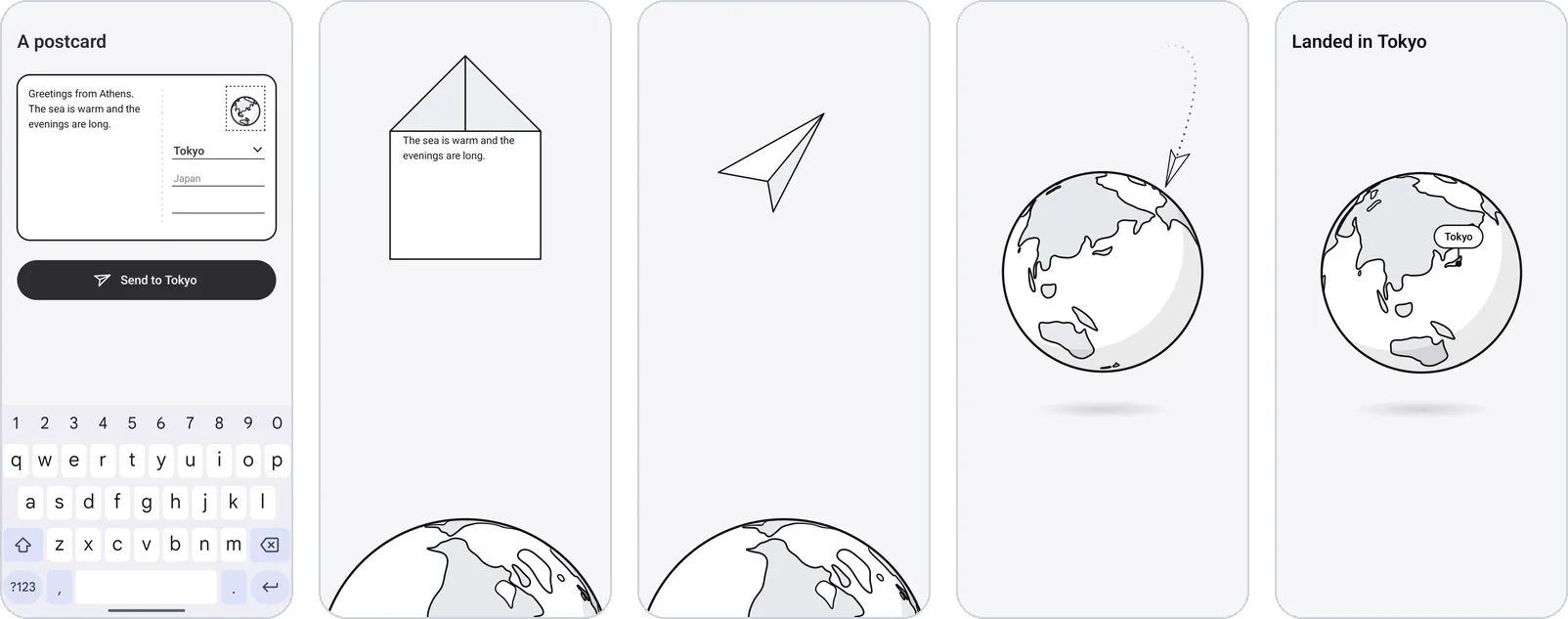
The trip also needed the globe at any size: small on the stamp, and shrinking as it rises from the bottom of the screen. So the globe’s drawing code was rewritten, and its fills got a new android.graphics.Paint(). On screen, nothing looked different.
Everything in the trip runs on one clock: the seconds since you pressed Send. Every moment has a name, and each one is built from the ones before it (shortened):
private const val FOLD_START = TRIM_END
private const val FOLD_END = FOLD_START + FOLDS * FOLD_STEP
private const val FORM_START = FOLD_END
private const val FORM_END = FORM_START + FORM_TIME
...
private const val FLIGHT_START = FORM_END + DIP_TIME
private const val FLIGHT_END = FLIGHT_START + FLIGHT_TIME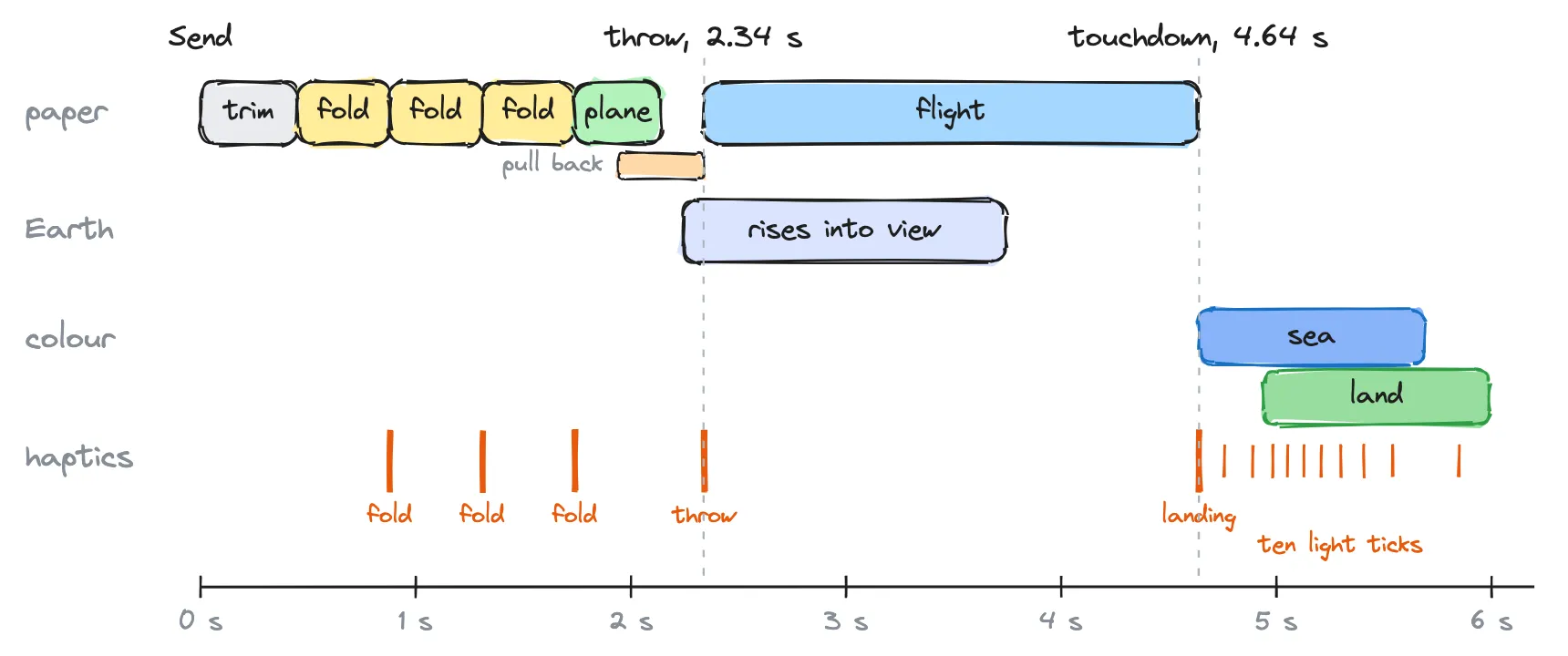
Each curve is a function of the clock: give it a time, and it tells you where things are. For example, springy is a damped spring that you can ask about any moment:
private fun springy(u: Float, damping: Float): Float {
    if (u <= 0f) return 0f
    if (u >= 1f) return 1f
    val e = exp(-damping * SPRINGY_RATE * u)
    if (damping >= 1f) return 1f - e * (1f + SPRINGY_RATE * u)
    val wd = SPRINGY_RATE * sqrt(1f - damping * damping)
    return 1f - e * (cos(wd * u) + damping * SPRINGY_RATE / wd * sin(wd * u))
}
Why one clock, and not an Animatable for each part? One clock keeps a dozen moving things in step, among them the paper, the plane, its trail, the rising Earth, the pin and the title. Any frame can be drawn from the clock alone. (The colour came on day six, and it has a second clock, which starts at touchdown.) Pressing Back before the throw, for example, makes the clock run backwards at three times the speed, so the paper unfolds into the postcard again. Rotating the phone, tapping to make the plane fly four times faster, and turning animations off are also just changes to the clock or to its speed. The drawing follows the clock.
The trip went through the same reviews as the globe. Stepping through the first version of the timing, frame by frame, showed that nothing moved for about half a second before the throw. That half second was hidden in pauses at the ends of the folds. So now each part starts just as the one before it comes to rest.
Then the motion review agent ported the flight maths to Python and ran 3,600 trips: ten cities, from every starting longitude. It found a real problem. The dive was aiming at the city while the Earth was still turning the city into place, so the target moved under the plane. In 42% of the trips, the plane turned more than 5 degrees in a single frame. In the worst one, its nose swung 120 degrees in 0.2 s. But the landing point is known the moment you press Send, so the dive now aims there. The worst turn in any trip is now 3.98 degrees per frame.
The UX review found that the page after the landing was a dead end, because the only way out was the system Back. So a “Write another” button now rises into view after the pin settles.
After midnight, my phone was available again, and I wanted numbers from a release build of the whole page. The first trip after a cold start ran 643 frames, and only one of them was late.
The moment just before the flight still did not feel smooth to me. The plane barely moved for a tenth of a second before it pulled back to be thrown. Now it starts to pull back halfway through its spring, while it is still swinging back from its overshoot. The throw used to reach full speed in three frames. It now takes 0.26 s.
I also wanted haptics. Now there is a tick as each fold is pressed flat, and a click as the plane leaves your hand. Both fire from the same loop as the drawing, on the frame that draws the fold or the throw. The landing already had its own haptic, a confirmation. The phone’s vibration log, dumpsys vibrator_manager, records every effect with its start time. Each one fired within 15 ms of its planned time.
Day 6: Colour that spreads over a sphere
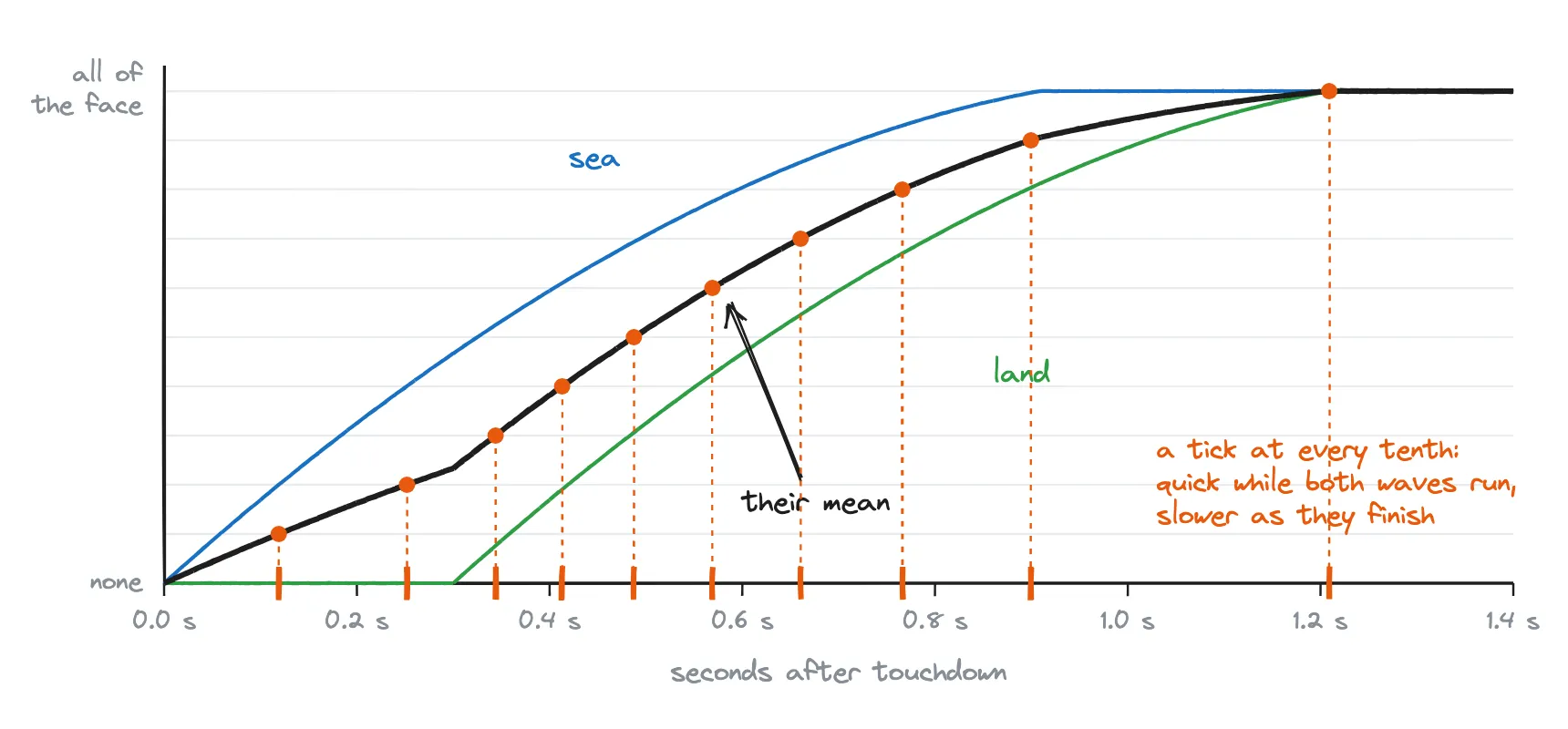
Until today, the globe had been black and white, and now I wanted colour: a deep blue sea, fresh green land and navy lines. It had to arrive as a wave when the plane landed, and leave when you started a new postcard. The sea turns blue in a wave that spreads out from the city, and the land turns green 0.3 s behind it. Pressing “Write another” turns the globe back to black and white, in a circle that grows from where your finger pressed.

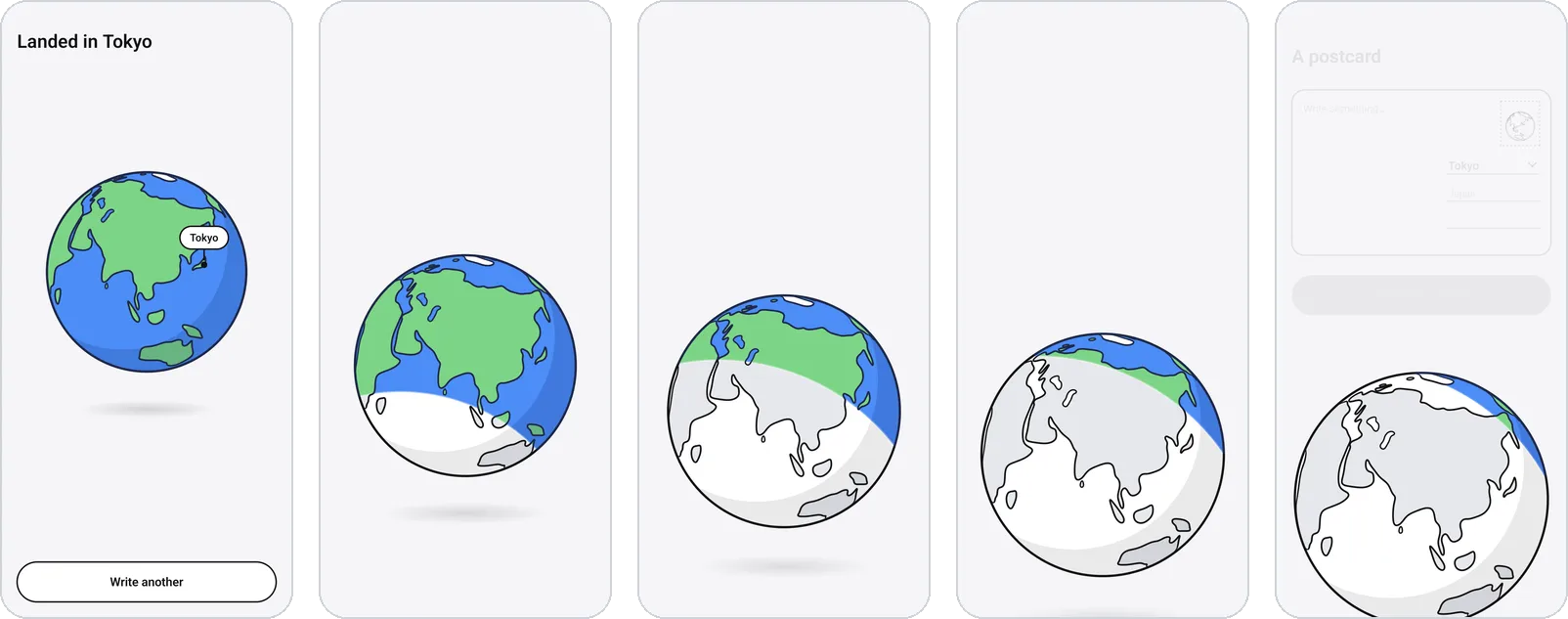
The waves ease out with a power of 1.8. A cubic ease-out would use 3:
private fun arrive(u: Float): Float = 1f - (1f - u).pow(WAVE_EASE)They start more gently, moving 19 px in the first frame at 60 Hz, while a cubic would jump 32 px. They also slow down less as they reach the far rim.
On a globe, a wave that spreads from a city is a cap: all the points within some angle θ of the city. The edge of a cap is a flat circle, cut through the sphere. A flat circle seen from far away is an ellipse. So the outline of the colour is an exact shape, and it needs no sampling at all. If you sampled the edge as points instead, you would need more than a hundred of them to keep it round at phone size. When the cap reaches around to the back of the globe, the ellipse touches the rim at two points. Beyond those points, the rim itself is the edge of the colour.
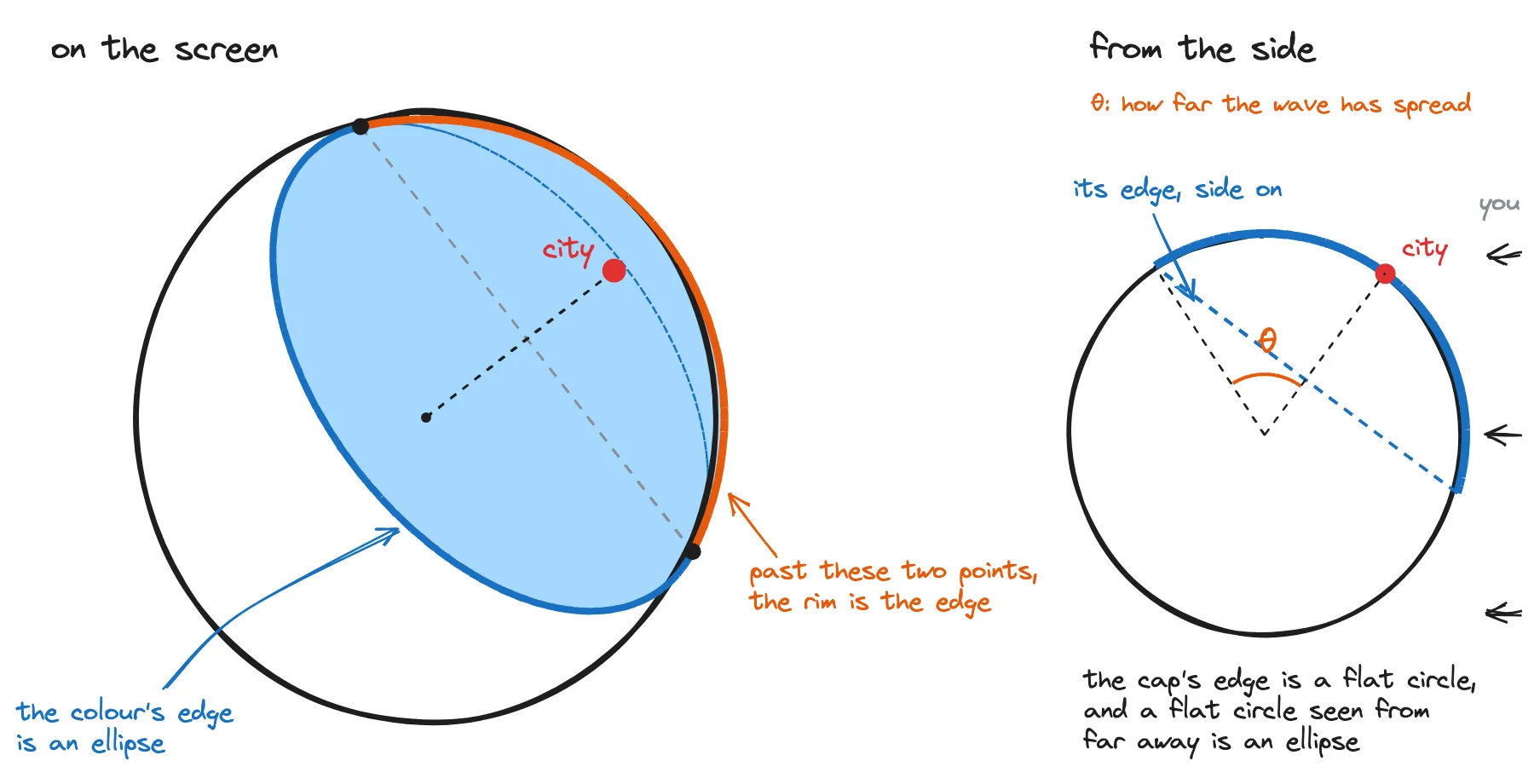
A cap is the whole ellipse until its edge reaches the rim. After that, the outline around a city that faces you is one arc of the ellipse and one arc of the rim. The code builds both arcs upright, with two arcTo calls. Then one matrix rotates them into place, towards the city.
In arcTo, Skia treats a sweep of exactly 360 degrees as zero, so the arc becomes a point. The code review found a way to hit that case. Where a cap’s edge just touches the rim, float rounding could produce exactly 360 degrees, about once in a hundred thousand crossings. The cap would then vanish for one frame. So every sweep now stops at 359.9 degrees, a constant called MAX_SWEEP.
That gives the outline. The JavaScript prototype painted the colour inside it on offscreen layers. A layer costs memory and a pass over its whole area. In the app, each colour is instead one more fill, laid on top of the black and white. A fill is never cut to fit exactly against another fill. If two fills met along one edge, the half-covered pixels on both sides would let the colour underneath show through as a thin seam.
The blue is the sea’s cap, filled over the white sea. The green is the land’s path drawn again, clipped to the land’s cap. This is where the inland seas from day two helped. They are already holes in the land, so they simply show the sea under them: white at first, then blue. The coast lines turn navy point by point, through the vertex colours of the mesh.
I also wanted to feel the colour as it spreads, so it gets ten light ticks. Ticks spaced evenly in time would not match what your eyes see, so they follow the colour instead. A tick plays each time the average of the two waves has covered another tenth of the globe’s visible face:
private fun colourReach(time: Float): Float =
    (min(1f, seaWave(time) / FACE_SHARE) + min(1f, landWave(time) / FACE_SHARE)) / 2f
On every step of the colour’s clock, the trip checks whether this number has passed the next tenth, and if it has, it plays a tick.
Later, I noticed that I could not feel the folds anymore. The vibration log showed all three folds firing on time. But my phone plays only three different vibrations for all the haptic types in the trip, and a fold got the faintest of them, a single light tick. Three of those, 0.43 s apart, were too faint to notice. Now a fold is a key tap, which is firm on my phone. These are the beats that the loop plays on its frames:
private enum class TripBeat(val feel: HapticFeedbackType) {
    Crease(HapticFeedbackType.KeyboardTap),
    Throw(HapticFeedbackType.VirtualKey),
    Colour(HapticFeedbackType.SegmentFrequentTick),
}
After that change, I could feel every fold.
Day 7: The default that uploaded a texture every frame
Last day. Everything was in place, so the globe got one more performance pass on my phone.
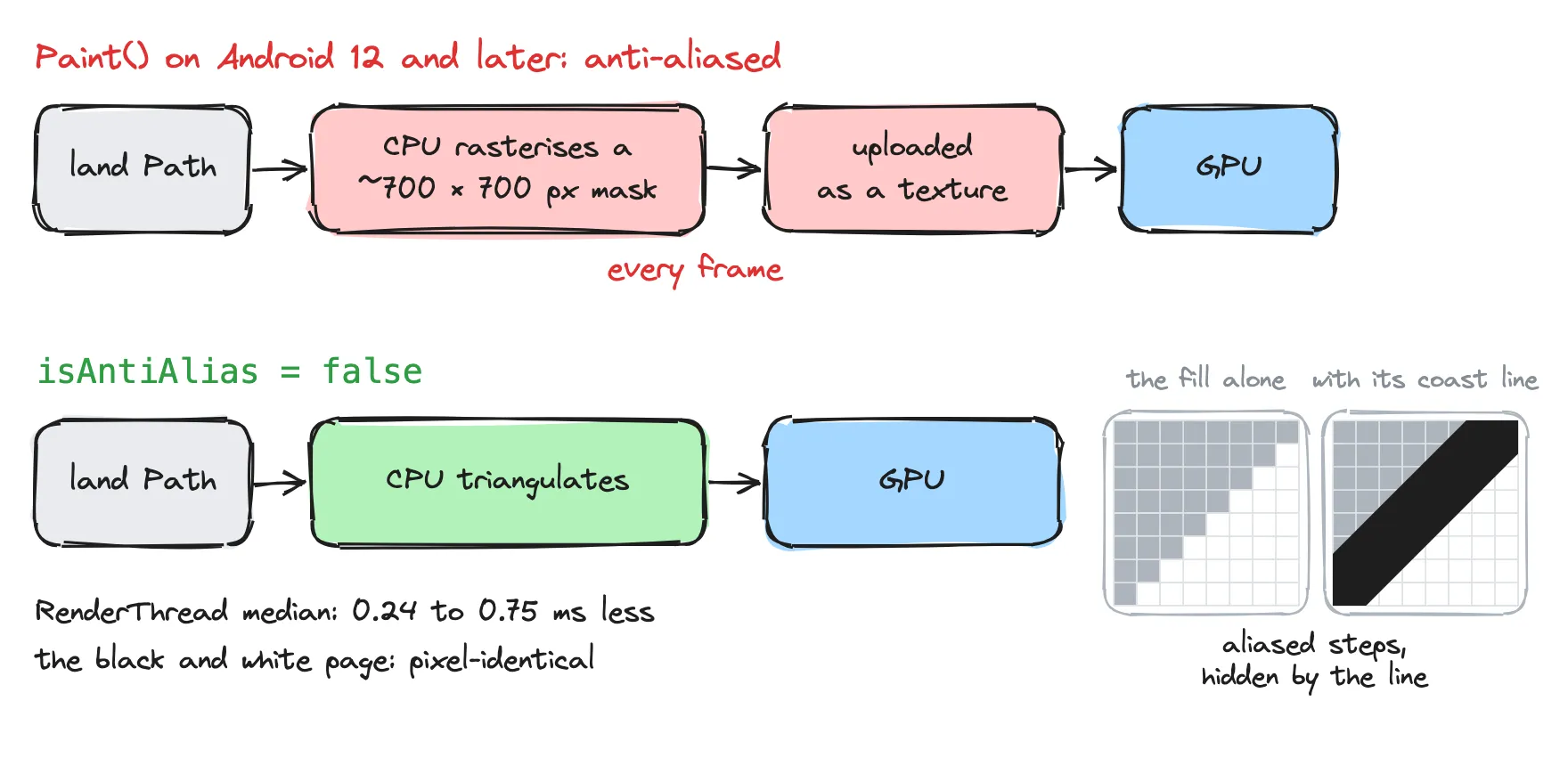
The trace showed the land, a flat grey fill, going through Skia’s software path renderer. It was drawn on the CPU into a coverage mask, then uploaded to the GPU as a texture of about 700 by 700 px, on every frame. That is what smoothing a fill this large costs. But on day three the fills had lost their smoothing, and the KDoc above them still said so.
So what happened? On day five, the rewrite that let the globe be drawn at any size gave its fills a new android.graphics.Paint(). That constructor’s Javadoc says:
On devices running
Build.VERSION_CODES.Sand above,ANTI_ALIAS_FLAGis set by this constructor, and it can be cleared withsetFlagsorsetAntiAlias.
Build.VERSION_CODES.S is Android 12. Nothing in the code cleared the flag, and on screen, smoothed and unsmoothed fills looked the same.
Compose’s DrawScope anti-aliases everything it draws, too. So if you want a fill without smoothing, you need your own Paint with anti-aliasing turned off, and you draw with it through drawIntoCanvas. Either a Compose Paint or an android.graphics.Paint will do. This is the globe’s code now, shortened:
drawIntoCanvas { canvas ->
    val c = canvas.nativeCanvas
    c.save()
    c.translate(x, y)
    c.scale(scale, scale)
    flat.isAntiAlias = smoothFills
    fillSea(c)
    fillLand(c, land.asAndroidPath())
    ...
    lines.draw(c)
    c.restore()
}
The reason from day three still holds. On a phone 1080 px wide, the coast line reaches about two and a half pixels past the fill’s edge on each side. Near the rim, where lines get thinner, it reaches about one pixel. The thinner lines around inland seas and small islands reach less far, and so do the lines on narrower phones: down to half a pixel. That is still enough, because the fill and the line are built from the same points.
Two edges are different. Where the green crosses the land, its edge comes from a clip (day six), and Android smooths clip edges anyway. The sea’s blue keeps its smoothing, because its edge crosses open sea, where no line covers it. So smoothFills is false for the big globe.
With smoothing off, the black-and-white page came out exactly the same, pixel for pixel. Because the RenderThread’s time jumps between two levels (day four), the two builds took turns in the test: three trips with one, then three with the other, for three rounds. The RenderThread’s median time fell by 0.24 to 0.75 ms, depending on the part of the trip. That is a small saving, but the landed globe no longer uploads a texture on every frame.
Turning smoothing off uncovered another cost. Skia keeps an atlas: one shared texture where it draws small anti-aliased paths. The first path that needs the atlas pays the cost of setting it up. Before the change, smoothed fills paid it on the very first frame. Without them, the first path to need the atlas was the paper plane’s outline as it faded into the pin. Setting up the atlas then cost a frame of 25 to 46 ms, just before touchdown.
The fix turns smoothing back on, but only for something small. The stamp’s little globe is on the page from the start, so now it draws its fills with smoothing. They are small enough for the atlas, and they keep it in use. With the fix, the frames just before touchdown took 8.7 ms or less in every run but one. That run was slower all through the colour wave, and its frames there took up to 17.8 ms. These numbers leave out the first run after each install, which is slower for another reason. I explain why in the P.S.
What the week taught me
The three things I promised at the start:
- To animate without recomposing, keep the values that change on every frame in plain fields. Let one counter, read only in the draw phase, ask for each redraw.
- Draw moving lines as a strip of triangles with a soft fringe, not as a stroked Path. On the globe, the stroked Paths cost as much as everything else the RenderThread did. As triangles, the same lines cost about as much as no lines at all.
- If you draw with
android.graphics.Painton Android 12 or later, checkisAntiAlias. A newPaint()has it on unless you turn it off, whatever a comment says. The edges you are paying to smooth may already be under a line.
And some smaller ones:
- Measure on a real phone, and judge the UI thread only on a release build. Here the UI thread took up to twice as long in the debug build.
- Create the
withFrameNanoslambda once, outside the loop, and let the loop sleep on a conflatedChannelwhen nothing moves. - Read
MotionDurationScale, so that turning animations off really turns them off. - Drive a long animation from one clock. Back, rotation and turning animations off then become changes to the clock, not new animations.
- Test motion in bulk. A simulation of 3,600 trips showed how often the plane turned too sharply, and where the worst case was.
- Never let a
Path.arcTosweep reach exactly 360 degrees. Skia turns it into a single point. - Know what a number measures before you act on it. The
framestatsspan that looked like GPU time was mostly not GPU work (see the P.S.). - When you remove a cost, check where it goes. Turning smoothing off moved the atlas set-up from the first frame to the landing.
On day one, the world was only numbers. By day seven, it turns under your finger, a paper plane lands on it, and it fills with colour.
P.S.
Two steady costs are left. On every frame, the CPU still turns the fills into triangles, and this is now the largest cost in a frame. And while the green wave crosses the globe, its clip is still a mask that is uploaded on every frame. The circle that takes the colour away needs no mask, because Skia tests a circular clip with a formula for each pixel.
Apart from those two costs, the slow frames that are left are shader compiles. They are why the first run after an install is slower. The first time a new kind of drawing appears after an install, the GPU driver compiles a small program for it. In the first trip after a fresh install, the phone compiled 26 to 28 of them, at 5 to 46 ms each. On later runs, the same programs came from Android’s shader cache in about a millisecond each.
One number in this story did not mean what it seemed to. In framestats, the span from IssueDrawCommandsStart to GpuCompleted looks like GPU time, and it came to about 10 ms per frame. Yet the GPU ran at 156 MHz, its lowest clock speed, and was busy for only 7 to 13% of each 16.7 ms frame. That is about 1 to 2 ms of work per frame. The span begins when the RenderThread starts sending commands, so it also includes the RenderThread’s own 4 to 6 ms and time spent waiting. Most of it is not GPU work.
If you want to measure your own screen, these are the commands behind the frame times, traces, GPU load and haptic timings in this article:
adb shell dumpsys gfxinfo com.example.app framestats
adb shell setprop debug.hwui.skia_atrace_enabled true    # then restart the app
adb shell atrace -t 14 -b 65536 gfx view > trace.txt
adb shell cat /sys/kernel/gpu/gpu_clock /sys/kernel/gpu/gpu_busy    # this path differs between phones
adb shell dumpsys vibrator_manager