04 Nov 2026 · Canvas · 17 min
I spent a week building a passport in Jetpack Compose
A booklet whose pages turn under your finger, drawn on a Compose Canvas.
This is one Compose screen, with no images, no SVG and no Lottie files. Every page, stamp and line is drawn by code on a Canvas. I built it over seven days in a row, and this is that week, written like a diary, with the code and the numbers.
The hardest part of a passport is one page: the one under your finger. It has to follow the finger, keep a natural curve, land with a small slap, and never make a frame late. On the last day, one frame was late in every run, always at the same moment.
If you animate or draw in Compose, three things here may save you time:
- how to make paper follow a finger, perspective included, with a few lines of maths
- why a thin outline that moves can end up drawn on the CPU and uploaded to the GPU on every frame, and how to stop it
- how to use Macrobenchmark to find the late frames that only a first-time user sees
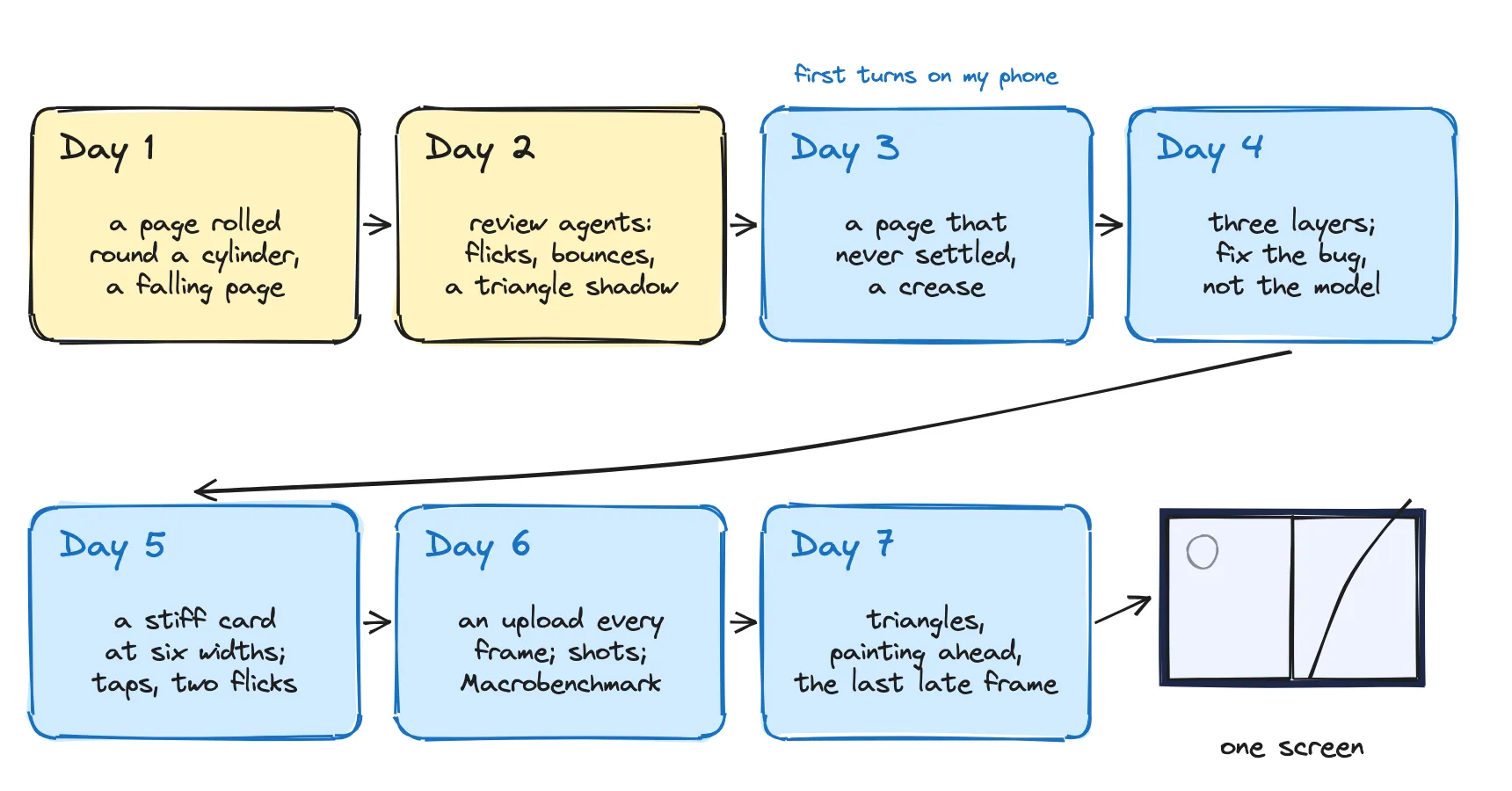
Day 1: A page that follows the finger
Today I listed what I wanted:
- The passport: a cover, and pages of made-up information.
- The focus: the page turn. Pages change with an animation, and only with a swipe or a scroll.
- The feel, most important of all: the page follows my finger in a way that feels 100% natural, and a flick sends several pages over at once.
- The style: the same as my spinning Earth.
- The rules of all my Canvas work: every shape built in code from simple parts, such as ovals, arcs and lines; no memory allocated in a frame; fast from the start; and nothing finished before a review of motion, art, code and user experience.
- Where to start: the emulator.
The first version was one Kotlin file of 2,685 lines, built on three ideas.
A camera in five lines. The booklet lies on a table, and the screen looks at it like a pinhole camera, with the eye at a height eye above the point (eyeX, eyeY). A point lifted z above the table is closer to the eye, so it looks bigger: its distance from (eyeX, eyeY) is multiplied by eye / (eye - z). Then a to f rotate, scale and move the booklet onto the screen. There is no 3D matrix and no Camera class:
fun project(x: Float, y: Float, z: Float) {
    val k = eye / (eye - z)
    val px = eyeX + (x - eyeX) * k
    val py = eyeY + (y - eyeY) * k
    screenX = a * px + c * py + e
    screenY = b * px + d * py + f
}
The answer goes into screenX and screenY instead of a new object, so a projection allocates nothing.
Paper round a cylinder. When a finger lifts a page, the page rolls up round an invisible cylinder. Each point of the page is flat on the table, on the cylinder, or over the top, upside down. The distance along the paper never changes, so the page never stretches:
fun place(x: Float, y: Float) {
    val dd = distance(x, y)
    val r = radius
    when {
        dd <= 0f -> {
            outX = x
            outY = y
            outZ = 0f
        }
        dd < PI_F * r -> {
            val shift = r * sin(dd / r) - dd
            outX = x + nx * shift
            outY = y + ny * shift
            outZ = r * (1f - cos(dd / r))
        }
        else -> {
            val shift = PI_F * r - 2f * dd
            outX = x + nx * shift
            outY = y + ny * shift
            outZ = 2f * r
        }
    }
}
Here dd is how far a point lies past the line where the roll starts, and (nx, ny) is the direction of the roll.
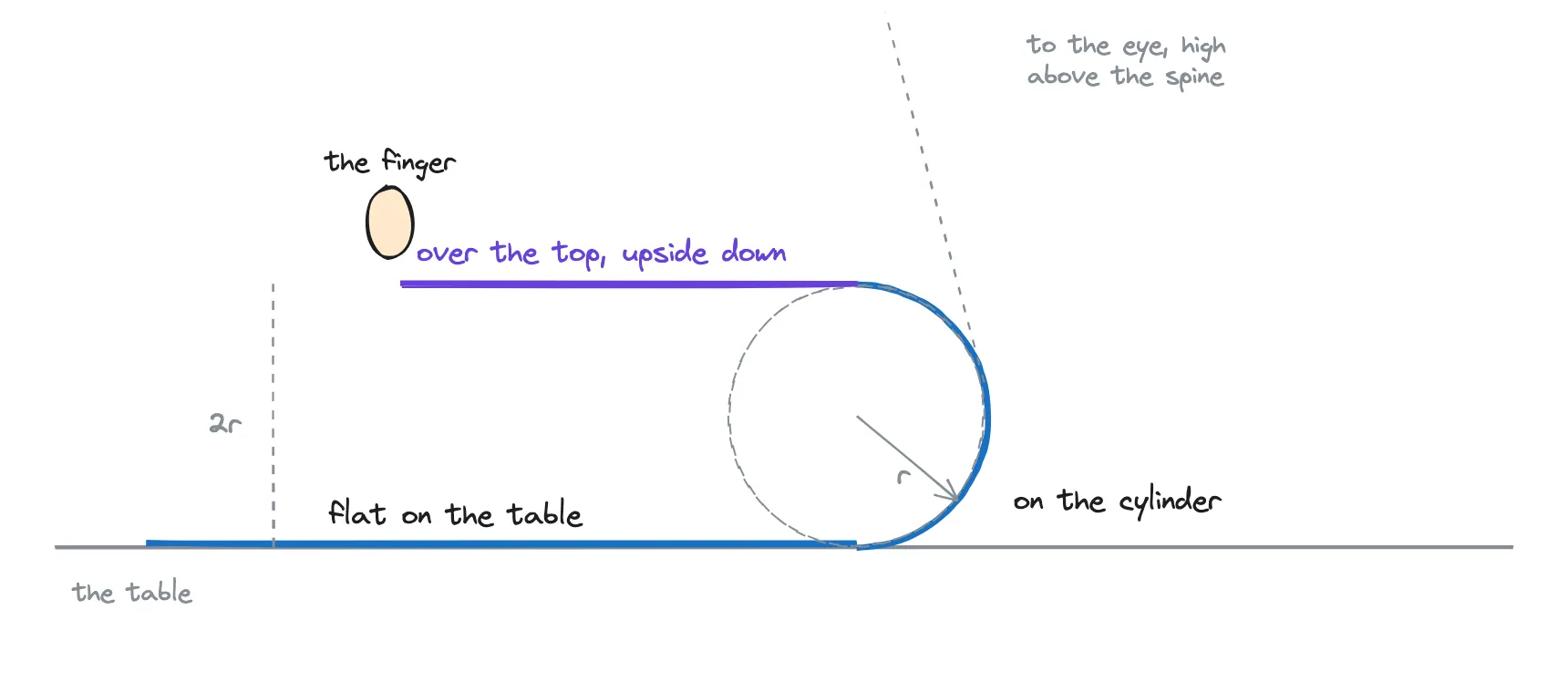
The finger holds the page at the top of the roll, twice the radius above the table. Perspective pushes a lifted point outwards, so the paper would slide away from the finger. The code places a page by the point on the table under the held point, which it calls the hand. It pulls the hand in, towards the point under the eye, by the same factor that perspective pushes the held point out, so the held point lands right under the finger. The factor depends on the roll’s size, and the roll’s size depends on the hand, so the code goes round three times:
for (round in 0 until 3) {
    leaf.handX = fx
    leaf.handY = fy
    roll.solve(leaf, layout)
    val k = (view.eye - 2f * roll.radius) / view.eye
    fx = eyeX + (tx - eyeX) * k
    fy = view.eyeY + (ty - view.eyeY) * k
}
Here (tx, ty) is the touch on the table, (fx, fy) is where the hand goes, and a leaf is the code’s word for one sheet of the booklet.
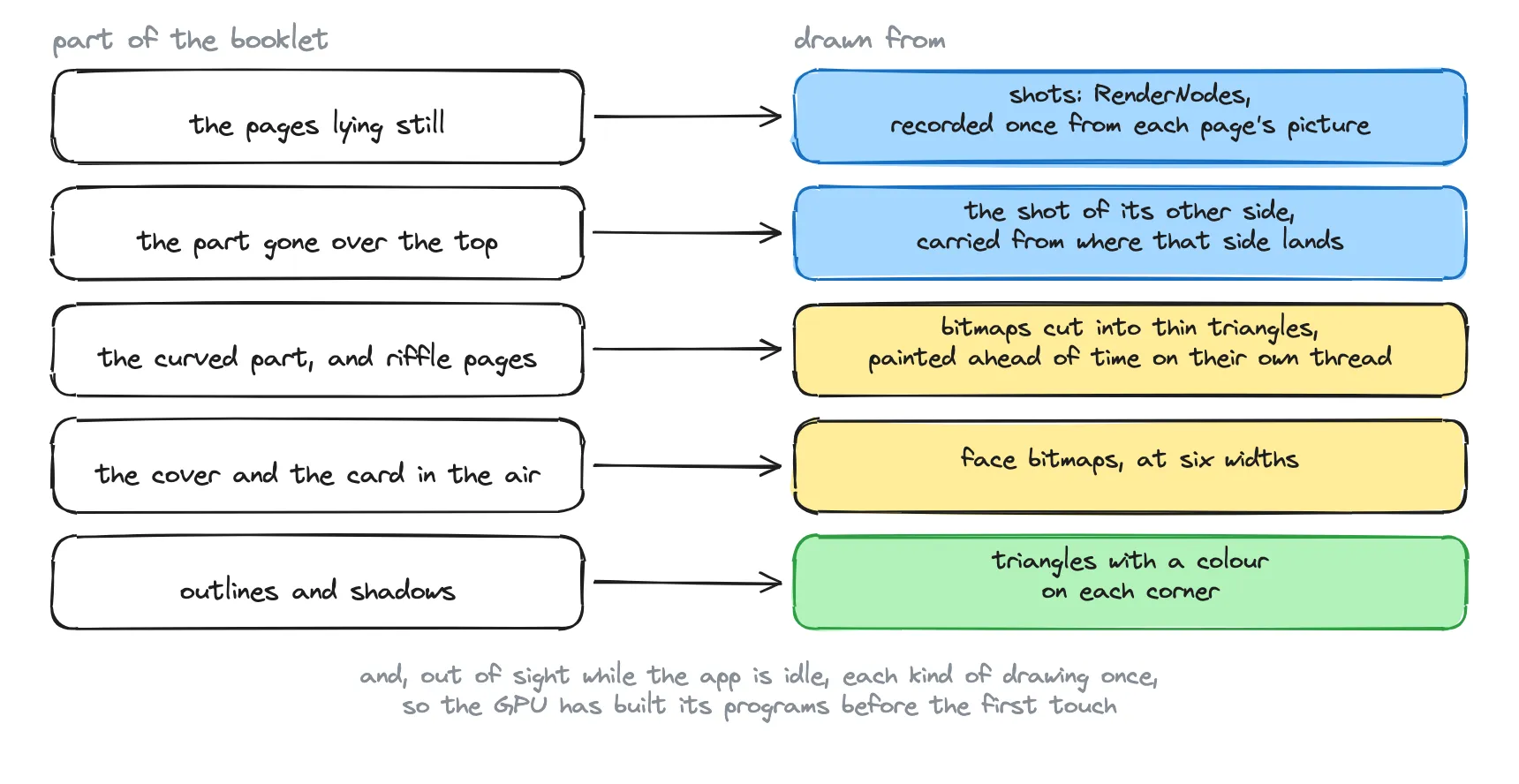
Each page drawn once. Each side of a page is recorded once into an android.graphics.Picture. The flat parts are drawn from that picture, and the curved part from a bitmap of the same side, cut into thin triangles.
The first motion used springs, and within the hour they were gone. A page is not a spring. It is a sheet with a little weight, pushed by a finger. So the turn was modelled as a falling page. A push moves it towards the side it is going to. Its weight slows the turn while the page rises, and speeds it up once the page is past upright. Air drag works against its speed:
acceleration = push - weight × cos(angle) - drag × speed
With a push of 12, a weight of 8 and a drag of 3, the page leaves the stack slowly, speeds up past upright, and lands with a small slap.
All of this runs in one loop for the whole booklet, started once with LaunchedEffect(book) { book.play() }. On each frame, the loop moves every page that is not held, and if anything moved, it adds one to a counter, frame. Only the drawing reads that counter, so nothing recomposes. When nothing moves, the loop sleeps on a channel until something, such as a touch, wakes it:
while (isActive) {
    withFrameNanos(tick)
    if (resting) {
        bell.receive()
        last = 0L
    }
}
A hard flick sent several pages over at once: a riffle, like running a thumb along the edge of a book. A small Earth is printed in the corner of each page, and in a riffle it spins like a flip book.
Tomorrow: the first reviews.
Day 2: What the review agents found
Today four review agents looked at the same frozen copy of the code, each with one job: the code and its geometry, the motion, the art, and the user experience, including accessibility. They found real problems:
- A flick at about normal speed was enough to start a riffle, so an ordinary flick riffled.
- A riffle of ten pages asked for twenty bitmaps in one frame, from a pool of sixteen, so a page could show what was printed on another page.
- Pages bounced 8 to 85 pixels when they landed.
- A test let go of the page in 23,760 different ways. In 738 of them, the maths gave
NaN(“not a number”) for a frame or two, at the moment the page landed.
Each was fixed and reviewed again. The bounce was fixed with an air cushion: as a page comes close to the stack, the air under it slows it down more and more. It is the air term in the falling page’s two lines of code:
rate += (toward * FALL_PUSH - FALL_WEIGHT * cos(PI_F * p) - (FALL_DRAG + air) * rate) * h
p += rate * h
Here p is how far the page has turned, from 0 to 1, rate is how fast it turns, toward is 1 or -1 for the side it is going to, and h is a small step of time.
A diagonal flick also made the page snap sideways as the finger let go, so now the page keeps drifting sideways for a short time, the way paper does.
And a page in a riffle dropped a hard grey shadow. A blur with BlurMaskFilter had made frames late on an earlier screen of mine, so the shadow became a mesh of triangles with a colour on each corner, drawn with drawVertices. The colour fades from grey to clear across the triangles, and the GPU draws that fade cheaply.
Tomorrow: my phone.
Day 3: The page that never settled
Today I put the build on my phone, and within a minute I found a bug: one page never came to rest. It stayed at an angle of about 12 degrees, and the screen kept drawing about 50 frames a second with no finger on it.
An AI agent wrote a copy of the page’s physics in Python, which let go of the page 20,000 times, in random ways. In 4,775 of them, the page never came to rest. The cause was yesterday’s fix. The sideways drift could grow without end, and the binding, which keeps every page attached along the spine, pulled it back on every step. The fix limits the drift and keeps a falling page’s hand inside the area the binding allows. After it, all 20,000 came to rest, the slowest within 1.23 seconds.
The next bug was a crease, a sharp diagonal fold, in the middle of a turn. My note said: “the curve is something natural and should stay at that point.” A drag that was a little diagonal made the roll lean, and the binding squeezed the paper into a crease. Within minutes, a fix faded the lean out over the first quarter of the turn. It looked right in the tests, but not on my phone: “it folds correctly with a good curve but then it becomes straight again.”
Tomorrow: a bigger change.
Day 4: Fix the bug, not the model
Today started with a bigger change. The page still lost its curve and became straight during a turn, so the whole model of the page was replaced with one where the page bent from a corner.
The first release build went on my phone too, because only a release build gives real numbers. The result was bad. The RenderThread, the thread that sends each frame’s drawing to the GPU, needed a median of about 20 ms per frame, against a budget of 16.6 ms. About one frame in three was dropped.
A temporary on/off switch for each part of the drawing showed why. With everything on, the median was 19.22 ms. Without the pages lying still, it was 10.45 ms. Those pages were drawn again on every frame, although they did not move. So the drawing was split into three layers, each a composable of its own:
- the ground, drawn every frame: the background and the soft shadow under the booklet
- the still pages, in a layer of their own, drawn again only when they change, for example when a page lifts off or lands
- the pages in the air, on top
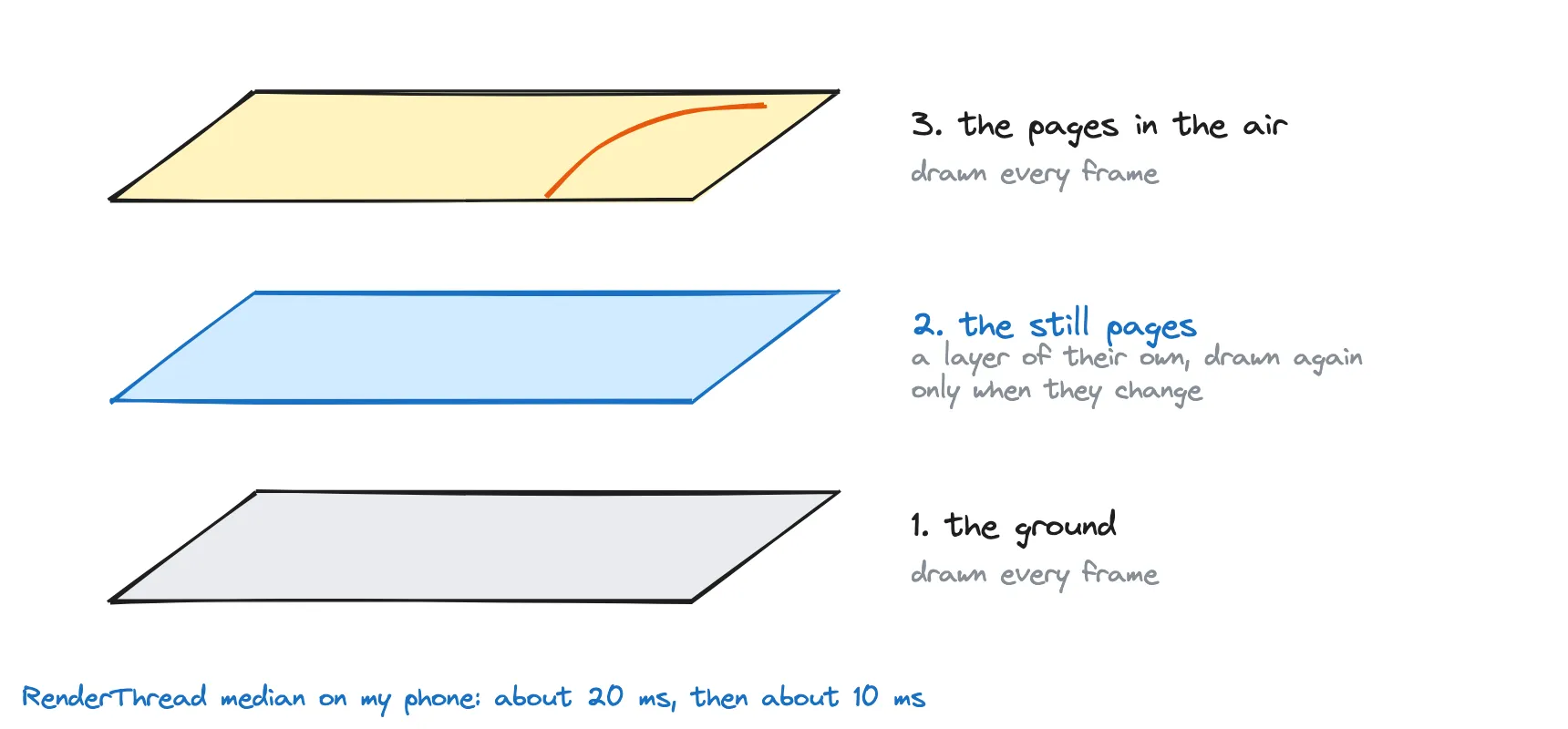
The still layer is a graphicsLayer with CompositingStrategy.Offscreen. A second counter, still, changes when what lies still changes, and the layer’s drawing reads only still. The graphicsLayer block reads both counters: frame, because the booklet moves while it opens, and still, because the layer holds either the closed cover or the open booklet. When such a block reads a value and that value changes, Compose runs only that block again: no recomposition and no layout. The bare book.frame and book.still lines below are those reads:
Spacer(
    Modifier
        .fillMaxSize()
        .graphicsLayer {
            book.frame
            book.still
            book.art?.placeStill(this, book)
            compositingStrategy = CompositingStrategy.Offscreen
        }
        .drawWithCache {
            val art = book.artFor(
                width = size.width,
                height = size.height,
                top = bars.getTop(this).toFloat(),
                bottom = bars.getBottom(this).toFloat(),
                density = density,
                texts = texts,
            )
            onDrawBehind {
                book.still
                art.drawStill(drawContext.canvas.nativeCanvas, book)
            }
        }
)
With three layers, the median fell from about 20 ms to about 10 ms.
The new model still had problems. A page always turned from a corner, even when I took it by the middle, and the shadows were wrong. My note was plain: at the start the motion had been very close to what I wanted, and then the mistakes began.
The first model had been a good one. Every bug since then had been real, but more than one fix had replaced the model instead of repairing it: the lean that faded out on Day 3, and the corner fold today. So the code went back to the cylinder and kept the three layers and the fixes that repaired it, such as the limit on the drift. The crease is now fixed by taking back only as much of the lean as keeps the curve open. The rule from that evening fits on one line: fix the bug, not the model. Then my note was short: go ahead without breaking anything.
Tomorrow: the card.
Day 5: A stiff card at six widths
Today was for the card, the passport’s stiff data page, which turns as one flat plane on its hinge. Drawn from its picture under perspective, it cost the RenderThread up to 79 ms for a frame on my phone.
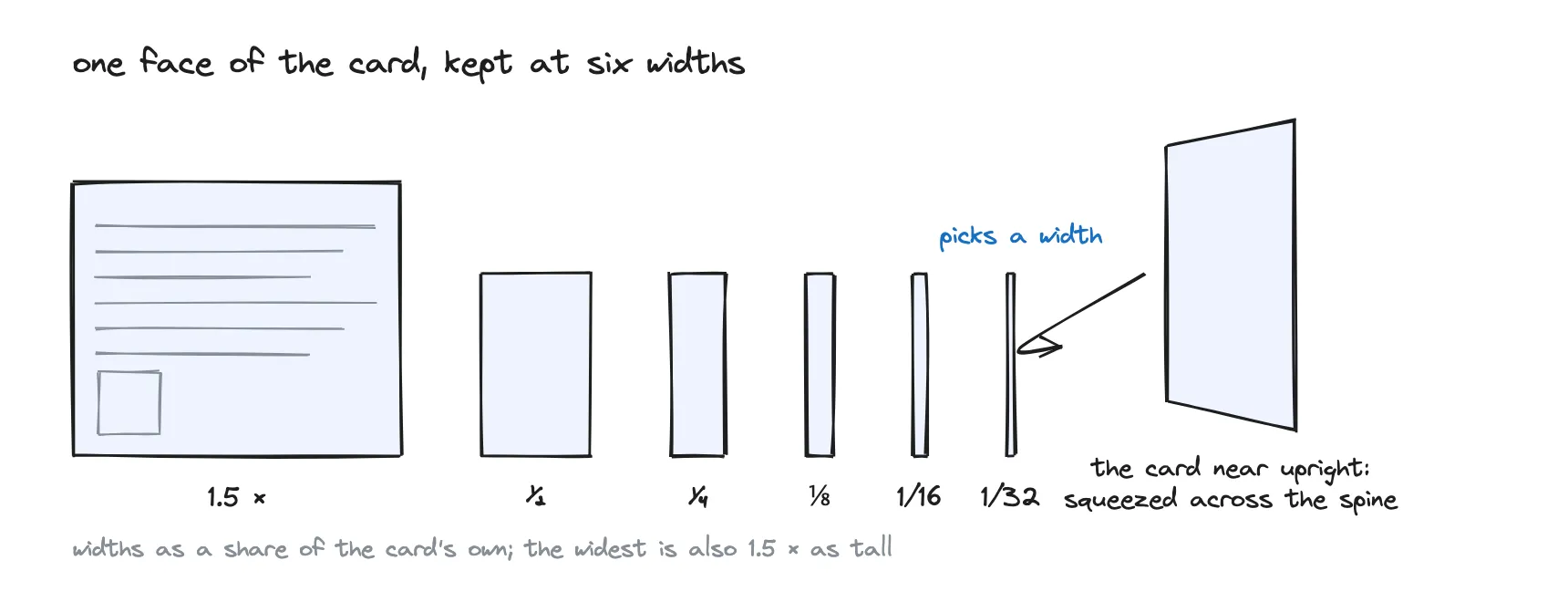
A bitmap is cheaper, but one bitmap was not enough. In the middle of its turn, the card is seen almost from its edge, and a squeezed bitmap loses letters: thin strokes fall between the pixels the GPU reads. So each face is kept at six widths: its full width, half of it, a quarter, and so on, all at full height, because only the width shrinks. Each frame picks the width that matches the squeeze, and fades in the next one as the squeeze grows, so no frame jumps from one bitmap to the next. It is a mipmap that shrinks in one direction only. On my phone, the longest gap between two frames of a card turn went from 116 ms to 17 ms. The cover is drawn the same way.
I also wanted my own name on the data page, and later my real date of birth. That evening I said yes to one more step: for 12 MB more memory, the widest face is drawn at one and a half times the screen’s resolution, so the print stays sharp just after the card lifts.
That night I wanted the passport a little bigger, and after that, the best performance possible. Bigger was not simple: a page standing on its edge is closer to the eye and looks about 18% larger, so the booklet could grow only about 2%. A few minutes later I wanted a tap to open it, a tap on a page to turn it, and a riffle only when I flick twice in a row, quickly.
One flick now turns one page, no matter how hard it is. A second flick in the same direction starts a riffle, if the finger touches the screen again within 400 ms after it lifted from the first flick:
private fun flickedAgain(fling: Float, forward: Boolean, liftAt: Long): Boolean {
    val flick = fling > FLICK_SPIN
    val soon = strokeStart - flickLift <= FLICK_AGAIN_MS
    val again = flick && flicked && flickForward == forward && soon
    flicked = flick
    flickLift = liftAt
    flickForward = forward
    return again
}
The second flick’s speed decides how many more pages turn, from two to nine. A tap turns a page as if it had been flicked from its free edge.
Tomorrow: performance.
Day 6: The texture uploaded on every frame
Today was for performance. I set up the whole process myself, in four steps. Each step says what it measures, how, and when it stops.
- Find the cost, on the emulator.
- Measures: what each thread does in each frame.
- How: a system trace, which records exactly that, during the same gestures every time. To find a cause, each part of the drawing can be switched off on its own.
- Stops when: the trace shows no shape drawn on the CPU and uploaded to the GPU on every frame, and nothing drawn again that did not move.
- Check it on my phone.
- Measures: the RenderThread’s median time per frame, and the longest gap between two frames.
- How: a release build, the same gestures, and
dumpsys gfxinfo framestats. - Stops when: the median fits inside the frame’s budget of 16.6 ms. The few slow frames left are lost among hundreds of good ones, so step 3 looks for them.
- Measure what a user sees.
- Measures: how late each frame is.
- How: Macrobenchmark runs four tests on my phone, the opening, the drags, the riffle and Back, eight times each. Every run starts in a fresh process, and each test’s first run starts like the first use after an install. The late frames are read one by one, and a trace of the run shows where the time went.
- Stops when: no frame in any run is late.
- Review every change.
- Measures: the motion, the art, the code and the user experience.
- How: review agents read each change in the source. Each fix is then measured again.
- Stops when: a review finds nothing new to fix.
Then I used an AI agent to run all of it, which automated the manual work.
One of the first changes was for the landings, which drew the still layer again, page by page. Now the open pages, and the few sides the next turn will show, are kept as shots. A shot is an android.graphics.RenderNode recorded once from a page’s picture, which the GPU keeps as a texture and draws at whole-pixel positions. A landing now moves textures instead of drawing pages. Recording a shot takes a few lines:
val x = floor(shotBox.left).toInt()
val y = floor(shotBox.top).toInt()
val w = ceil(shotBox.right).toInt() - x
val h = ceil(shotBox.bottom).toInt() - y
shot.setPosition(x, y, x + w, y + h)
val canvas = shot.beginRecording(w, h)
canvas.translate(-x.toFloat(), -y.toFloat())
canvas.concat(shotView.matrix)
drawSide(canvas, index, back = left, left = left)
shot.endRecording()
When a shot is made, shot.setUseCompositingLayer(true, null) tells the GPU to keep it as a texture.
Then a system trace on the emulator showed a surprise: while the cover or the card turned, a texture of its size was uploaded to the GPU on almost every frame. When Skia, the library that draws Android’s Canvas, cannot draw a shape on the GPU, it draws it on the CPU into a mask, an image of how much of each pixel the shape covers, and uploads that, again on every frame while the shape moves. Switching off one possible cause at a time found the shape: the thin outline around the cover and the card, a stroke with round joins (Paint.Join.ROUND). With mitred joins (Paint.Join.MITER), the sharp corners of a picture frame, Skia drew it on the GPU, and the uploads fell from 153 to 34.
Then came step 3: Macrobenchmark, a Jetpack library that drives the app on a phone and records every frame. In every run of the opening, the first frame was the slowest, 40 to 56 ms late. One trace showed why: that frame took 64 ms, and 53 ms of it went into building shader programs. A shader program is a small program the GPU builds the first time the app draws one kind of thing, and right after an install, none have been saved yet. Earlier measurements had barely shown it, most likely because the programs were already saved by then.
The fix is a rehearsal. While nothing moves, each kind of drawing is done once, out of sight, in both places the booklet is drawn: in the still layer, as a layer of its own that the GPU paints but a clip of zero size keeps off the screen, and on the window, under two rectangles of the background colour. So the programs are built while the app is idle, before the first touch:
private fun holdRehearsal(canvas: NativeCanvas, book: PassportBook) {
    if (!canvas.isHardwareAccelerated || rehearsalDone) return
    if (!stillRehearsed && rehearsalDue(book)) {
        rehearsal = recordRehearsal()
        stillRehearsed = true
    }
    val held = rehearsal ?: return
    canvas.save()
    canvas.clipRect(0f, 0f, 0f, 0f)
    canvas.drawRenderNode(held)
    canvas.restore()
}
Macrobenchmark’s frameOverrunMs says how late each frame was: above zero, the frame missed its deadline by that much. Only one frame in a hundred is later than the 99th percentile. For the opening, the 99th percentile fell from 51.9 ms to 16.8 ms.
But a trace on my phone still showed an upload on every frame of the opening: a mask the size of the cover, 715 by 1,029 pixels, which the emulator had not shown. Under perspective, the outline’s rounded corners become a different kind of curve, and on my phone, which runs Android 13, Skia most likely would not stroke that curve on the GPU. So each rounded corner is now six short straight lines, less than a third of a pixel off the true curve.
Tomorrow: the rest of the late frames.
Day 7: The last late frame
Today the page drags still had a cost. On the emulator, three slow drags caused 448 texture uploads in 201 frames, the biggest the size of a page. There were three causes:
- A rolled page’s outline is not convex: part of its edge bends inwards. Skia draws a curved outline like that on the CPU, with round joins or without.
- The shadow under the part that has gone over the top was drawn on the CPU too.
- That part of the page was drawn from its picture at a new size on every frame, so every letter was drawn again from scratch.
The outline and the shadow became triangles, like the coast lines of my spinning Earth. At points along the line, called stations, the code puts four vertices across the line: clear, ink, ink, clear. The clear ones lie one pixel further out, so each edge fades over one pixel, the way anti-aliasing would draw it:
for (s in 0 until stations) {
    val v = INK_ACROSS_LINE * s
    put(v, s, edge, clear)
    put(v + 1, s, core, strong)
    put(v + 2, s, -core, strong)
    put(v + 3, s, -edge, clear)
}
val k = strip(if (closed) stations else stations - 1, INK_ACROSS_LINE, rows = INK_ACROSS_LINE - 1)
canvas.drawVertices(
    NativeCanvas.VertexMode.TRIANGLES,
    stations * INK_ACROSS_LINE * 2,
    positions, 0,
    null, 0,
    colors, 0,
    indices, 0, k,
    paint,
)
strip joins each station’s vertices to the next station’s with triangles, and one drawVertices call draws them all, with a colour on each vertex and no texture.
The part over the top shows the back of the page, which already has a shot, recorded where it will lie once the page lands. So the code carries that shot to where the part is at each moment. The same three drags now cause 12 uploads in 200 frames, and the RenderThread’s median work per frame fell from 1.91 ms to 0.47 ms.
The review agents read every change and found two flaws in the new outline, and both were fixed.
My phone then showed what was left, on the UI thread: a frame that painted the bitmap of a page about to fly in a riffle took up to 20 ms. Those bitmaps are now painted ahead of time, on a thread of their own, and a page that the riffle will cover again is drawn from its bitmap when it lands.
The last late frame to be fixed was in Back, which turns every page back and closes the cover. In every run, its ninth or tenth frame was 10 to 13 ms late. That is when the card lifts and the inside of the cover shows for the first time, with its printed rosette and globe drawn from its picture. The inside of the cover is now a shot too. In eight runs after that, only one frame near that moment was late, by 0.06 ms.
On my phone, the 99th percentile of frameOverrunMs, from the first Macrobenchmark run to the last:
| Test | First | Last |
|---|---|---|
| Open with a tap | 51.9 ms | 0.25 ms |
| Drag pages over and back | 3.9 ms | 0.25 ms |
| Riffle with two flicks | 54.4 ms | 7.3 ms |
| Back to the closed cover | 13.0 ms | 0.06 ms |
In the tests of the opening, the drags and Back, about one frame in a hundred is still late, and only one of those by more than 5 ms. In the riffle, each run has about 55 frames, and six to nine of them are late, by up to 9.4 ms. The worst are most likely its first landing and its last. So by the rule of step 3, the work is not done yet.
What the week taught me
The three things I promised at the start:
- To make paper follow a finger, roll it round a cylinder and keep the held point under the finger. Perspective pushes a lifted point outwards, so pull the point on the table below it inwards by the same factor.
- A moving outline that is not convex, or that has round joins, can end up drawn on the CPU and uploaded on every frame. On every new screen, switch on Skia’s trace points with
adb shell setprop debug.hwui.skia_atrace_enabled trueand search a trace forTexture upload. Use mitred joins, cut rounded corners into short straight lines under perspective, and draw outlines that are not convex as triangles. - A first-time user pays costs that you never see on a phone that has already run the app. Run Macrobenchmark, read the first frames of each test, and while nothing moves, do each kind of drawing once, out of sight.
And some smaller ones:
- Fix the bug, not the model. A good model with a bug is closer to finished than a new model with no known bugs.
- A
Picturedrawn under a matrix that changes every frame is drawn from scratch every frame. - One flick, one page. Let a second quick flick ask for more.
- Test physics in bulk. A copy of the physics in Python, written by an AI agent, let go of the page 20,000 times, found why one page never came to rest, and proved the fix.
On day one, a page was a few lines of maths. By day seven, it is the same maths on the same cylinder, and almost every frame of a turn is on time.
P.S.
Accessibility. With TalkBack on, a double tap taps the centre of the screen. Here that is just beside the spine, so it closed the passport. The screen now declares its own click action: open, turn or close.