13 Nov 2026 · Network · 16 min
One cat, three phones, no server
A drawn cat walks from one phone to the next. This is how the phones find each other and keep the cat in one piece.
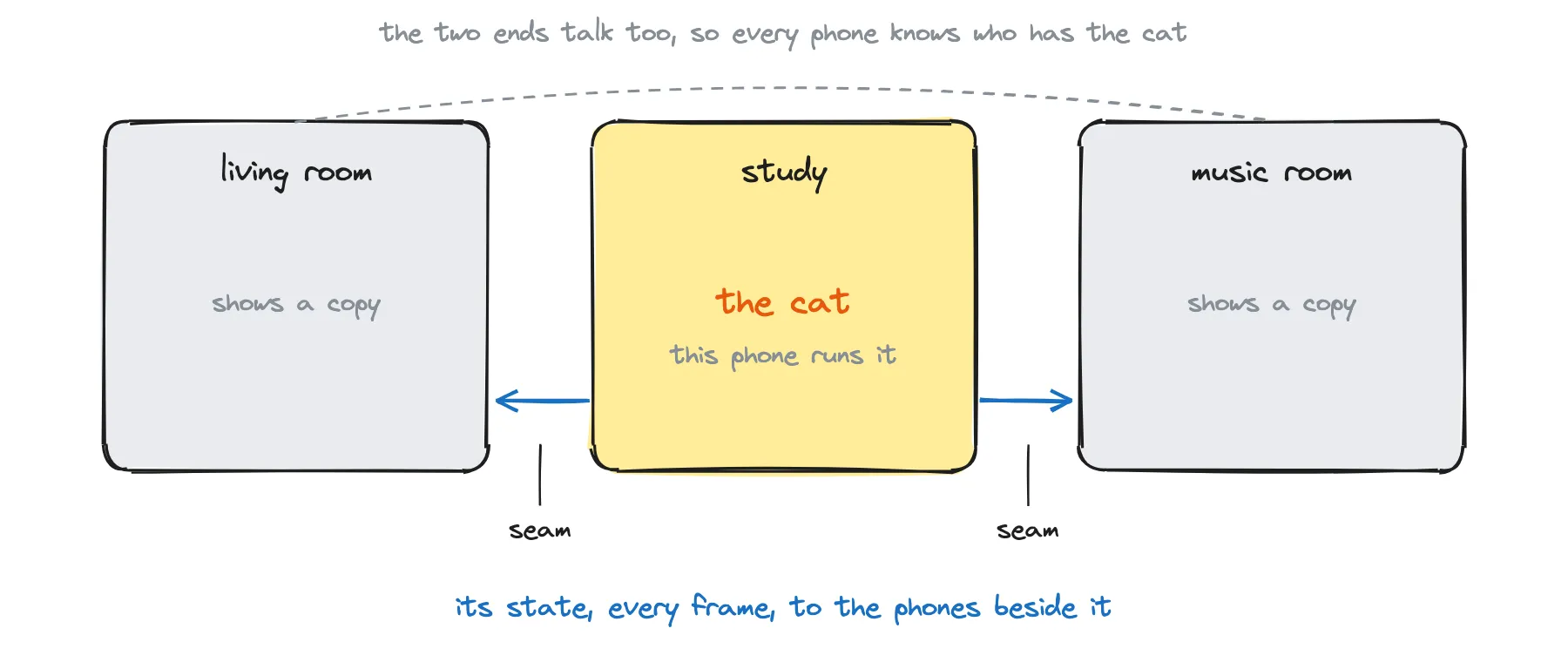
Put three phones on a table, side by side. Each one shows a room of a small black and white house: a living room, a study, a music room. A ginger cat lives in the house. It sits, it blinks, it watches the goldfish. Tap the floor and it walks over to you.
Now swipe a finger from one screen onto the next. The two screens become one house. The cat gets up and walks to the edge of its room. It stops in the doorway, half on each phone, with its head on one and its tail on the other, and looks up at you. Then it walks on into the next room.
I call that swipe a stitch, and the line where two screens meet the seam. Both words come back often.
From the outside it looks like one picture spread over three screens. It is not. Each phone draws its own room and its own cat, sixty or more times a second, and each phone has its own clock. For the trick to work, the phones must agree on where the cat is, all the time, while every message between them arrives a little late.
This article is about how they agree. The drawing is a story for another day.
What I wanted
I had four wishes for the way the phones connect:
- Same room, no shared network. Two phones in the same room are often on different Wi-Fi networks, or on none. The connection has to work anyway.
- No delay through the Internet. Messages go straight from one phone to the other, never through a server.
- Taps answered at once. A tap on any phone should get an answer from the cat at once, even when messages are slow.
- More than two phones. Three phones in a row should be three rooms of one house.
Underneath these wishes sit two problems. The first is distance: the phones are separate machines, and anything one of them says reaches the others late. The second is ownership: there is one cat, so exactly one phone must be in charge of it, and the others must follow without arguing. Almost every idea below is a way of living with one of these two problems.
The phones get there in five steps: they meet, they talk, they agree on the time, they share one cat, and they hide whatever delay is left. A sixth step adds a third phone.
Step 1: Meeting
Two phones cannot talk until each knows how to reach the other. The app gives them two ways to meet.
On the same Wi-Fi
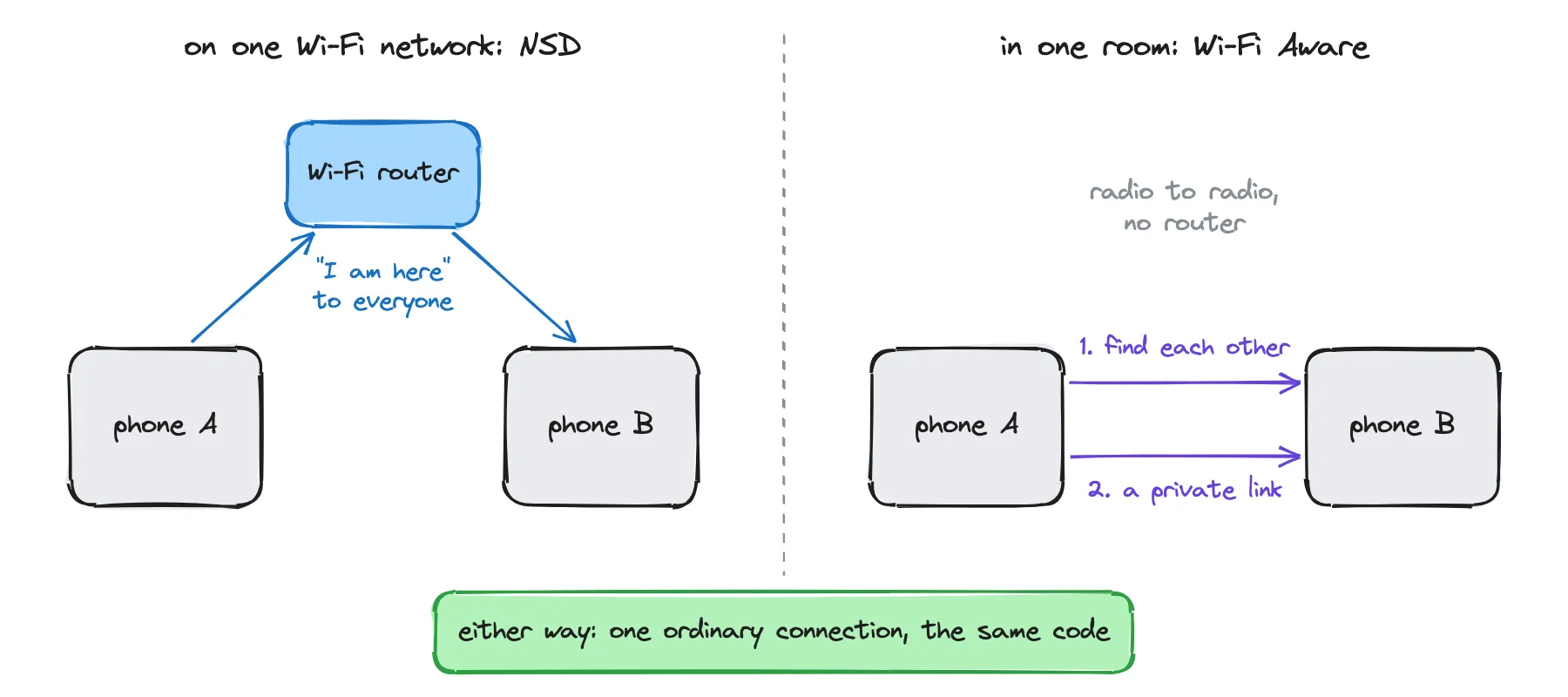
The first way is the one a home printer uses. Each phone announces “I am here, and this is how to reach me” to the whole network, and listens for the same announcement from others. The standard for this is called DNS-SD, and on Android you use it through NsdManager. The announcement travels by multicast, which means one message that reaches every device on the network.
Each phone makes up a random id the first time it runs and keeps it for good. It puts the id inside the name it announces. So when one phone finds another, it learns the other’s id too.
That id settles an awkward moment. Both phones usually see each other at almost the same time. If both reached out, they would open two connections where one is enough. So they follow a simple rule: the smaller id dials. The phone with the smaller id connects at once. The other waits two and a half seconds, and connects only if nothing has arrived:
resolve(info) { host, port, protocol ->
    if (protocol != this@PhoneLink.protocol.toString()) return@resolve
    seen()
    if (id < peer) {
        dial(host, port)
    } else {
        thread(name = "wander-fallback", isDaemon = true) {
            Thread.sleep(DIAL_FALLBACK_MS)
            if (!connectedTo(peer) && !closed) dial(host, port)
        }
    }
}
The wait is there for the day only one phone hears the other. And if both dial anyway, both phones keep the connection that the smaller id opened and close the other, so they still agree.
The announcement carries one more thing: a small note, called a TXT record, with a protocol number. That number is the version of the message format. Phones with different numbers never dial each other, so an old build and a new one never try to talk in words the other does not know.
This way of meeting is cheap. An app that targets API 35 needs no runtime permission for it, and two emulators on one computer find each other exactly as two phones do, which makes testing easy. Its price is the network. Both phones must be on the same one, and that network must let multicast through. Some networks, such as guest networks, may not. And from Android 17, an app that targets API 37 will also need the new ACCESS_LOCAL_NETWORK permission.
In the same room
The second way needs no network at all. Wi-Fi Aware lets two phones find each other directly, radio to radio, with no router in between.
It works in two stages. In the first, each phone announces itself and listens. The messages in this stage are tiny, about 255 bytes, and some of them get lost. That is fine for saying hello, but the cat needs far more: its description is 943 bytes, sixty times a second. So in the second stage the phones ask the system for a data path, a private network between just the two of them, and open an ordinary connection over it.
The same rule picks the roles, and the larger id gets one more job: it listens. It opens a server socket, a socket that waits for someone to connect, and asks for the data path, giving its port number.
private fun respond(p: DiscoverySession, peer: PeerHandle) {
    val listening = runCatching { ServerSocket(0) }.getOrNull() ?: return
    server = listening
    val specifier = WifiAwareNetworkSpecifier.Builder(p, peer)
        .setPskPassphrase(AWARE_PASSPHRASE)
        .setPort(listening.localPort)
        .build()
    ask(specifier, object : ConnectivityManager.NetworkCallback() {})
    Thread {
        runCatching { listening.accept() }.onSuccess(::connectedBy)
    }.start()
}
The phone with the smaller id asks for the same data path. When it is ready, the system tells it the other phone’s address and port, and it dials, once:
override fun onCapabilitiesChanged(network: Network, caps: NetworkCapabilities) {
    val info = caps.transportInfo as? WifiAwareNetworkInfo ?: return
    val address = info.peerIpv6Addr ?: return
    val port = info.port
    if (port <= 0) return
    handler.post {
        if (dialled) return@post
        dialled = true
        Thread {
            runCatching { network.socketFactory.createSocket(address, port) }.onSuccess(::connectedBy)
        }.start()
    }
}
After that, the connection goes to exactly the same code as a connection made over Wi-Fi. Nothing else in the app knows, or cares, how the two phones met.
The phones try their shared network first. If no neighbour has turned up after half a second, Wi-Fi Aware starts as well. A phone that can already see its neighbour on the network does not also reach it over Wi-Fi Aware, so two phones never end up with two connections.
This second way has its own price. The app has to ask once for the NEARBY_WIFI_DEVICES permission (location, before Android 13). Not every phone has Wi-Fi Aware, and the system switches it off when Wi-Fi or Location is off. The emulator images used here do not report it at all, so the app never tries it there. That is why the first way stays.
Roads not taken
There were other ways to meet. Nearby Connections needs Google Play services, Bluetooth and location permissions, and both sides accepting each connection. Wi-Fi Direct makes the phones form a small network of their own before any data moves. Bluetooth Low Energy might work, but nobody has tested here whether it can carry sixty descriptions of a cat a second.
The most tempting road was a relay server on the Internet. Every phone connects to it, and the server passes messages along. Any two phones could meet that way, anywhere in the world. A small one was built and tested on my computer. Then I dropped it, because it broke the second wish: every message would go out to the Internet and back, for two phones lying side by side. The relay did find one more job before it went, in step 5, where it played the part of a slow network.
Step 2: Talking
Once two phones have met, they talk over one TCP socket: a two-way connection that delivers bytes in the order they were sent. One thread reads from it, and one thread writes to it. The code that draws the screen never touches it. That way a slow network can make a message late, but it can never make a frame late.
The phones send two different kinds of message, and most of this step is about not treating them alike.
The first kind is the state of the cat: every number that describes it at one moment. Where it is, how fast it moves, where it looks, how far its tail has swung. There are 231 numbers. The phone with the cat sends a new state every frame, each time its screen draws a new picture. A state is out of date as soon as the next one exists, so only the newest one matters.
The second kind is events: a tap, a stitch, or a handoff, which is the message that gives the cat to the next phone. Events are the opposite of states. Every single one must arrive, once, in the order it was sent. Lose a handoff and you have no cat, or two.
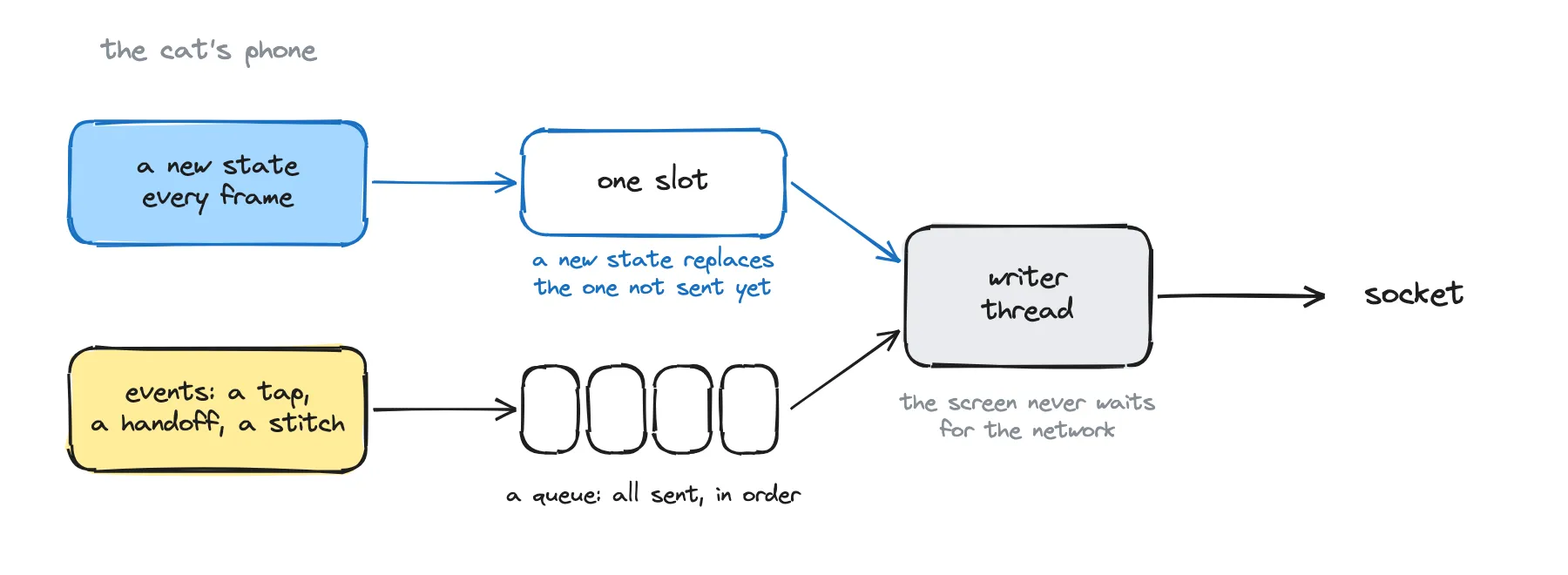
So the writing thread takes from two places. Events wait in a queue, and all of them are sent, in order. States go into a slot that holds only one:
fun offerState(epoch: Int, at: Long, values: FloatArray, count: Int, ack: Int) {
    if (!greeted) return
    synchronized(lock) {
        values.copyInto(pending.values, endIndex = count)
        pending.count = count
        pending.epoch = epoch
        pending.at = at
        pending.ack = ack
        hasPending = true
        lock.notify()
    }
}
If the network is slow and the writer has not sent the last state yet, the new state takes its place. Nobody needs the old one. The phone stays current instead of falling further and further behind. The call copies the 231 numbers into an array that already exists, so it creates no garbage, which matters in code that runs every frame.
A state is 943 bytes. At sixty frames a second, that comes to about 453 kilobits a second, before the network adds its own headers. The code also sends two small numbers with each state: epoch is the handoff number from step 4, and ack says which taps from the other phone have arrived. That figure comes from adding up the message format, not from measuring a network.
You might wonder why not UDP, which many games use. With TCP, one lost message holds up every message behind it until it is sent again. UDP never does that. But UDP also loses messages without telling anyone, and here the events must arrive. On UDP you would build that guarantee yourself. The slot gives the cat the part of UDP’s behaviour it needs most: old states never pile up inside the app. Inside the system’s network buffers, a lost packet can still hold up the states behind it. How often that happens on a home network has not been measured.
Every state also says when it was made. That only helps if both phones read time the same way, which they do not.
Step 3: Agreeing on the time
Every phone has its own clock, and no two clocks agree exactly. A time from another phone means nothing until you know how far apart the two clocks are.
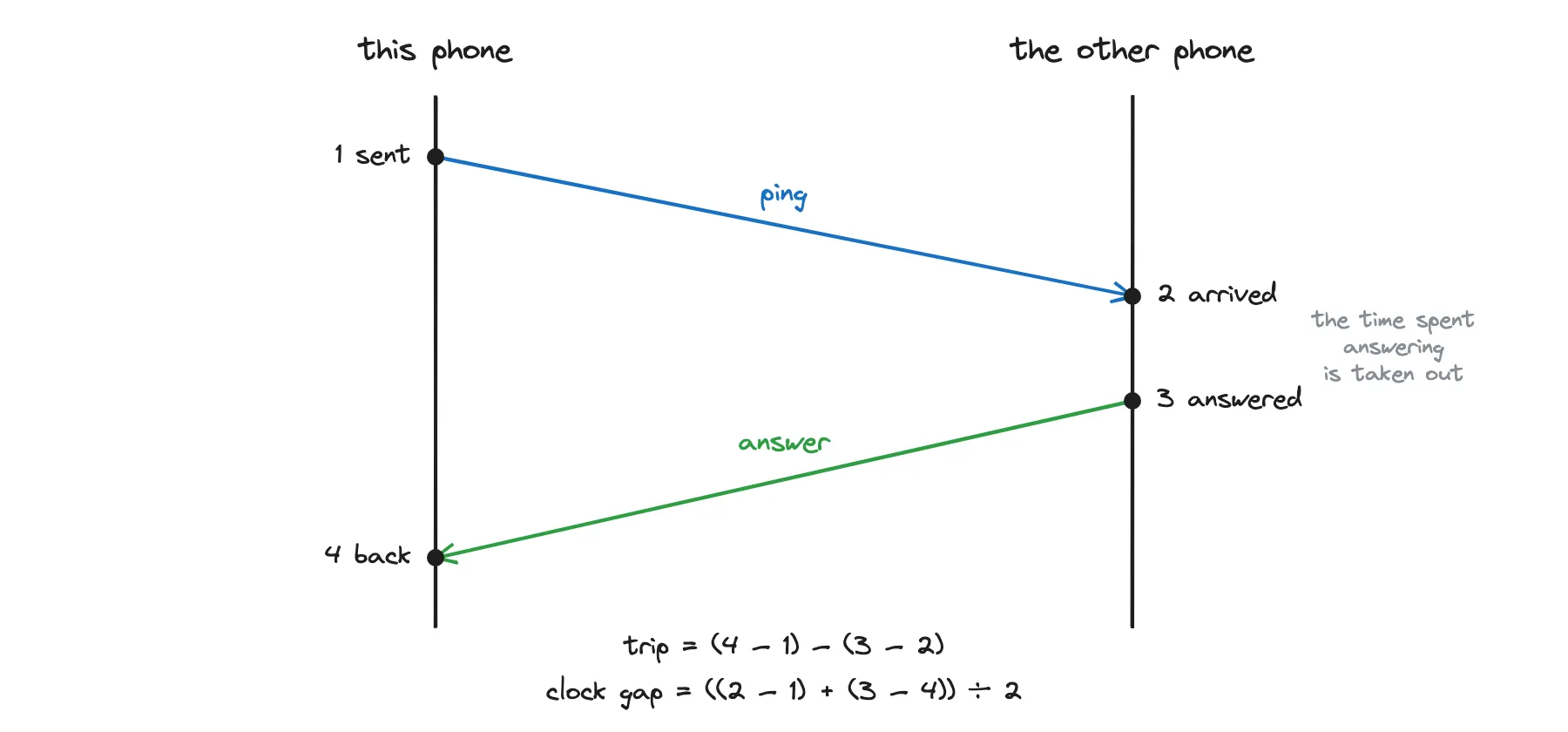
The phones find out with the arithmetic of NTP, the protocol computers use to set their clocks over the Internet. One phone sends a ping, a short message the other answers at once. Four moments get written down: when the ping leaves, when it arrives, when the answer leaves, and when the answer gets back.
fun add(sentAt: Long, peerGot: Long, peerSent: Long, backAt: Long) {
    trips[next] = (backAt - sentAt) - (peerSent - peerGot)
    offsets[next] = ((peerGot - sentAt) + (peerSent - backAt)) / 2
    next = (next + 1) % CLOCK_SAMPLES
    var best = 0
    for (i in 1 until CLOCK_SAMPLES) if (trips[i] < trips[best]) best = i
    offset = offsets[best]
    oneWay = trips[best] / 2
    samples++
}
The arithmetic assumes the ping took as long to go as the answer took to come back. If it did not, the clock gap comes out wrong, but never by more than half the trip. A short trip therefore means a small error. So the phones keep the last eight pings and trust the quickest. Half of that quickest round trip is also a good estimate of how long a message takes one way, which step 5 puts to use.
From then on, every time that comes off the socket is turned into the receiving phone’s own time as it arrives. From there on, the cat’s code uses only its own clock.
With a shared clock, a phone can tell how old any state is. Step 4 depends on exactly that.
Step 4: One owner, many copies
There is one cat, so one phone must be in charge of it. The rule is a plain one: the phone the cat is standing on owns it. I call it the cat’s phone. It decides when the cat walks, sits, blinks and looks up. Every other phone only shows a copy.
The easy way to show a copy would be to draw the latest state as it arrives. That fails at the seam. A state is always a little old when it lands, so the copy would always be a little behind, and a cat standing across two screens would come apart in the middle.
So the other phone does something better than drawing the state. It runs it.
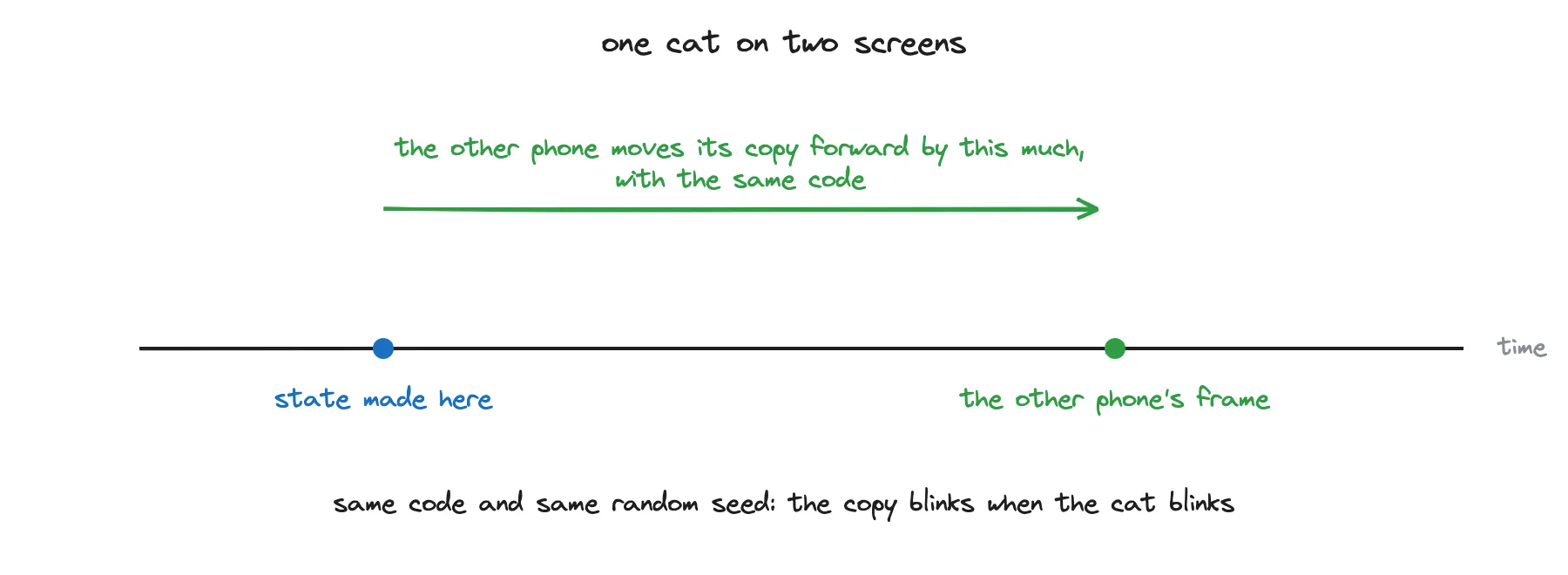
The cat’s phone moves the cat forward in time each frame, using the code that animates it, and sends the whole state. The other phone takes the newest state and moves it forward with the same code, from the moment the state was made to the moment of its own frame. Then it draws that. It starts again from a fresh state every frame, so small differences never get the chance to add up.
This only works if the cat’s own movement is entirely described by its state. It is. The cat reads no clock of its own, and even its random numbers come from a seed that travels inside the state. So when the cat blinks, twitches an ear, glances round or flicks its tail, the copy does the same at the same moment.
Ownership moves with the cat. When the middle of its body crosses the seam, the cat’s phone sends the whole state as a handoff, with a number, and the next phone becomes the owner. A phone ignores what any older-numbered state or status says about the cat, so a late message from before the handoff can never pull the cat back.
With two phones on one table, messages take a few milliseconds, and this is enough. But one thing still gives the delay away: your finger.
Step 5: Hiding the delay
Tap the floor of a phone that does not own the cat. The cat should turn and walk towards you. But the cat’s phone makes that decision. The tap has to travel there, change the cat, and come back inside the next state. Only then does the cat on your phone react.
To see this clearly, the test made the network slow on purpose. Two emulators talked through the small relay server that step 1 dropped, which held every message back by 40 ms each way. On the tapped phone, the cat now reacted 117 to 233 ms after the tap. That is long enough to feel, like a cat that hears you but takes its time.
Three changes took that wait away.
Show it here, fix it there
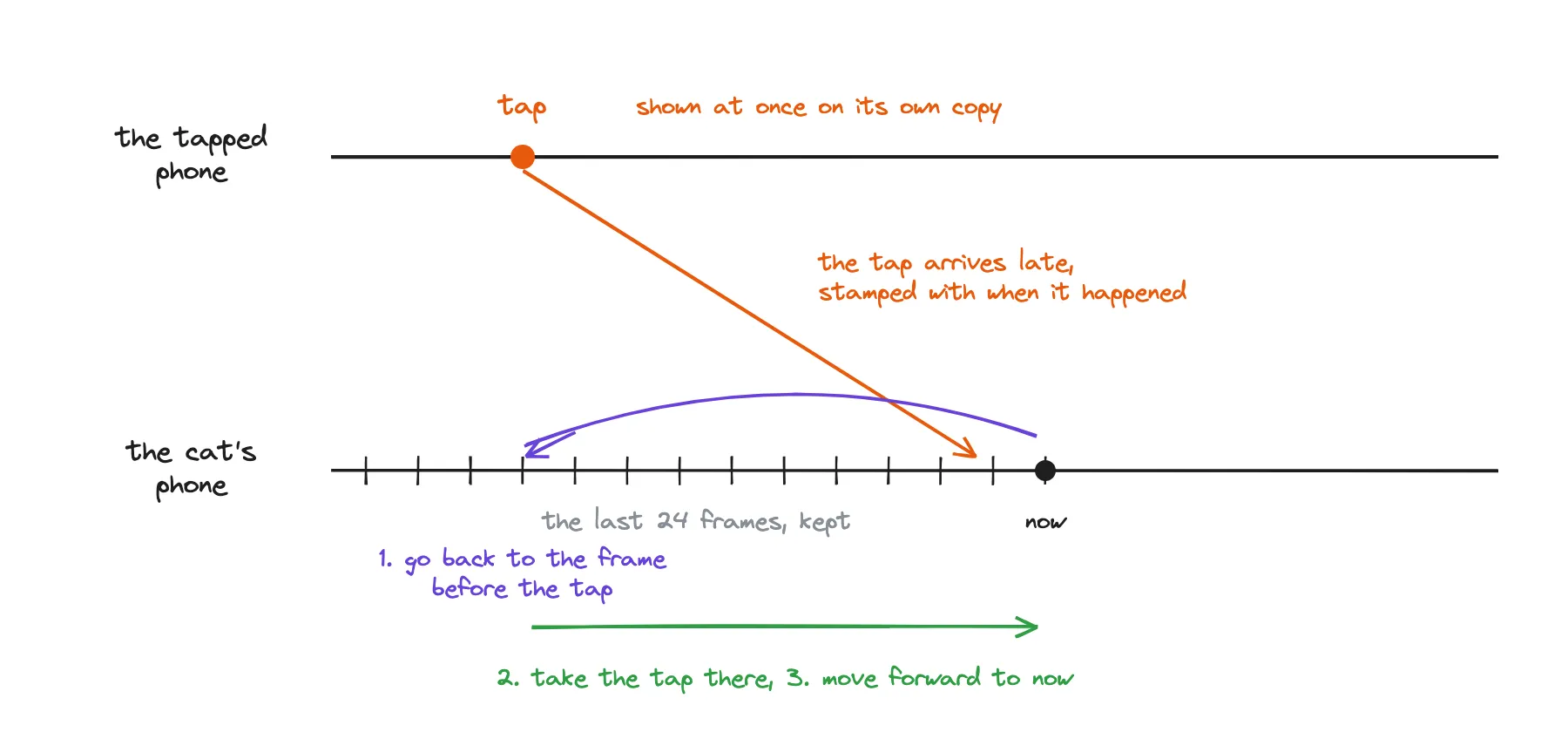
The first change is touch prediction. Your phone does not wait. It applies the tap to its own copy of the cat straight away, gives the tap a number, and sends it. Until the cat’s phone has the tap, each new state it sends is missing it. So every frame, your phone adds the tap again on top of the newest state, at the moment it happened, and stops once a state says the tap arrived.
The second change is rollback, on the cat’s phone. The tap arrives late, but it carries the time it happened. So the cat’s phone keeps its last 24 frames, about 0.4 seconds of the cat’s life on a 60 Hz screen. It goes back to the last frame before the tap, applies the tap there, and moves the cat forward again to now:
private inline fun takeAt(at: Long, seq: Int, n: Neighbour, take: () -> Unit) {
    n.seqTaken = maxOf(n.seqTaken, seq)
    if (!n.stitched || !runsCat || leaving || at >= catTime) {
        take()
        return
    }
    var newest = -1
    for (k in 0 until historyCount) {
        val i = (historyNext - 1 - k + HISTORY_FRAMES) % HISTORY_FRAMES
        if (historyAt[i] <= at) {
            newest = i
            break
        }
    }
    if (newest < 0) {
        take()
        return
    }
    cat.load(history[newest])
    runOn(cat, at - historyAt[newest], MAX_AHEAD_NS)
    take()
    runOn(cat, catTime - at, MAX_AHEAD_NS)
    for (k in 0 until historyCount) {
        val i = (historyNext - 1 - k + HISTORY_FRAMES) % HISTORY_FRAMES
        if (historyAt[i] <= at) break
        historyAt[i] = Long.MIN_VALUE
    }
}
Now both phones agree about the tap, with no correction needed: your phone showed it at the moment it happened, and the cat’s phone acted on it at that same moment. The cat usually reacted one frame after the tap, 17 ms on a 60 Hz screen, and never more than three frames after.
There was a catch. In the same run, the head and the tail stopped lining up at the seam: in one frame they were 1.5 mm apart, and in two others 0.87 mm, as measured below. The logs did not show the cause. The likeliest suspect was the cat’s own decisions, so the third change went after them.
Decide a moment ahead
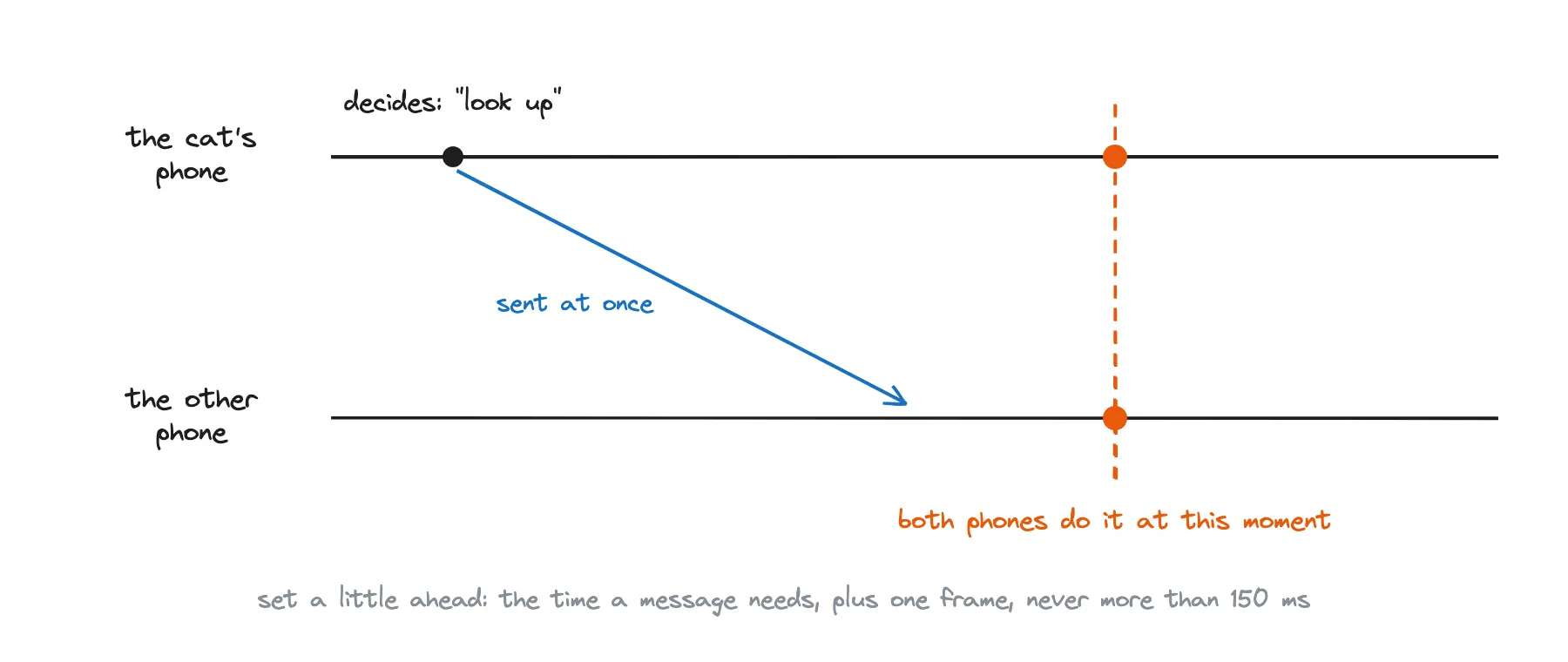
Some of the cat’s choices are not in its state at all. The code around the cat, on the cat’s phone alone, decides where it walks next, when it looks up at you, and when it gives you a slow blink back. The other phone heard about each of these only when the next state arrived. Until then its copy kept doing the old thing, and then it jumped.
The fix is to decide a moment ahead. When the cat’s phone makes a decision, it does not act on it at once. For each phone stitched beside it, it takes half the quickest recent round trip. It picks the longest of those, adds 17 ms, one frame at 60 Hz, and schedules the decision that far ahead. It sends the decision straight away. Both phones then carry it out at the same moment.
private fun order(kind: Int, a: Float = 0f, b: Float = 0f) {
    val l = link
    if (l == null || firstStitched() == null) {
        doOrder(cat, kind, a, b)
        return
    }
    var oneWay = 0L
    for (i in neighbours.indices) {
        val n = neighbours[i]
        if (n.stitched) oneWay = maxOf(oneWay, l.oneWayNs(n.id))
    }
    val at = now + minOf(oneWay + ORDER_MARGIN_NS, ORDER_MOST_AHEAD_NS)
    if (orderFrom != id) {
        orderCount = 0
        orderFrom = id
    }
    keepOrder(kind, a, b, at)
    val message = PeerMessage.Order(kind, a, b, at)
    for (i in neighbours.indices) {
        val n = neighbours[i]
        if (n.stitched) l.send(n.id, message)
    }
}
While a decision waits for its moment, the cat makes no new ones. No decision is ever set more than 150 ms ahead, so the cat never hesitates for long. If a decision still arrives late, the other phone carries it out on arrival, and for a moment its copy is a little behind. On a very slow link, that small jump is what remains.
What the numbers say
Each phone wrote one line to its log every frame: the time on the shared clock, and where it drew the cat. A script lined up the phones’ logs. Whenever the cat was within 25 mm of the seam, it measured how far apart the two halves of the cat were, in millimetres on the table. Zero means one unbroken cat. Each tap was logged too, and its reaction time is the time until the cat on the tapped phone started to head for it.
Each row below is one run on two emulators, with six to eight taps. The first row has none of the changes. The second adds touch prediction and rollback, and the third adds decisions ahead, all with 40 ms each way. The last row runs everything with 80 ms each way.
| Run, two emulators | Tap to reaction | Seam, worst frame |
|---|---|---|
| 40 ms each way, no prediction | 117 to 233 ms | 0.06 mm |
| 40 ms, prediction and rollback | 17 to 50 ms | 1.50 mm |
| 40 ms, all three changes | 17 to 33 ms | 0.03 mm |
| 80 ms, all three changes | 17 to 33 ms | 0.42 mm |
Between real phones on a table, messages travel much faster than in these tests. On two real phones on one Wi-Fi network, the cat reacted one frame after a tap, 8 ms on a 120 Hz screen, and the two halves were never more than 0.31 mm apart. Over Wi-Fi Aware a tap also took one frame, 8 or 17 ms depending on the screen, and the halves stayed within 0.01 mm. In each of those runs only one to three taps could be measured, with a few hundred frames near the seam, so treat them as first numbers rather than averages.
Two phones now behaved. Then a third phone joined the row.
Step 6: The third phone
With two phones, each phone has one neighbour, and every question has an obvious answer. With three in a row, the phone in the middle has two neighbours, and the phones at the ends never touch. Three things had to change.
Everyone talks to everyone. Each phone keeps a connection to every phone it finds, up to four, but is stitched to at most one on each side. So the two ends of a row talk to each other, even though they never sit side by side. It looks wasteful, and it is what keeps ownership simple: every phone hears straight from the phone that has the cat, so no phone thinks the cat is gone and starts a second one.
Each phone describes the rest of the row. A phone sends each neighbour a status of its own. It says on which side the sender put that neighbour, and how high up, because phones of different sizes do not line up. It also says what lies beyond the sender on its far side: how wide the rooms there are, and whether the cat is out there:
for (i in neighbours.indices) {
    val n = neighbours[i]
    val o = if (n.stitched) beside(-n.side) else null
    val far = if (o == null) 0f else minOf(o.widthMm + o.far, ROW_MOST_MM)
    val catFar = o != null && (o.runsCat || o.catFar)
    val others = stitchedCount - if (n.stitched) 1 else 0
    val company = joinedCount - if (n.joined) 1 else 0
    l.send(n.id, PeerMessage.Status(widthMm, heightMm, groundMm, age, holds, n.epoch, n.side, n.y, room.ordinal, far, catFar, others, company))
}
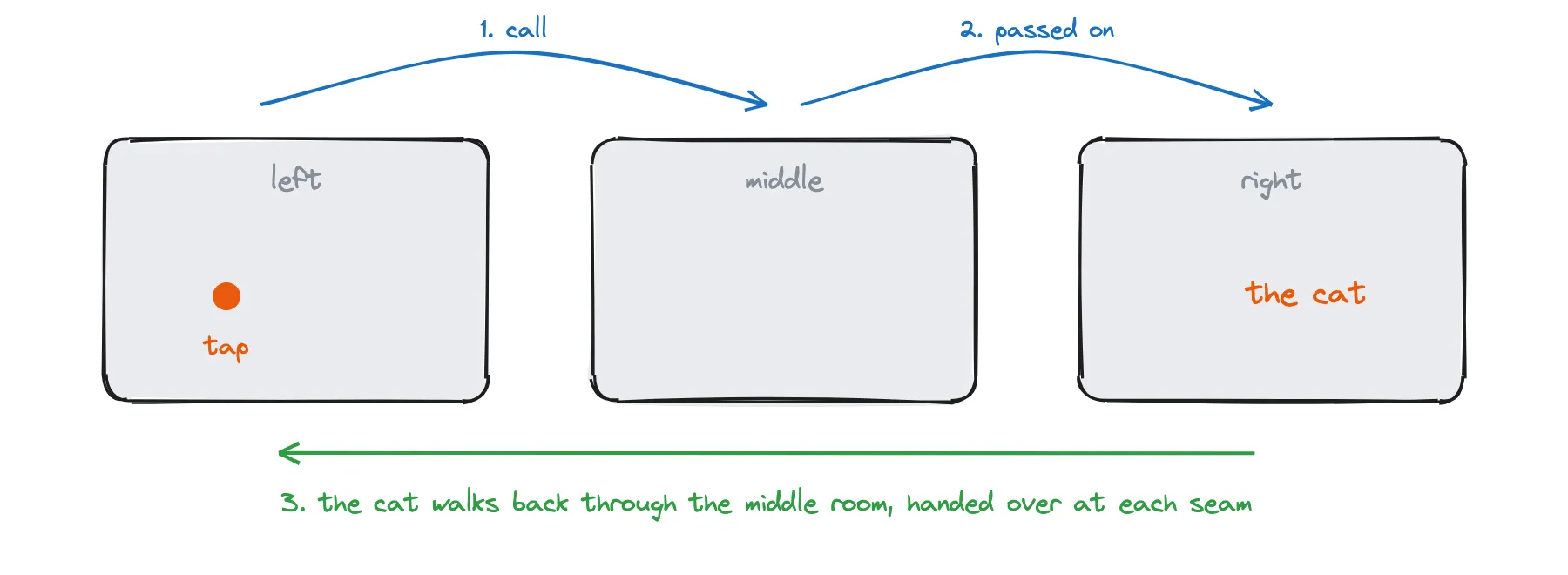
That last part lets a tap travel. Tap the phone at one end, and the tap goes to the middle phone, which passes it on towards the cat. It counts each phone it passes through, so it can never go round for ever. The cat then walks back through the middle room, changing owner at each seam.
A third room. Three phones needed three rooms, so the house gained a music room, with an upright piano and a record player. When a phone joins a row and another phone in the row already shows its room, it moves to a room that no phone shows.
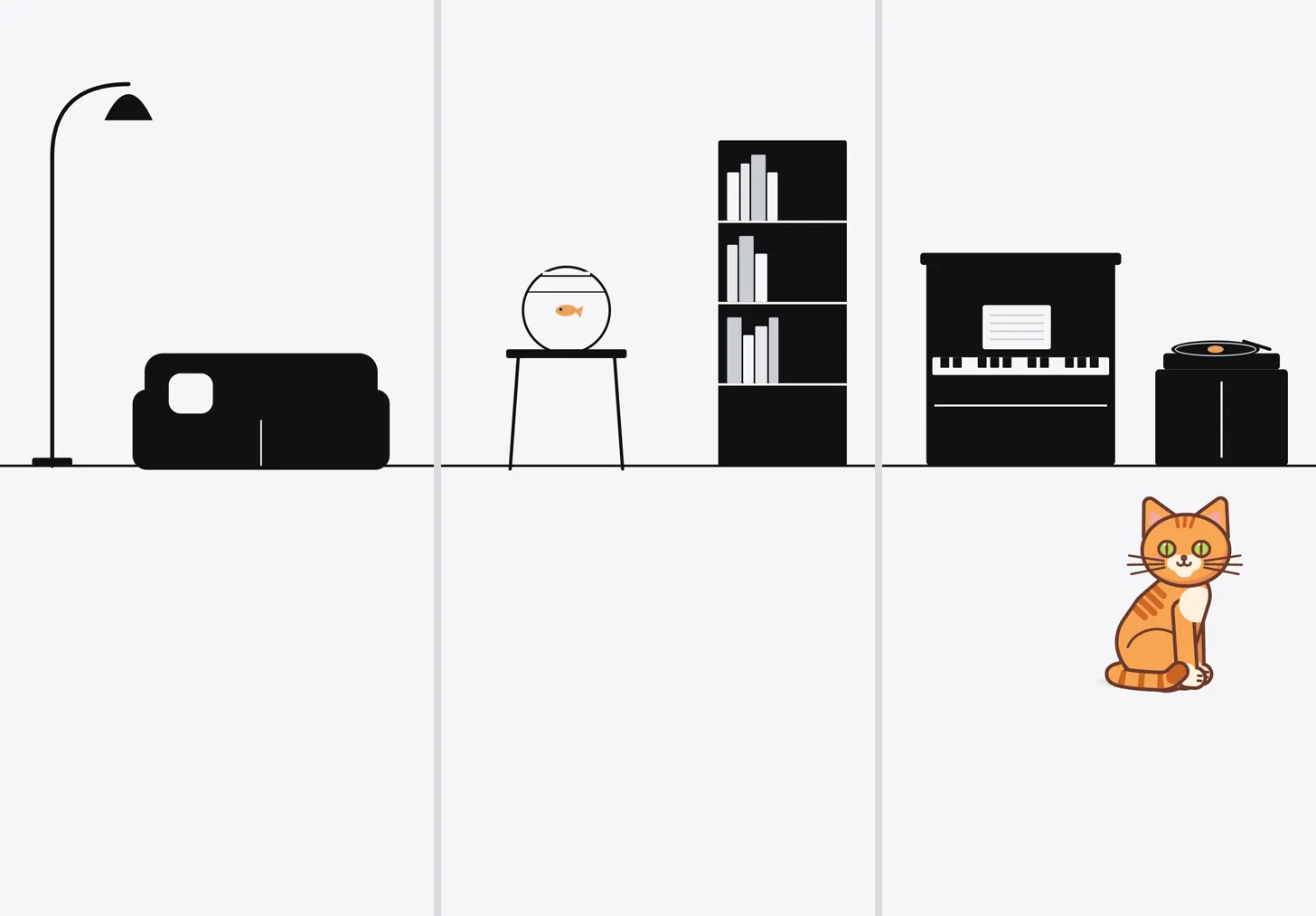
Three emulators ran the same script eight times: open all three, stitch them, call the cat to the far right, then the far left, then back. Every run ended with one cat. The two halves at each seam stayed within 0.5 mm, except for two frames in one run, of 3.7 mm and 0.7 mm, each within a quarter of a second of a handoff. In one run the phones stitched late, most likely because the test’s scripted swipes did not register.
What carries over
Strip away the cat, and three ideas remain that would fit other apps where devices share one moving thing.
The first is to give everything one owner, and let ownership move. Two phones that both decide will sooner or later disagree. One owner, chosen by a rule as plain as “the phone the cat stands on”, leaves little to argue about. The moment ownership changes hands still needs care. A numbered message does the handing over, and what an older-numbered message says about the cat is ignored.
The second is to send state, not pictures, and run it on the other side. A copy that is moved forward from a timestamped state keeps up with the original, as long as everything that drives it travels inside the state, or alongside it, as the taps and the decisions do. That is why even the random numbers live in the state.
The third is to plan around the delay. Show the user’s own action at once, and let the owner apply it at the moment it happened. Make the owner’s own decisions a moment ahead, so everyone acts on them together. The messages are as slow as before. But your own taps show at once, and the cat announces its choices early, so up to the 80 ms tested here you hardly see the wait.
P.S. Accessibility
A screen reader cannot swipe across two phones. With TalkBack on, once another phone is found, each room offers two actions, “The other phone is on the left” and “The other phone is on the right”. Each one stitches the newest phone that is not yet beside it to that side. The room also says where the cat is, including “Here. The rooms on both sides are open.” when the cat is in the middle room of a row.