20 Nov 2026 · Network · 16 min
The shortest way between two phones
Two phones touch, and a video crosses the few centimetres between them. No Internet, no Bluetooth. This is the story of those centimetres.
Two people sit at the same table. One wants to give the other a video. The phones are a few centimetres apart, and most of the time the video still leaves the room: up to a server on the Internet and back down, often made smaller on the way.
I wanted the shortest way that could exist. Touch one phone with the other, and the file is there.
This is how it looks now. Two phones lie on a table, facing each other, with their top edges almost touching. On one of them you choose a few files: a video, some photos, a PDF. A soft light starts to pulse slowly along the top edge of both screens. The phones have found each other.
Now push one phone against the other. A small knock, top edge to top edge. Light spreads from the point where they met and runs down both screens. A few seconds later the other phone says “3 files arrived”, and offers two buttons: “Keep” and “Not now”.
Nothing else happened. Nobody opened a share sheet, picked a name from a list, or typed a code. There was no account and no cloud. The phones were not even on the same Wi-Fi.
And there was no Bluetooth. The app never uses it, not to find the other phone and not to move the file.
So how do the files cross, and why only to the phone that was touched? This article is the answer, in six steps. The light on the screen is a story for another day.
This week’s quest
Every week I give myself a quest: one small thing that should feel like magic. Last week’s was a cat that walks from one phone to the next. This week’s was one sentence long:
Move any file from one phone to another with a single touch, with no Internet and no Bluetooth.
The quest had six rules. Most of them were added during the week, most of them after something went wrong:
- Any file. Photos, videos, documents, whatever the phone can pick.
- Only the phones that touched. A phone that is only nearby must never receive a byte.
- As fast as the phones can go. Even if that takes a protocol of our own.
- Whole, or not at all. A file that looks fine and is damaged would be the worst result.
- Written once. The receiving phone stores each file one time, with no hidden second copy.
- Private. If either of the two people wants the link encrypted, it is encrypted.
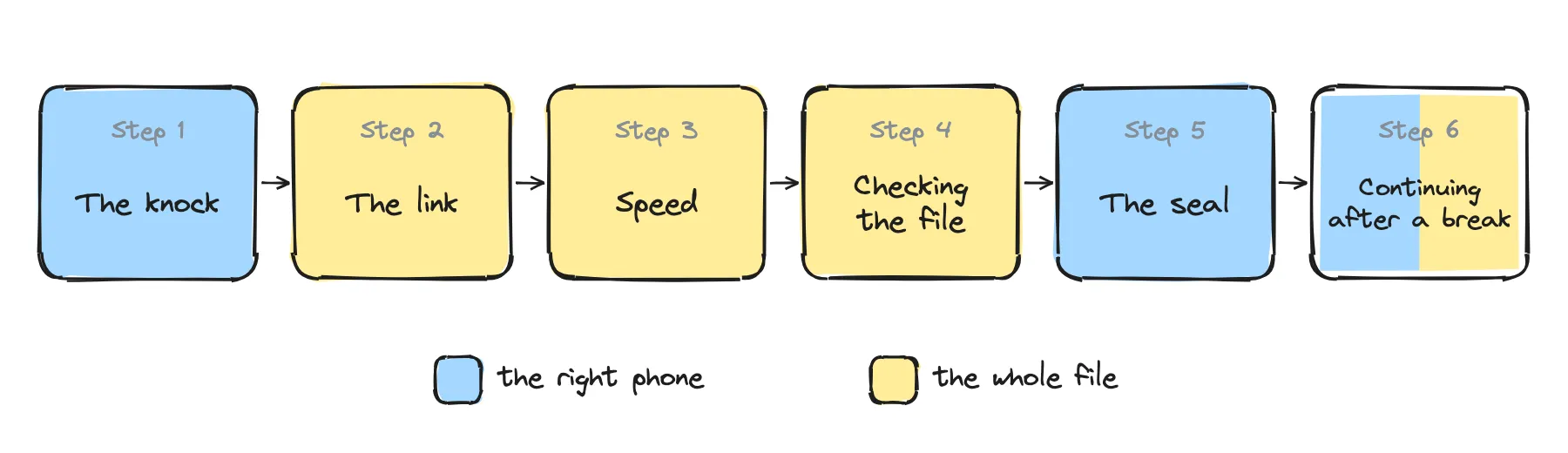
Underneath these rules sit two problems. The first is the right phone: the files must go to the phone you touched, and to nobody else in the room. The second is the whole file: every byte must arrive, in order, over a radio that sometimes goes quiet in the middle. Almost every idea below serves one of the two.
The phones get there in six steps: they feel the knock, they link, they go fast, they check the file, they seal the link, and they continue when the link breaks.
Step 1: The knock
How does a phone know that another phone touched it? It does not. There is no sensor for that. What a phone has is an accelerometer, a sensor that reports how hard the phone is being pushed, in three directions, many times a second. It measures in m/s². For scale, gravity pulls on a phone at rest with 9.8 m/s².
A knock on the top edge appears there as a spike: a few milliseconds of hard push along the phone’s long axis, the line from its top to its bottom.
The first detector asked for a reading every 20 ms and looked for a big change. It was built on the emulator, where a script can fake any push. Then it met two real phones, and failed. A real knock appeared as a push of only 0.2 to 4.4 m/s² along the phone, because its peak fell between two readings. Worse, the two phones disagreed about when the same knock happened, by 473 ms.
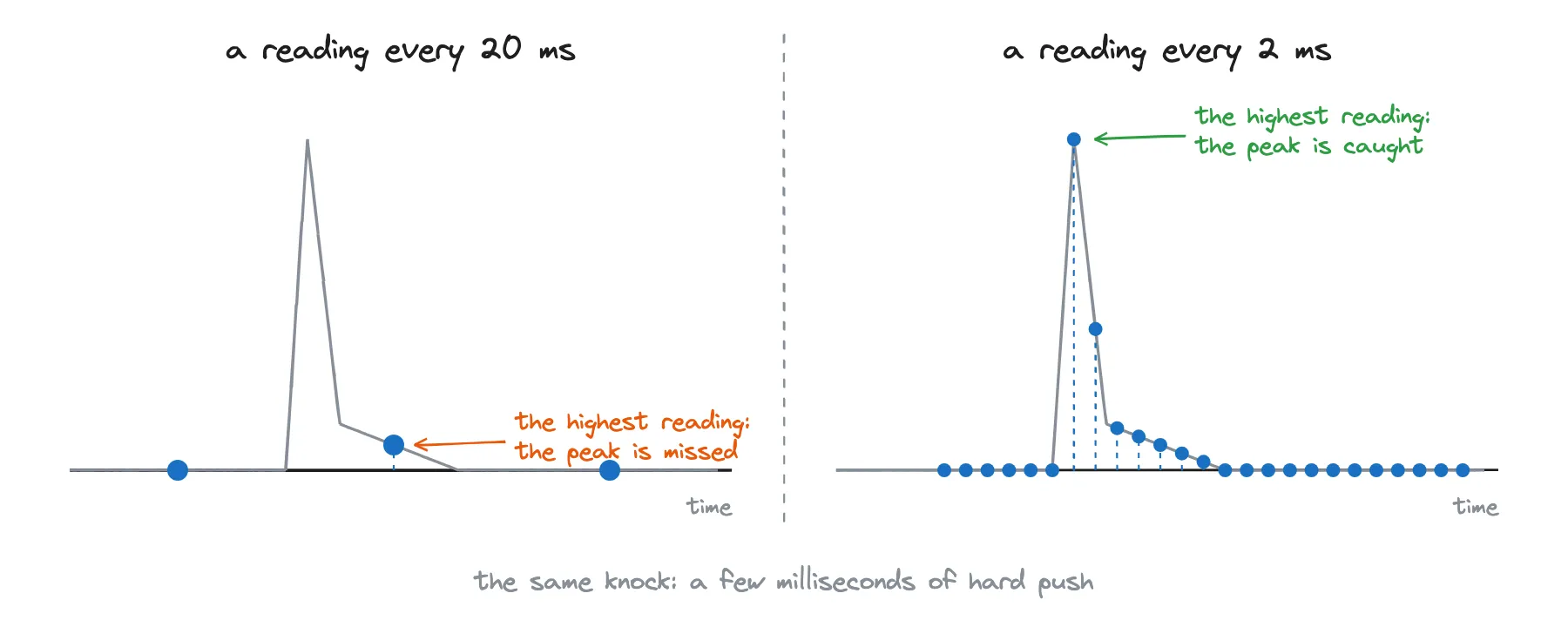
Those two numbers came from a log. The phones had been made to write down every push they felt. The detector was then changed to read the sensor as fast as the phone allows, and I knocked the phones together again, in my hands. The second log gave this:
| What happened | Peak push | Share along the long axis |
|---|---|---|
| Two real knocks, top to top, three readings | 18.5, 18.6 and 44.4 m/s² | 78 to 96% |
| A hand carrying the phone | 2 to 4.3 m/s² | varies |
| Jolts across the phone | 6.3 to 13.1 m/s² | 22% or less |
| A push along the phone that only one phone felt, and the shake after a knock | 5.7 and 5.8 m/s² | 97% and 55% |
The table shows that strength alone is not enough. A jolt across the phone reached 13.1 m/s², more than the limit the detector ended up with. What separates the two is direction: a real knock runs along the phone, and that jolt had only 13% of its push there.
So the detector looks at both. It asks for the fastest rate the sensor offers: a reading every 2.0 ms on one of my phones and every 2.5 ms on the other. It compares each reading with the average of the last 50 ms. A moving hand changes that average, and a short spike does not, so a spike is far from it. When that happens, the detector watches for 40 ms to find the peak. Then it decides:
if (now - joltAt < JOLT_HOLD) return
jolting = false
val soft = joltPeak < KNOCK * KNOCK
val askew = joltAlong < ALONG_SHARE * joltPeak
val ringing = joltAt - lastKnock < KNOCK_REST
val verdict = when {
    soft && askew -> "too soft and not along the phone"
    soft -> "too soft"
    askew -> "not along the phone"
    ringing -> "the ring of the knock before"
    else -> "a knock"
}
A knock must pass three tests. Its peak is at least 9 m/s². At least half of its energy lies along the long axis. And it comes at least half a second after the knock before, because the phone keeps shaking for a moment after a knock.
The limit of 9 sits between the strongest push in the log that was not a knock, 5.8, and the weakest real knock, 18.5. Only two real knocks were logged, three readings in all, so treat 9 as a first number. Softer knocks have not been measured yet.
With the sensor read this fast, the two phones disagreed about the time of one knock by only 2 to 4 ms. The next idea depends on that number.
Both phones must feel it
One phone feeling a knock proves little. Somebody put it down on the table, or dropped it. Two phones feeling a knock in the same instant is much stronger proof. A shaken table will rarely do that to two phones at once.
The phones are already linked when they touch. They find each other as soon as the screen is open, and step 2 tells how. So each phone can tell the other when it felt a knock.
Their clocks do not agree, so the message does not hold a time. It holds how long ago the knock was, and the other phone subtracts that from its own clock. If both knocks fall within 100 ms of each other, it was one touch. The phone that has files chosen then sends an offer: how many files, how many bytes, and the moment of contact.
The offer is where the rule “only the phones that touched” is enforced. I call it both phones must feel it. The receiving phone accepts an offer only if it has a knock of its own, close enough to the moment the offer names:
val touched = synchronized(this) {
    val felt = ownKnock
    ownKnock = 0L
    felt != 0L && now - felt <= MEETING_WINDOW + OFFER_SLACK && abs(felt - contact) <= together() + OFFER_SLACK
}
This check runs on the thread that reads the link, before the phone reads a single byte of a file. That detail came from the review agents. In an earlier version the decision was made a moment later, on the main thread, and by then megabytes had already landed on a phone that was about to say no.
The rule also closed a tempting road. Since the phones link before they touch, the bytes could start crossing early, and the knock would only release them. It would feel instant. I dropped the idea, because it sends files to a phone nobody has touched yet.
Knowing which phone you meant is half of the quest. The other half needs something to move the bytes.
Step 2: The link
The link started as a copy of last week’s. Each phone announces itself on the Wi-Fi network with NsdManager, the way a home printer does, and finds the other. Then they open one TCP socket: a two-way connection that delivers bytes in the order they were sent. Every 2 seconds each phone sends a tiny message that says “I am here”. If a phone hears nothing for 7 seconds, it calls the link lost.
That worked for photos on the emulators. Then a large video was sent between my two phones, through the home router. Part of the way through, the screen said the phones had lost each other. They were still touching.
The first explanation was wrong. The system log showed that Android had frozen the photo picker’s process six seconds into the transfer. The file was being read through that picker, so the explanation seemed right: the read must have broken. A guard was built for it, and it is still there. If reading a file fails, the sender opens it again and skips to where it stopped, up to three times.
Then the video was lost again. This time the app logged the reason for the loss, and the reason was not the picker. Both phones had stopped hearing each other at almost the same moment, 159 MB into a 624 MB video. The link had gone silent for 7 seconds in both directions, and the app’s own 7 second rule had ended it.
The home Wi-Fi had gone quiet. The signal on one phone was very weak, and in that same second the phone had moved to a range extender, a box that repeats the router’s signal. The picker had frozen at about the same time, and the first explanation had nothing more behind it than that.
Two changes followed. The small one is a longer wait. While files cross, a phone now waits through 30 seconds of silence before it calls the link lost, because TCP recovers from a pause of a few seconds by itself. The big one changed which road the bytes take.
Direct first
Two phones that touch are close. They do not need a router between them. Wi-Fi Aware lets them find each other directly and open a private network of their own. Last week’s app already had the code for it, and it was reused unchanged.
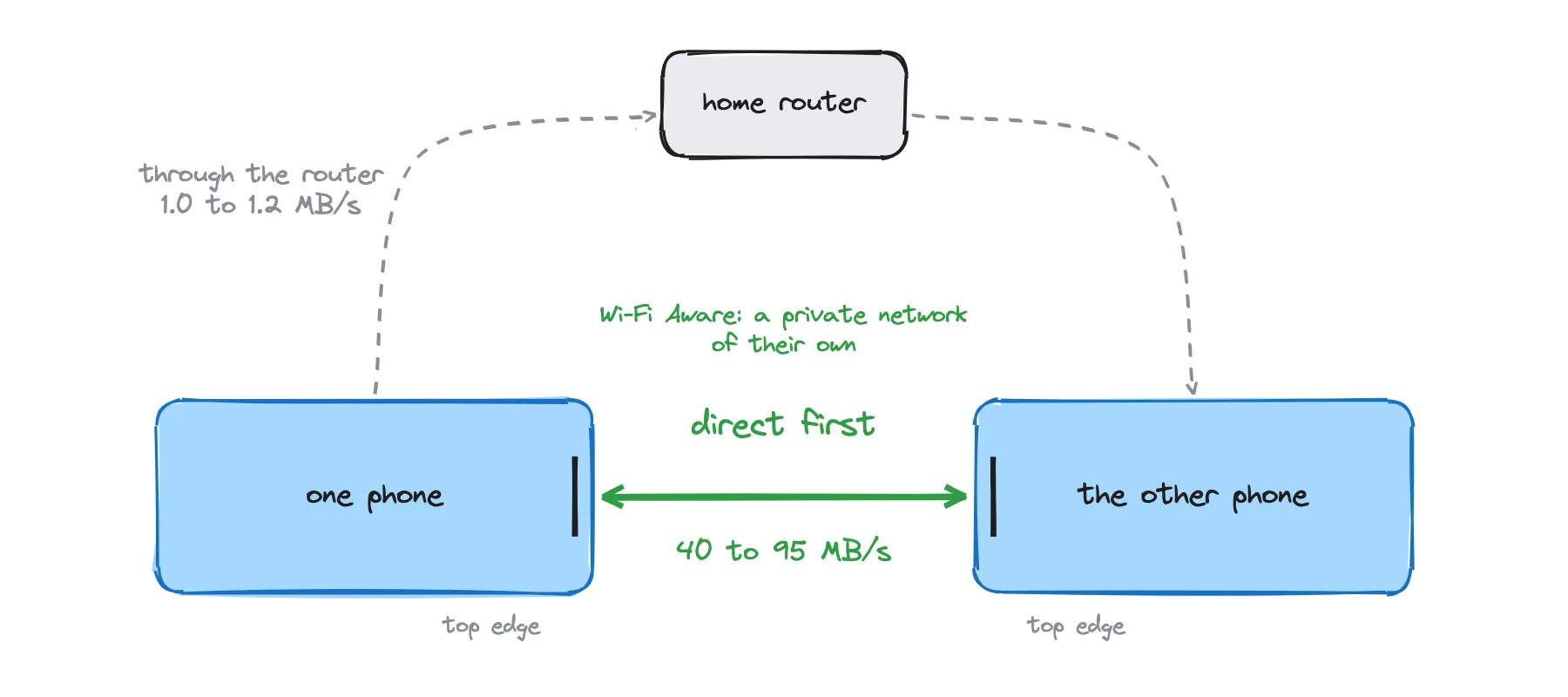
Last week’s app tried the shared network first and Wi-Fi Aware second, because its messages were small. For files the order is reversed, and I call it direct first. A phone that can use Wi-Fi Aware waits up to 8 seconds for the direct link before it connects through the shared network. Between my phones the direct link formed in 1 to 3 seconds in the logged runs. If the phones still end up linked through the router, they keep asking for a direct link once a minute, and switch to it when no files are crossing.
This is also why the phones in the opening did not need the same Wi-Fi. With no network in common, they still meet.
The price is the same as last week. The app asks once for the NEARBY_WIFI_DEVICES permission, or for location on Android 12 and older. Not every phone has Wi-Fi Aware, and the emulator has none. So the shared network stays as the second road, and every test on emulators runs on it.
Now the bytes had a short road. The next question was how fast they could travel on it.
Step 3: Speed
For speed I set an order of work: measure first, find where the time goes, and only then build. A protocol of our own was allowed, but it had to earn its place with numbers.
So the app first got two log lines per file: how many megabytes a second, and where the time went. Five videos, 608 MB in all, crossed over the direct link at 52 to 70 MB/s, about 57 overall. The sending phone spent 87% of its time waiting for the link to take more bytes. The receiving phone spent between 11 and 52% of its time writing to storage, and while it wrote, it did not read the link.
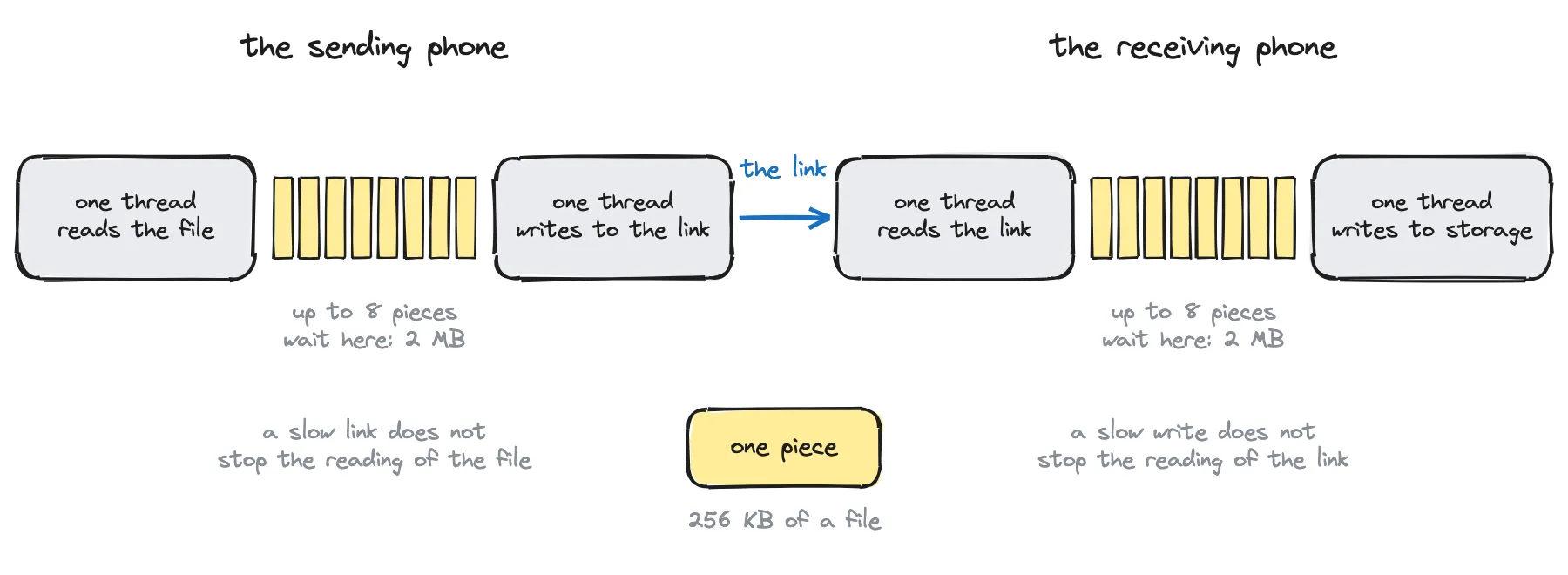
That last part looked like the place to gain speed. The new protocol cuts every file into pieces of 256 KB. On the sender, one thread reads the file ahead while another writes to the link. On the receiver, one thread reads the link while another writes to storage. Up to eight pieces, 2 MB, can wait between the two threads, so a slow write does not stop the reading.
On my computer, with no radio involved, the old code moved about 3,000 MB/s and the new one about 6,500. On the phones it changed nothing: 57 MB/s before, 57 after.
The protocol was never the limit. The radio was. A sender that waits for the link 87% of the time has two possible causes, a slow receiver or a slow radio. The new protocol removed the first, and the speed did not move.
One guess was left: a phone that is connected to a router may have to share its radio time with it. So both phones were taken off the home Wi-Fi, with Wi-Fi still switched on, and three of the videos were sent again. They crossed at 82, 94 and 95 MB/s, about 90 overall against 57. That is one run, and the cause is not proven: later test runs on the home Wi-Fi reached 84.
Roads not taken
Three more ideas were meant to get more speed from the radio, and each was removed again.
Android lets an app ask for a high performance or a low latency Wi-Fi mode. Neither changed the speed by more than it already changes between two runs of the same test. Several connections at once did no better: two, four and eight TCP sockets over the same direct link gave 54 to 82 MB/s, where one socket gave 67 in the same test. The third idea was to ask for a different radio channel. The code was written and removed, because neither phone lets an app choose one.
Bluetooth and a relay server on the Internet were never options, because the quest forbids both. Bluetooth is also far too slow for a video, and a relay would send a file out to the Internet and back for two phones that touch.
What the numbers say
Each row is the sending phone’s own log line. Rows one and three are a test file of made-up bytes, 300 or 400 MB, started by a script. Row two is three real videos.
| Road | Speed |
|---|---|
| Direct, both phones also on the home Wi-Fi | 40 to 84 MB/s |
| Direct, both phones off the home Wi-Fi (three videos, 451 MB, one run by hand) | 82 to 95 MB/s |
| Through the home router (step 6 tells how a transfer ends up there) | 1.0 to 1.2 MB/s |
The first row is wide: the same test gives 41 one minute and 81 the next. Row two is one run and row three is three, so treat them as first numbers.
The last row is why the direct road matters. A 300 MB file that takes four to eight seconds straight across would take four to five minutes through my router.
The bytes now crossed fast. That says nothing yet about whether they arrived right.
Step 4: Checking the file
Imagine a video that arrives, looks fine in the gallery, and breaks ten minutes in. Nobody would know until they watched it. The rules call this the worst result.
TCP promises bytes in order, and it checks them with a small checksum, a short number worked out from the bytes that catches most damage and not all. For a 600 MB video I wanted a stronger promise: whole, or not at all.
A fingerprint at the end
While the sender reads a file, it also computes its SHA-256 hash. I call it the file’s fingerprint: 32 bytes that change completely if a single bit of the file changes. After the last piece, the sender sends the fingerprint. The receiver computes its own from the bytes it wrote. If the two differ, the file is refused, the link is dropped, and the screen says the phones lost each other.
Before a file counts as arrived, the receiver also asks the system to finish writing it to storage. A file that counts as arrived is really there.
The first version computed the fingerprint on the same thread that talks to the link, and that took 8 to 10% of the sender’s time. The work then moved to the threads that already read and write the file. After that no cost could be measured.
One assumption had broken earlier. The file picker reports a size for every file, and it seemed safe for the receiver to refuse any byte beyond that size. It is not safe. One test file was announced as 8.8 KB and was really 62 KB, because it had changed after the system last measured it. The announced size is now used only for the progress on screen.
Write once, show later
A file that arrives whole can still arrive twice. Arriving files first went into the app’s private folder. On “Keep” they were copied to the phone’s shared storage. That is two writes for every file, and until the first one is deleted a 600 MB video takes 1.2 GB.
Android’s MediaStore has a better way, and I call it write once, show later. A file can be created in its final place, in Pictures, Movies, Music or Downloads, and marked pending. A pending file is hidden from every other app:
private fun place(name: String, mime: String): Uri {
    val (collection, folder) = shelf(mime)
    val values = ContentValues().apply {
        put(MediaStore.MediaColumns.DISPLAY_NAME, name)
        put(MediaStore.MediaColumns.MIME_TYPE, mime)
        put(MediaStore.MediaColumns.RELATIVE_PATH, "$folder/$KEPT_FOLDER")
        put(MediaStore.MediaColumns.IS_PENDING, 1)
    }
    return app.contentResolver.insert(collection, values) ?: throw IOException("no place for $name")
}
The bytes go straight there. “Keep” clears the pending mark, and the file appears in the gallery. “Not now” deletes it. If the app dies in the middle, it deletes its own leftover pending files the next time it starts. In one test, writing through MediaStore ran at about 175 MB/s on my older phone, faster than the radio delivers.
The file is now whole, and written once. But it was not yet secret. The direct link is encrypted with a passphrase that every copy of the app holds, and through a router the bytes had no protection of their own.
Step 5: The seal
The rule fits in one line: if either of the two people wants the link encrypted, it is encrypted. Later I went one step further and made it the default. Now the link is unencrypted only if both people switched the setting off.
When two phones link, each one says whether it wants a seal. If either does, they agree on a secret before anything else is said.
The agreement is ECDH, the same idea a browser uses for HTTPS. Each phone makes a fresh pair of keys for this one link, a public key and a private key. They swap public keys. Each phone then combines its own private key with the other’s public key, and both arrive at the same secret. Somebody who only listens sees two public keys and cannot calculate it.
From the secret come two keys, one for each direction. Every message after that travels encrypted and numbered. A message that was changed, dropped, repeated or moved breaks the link.
The same four digits
One danger is left. Somebody in the middle could hold one link to each phone and pass the files along, reading as they go. The two phones would then hold two different secrets.
So both screens show a four-digit code made from the secret. The two people look at both screens. The same code on both means there is nobody in between. If the codes differ, do not send.
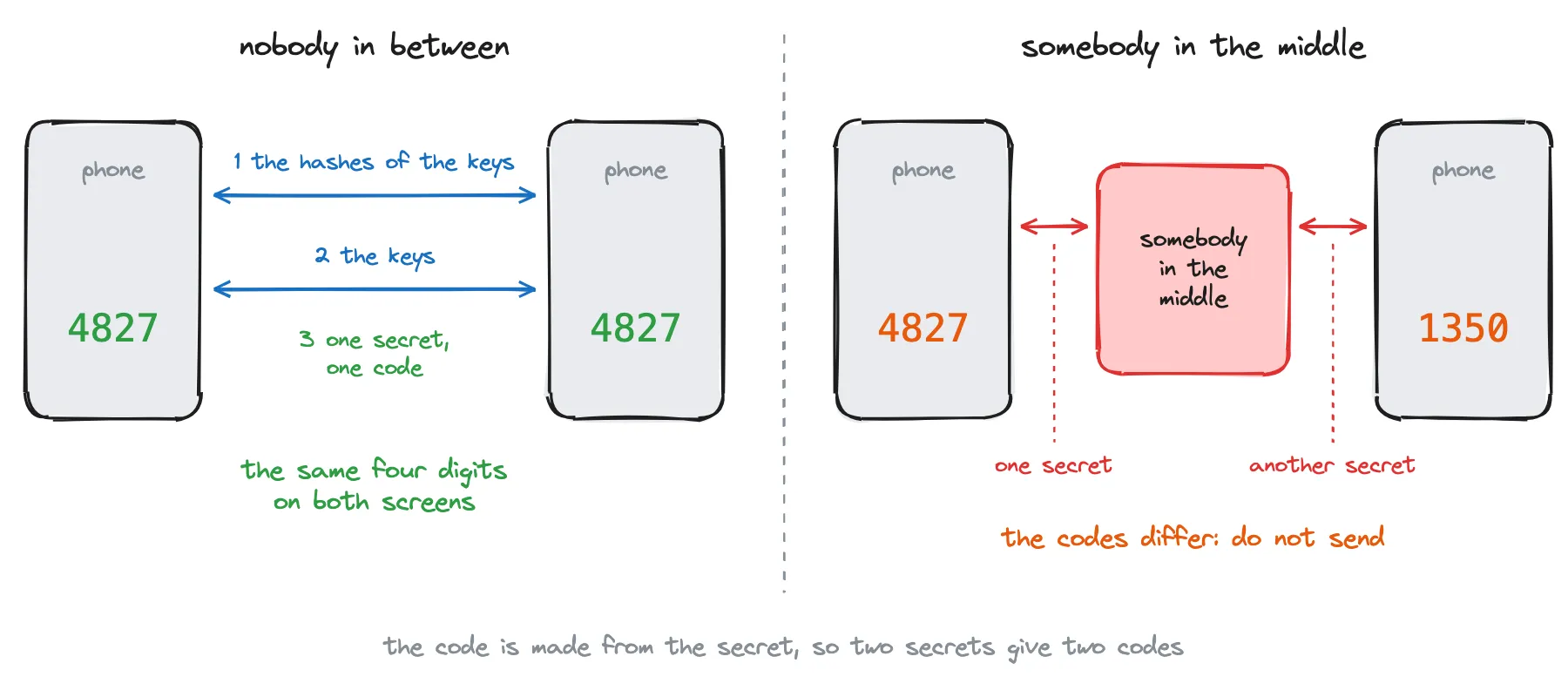
Four digits are few. Someone in the middle could try key after key, in private, until the two codes happen to match. To stop that, each phone first sends only the hash of its public key. It sends the key itself only after it has received the other phone’s hash:
val mine = pair.public.encoded
val hash = MessageDigest.getInstance(FINGERPRINT)
output.write(hash.digest(mine))
output.flush()
val promised = ByteArray(FINGERPRINT_BYTES)
input.readFully(promised)
output.writeShort(mine.size)
output.write(mine)
output.flush()
val length = input.readUnsignedShort()
if (length == 0 || length > SEAL_KEY_LONGEST) throw IOException("not a key")
val theirs = ByteArray(length)
input.readFully(theirs)
if (!MessageDigest.isEqual(hash.digest(theirs), promised)) throw IOException("not the key that was promised")
Now neither side can change its key after seeing the other’s. Whoever sits in the middle must choose its keys blind, so it gets one guess, with one chance in ten thousand.
On the phones the seal cost nothing that could be measured. Over the direct link, four runs of the 300 MB test gave 61 to 77 MB/s unencrypted and 63 to 77 MB/s sealed. The radio is much slower than the cipher, so the cipher’s cost does not show.
One problem was left, the one from the lost video: a link that breaks in the middle.
Step 6: Continuing after a break
Think of the lost video again. Its link broke at 159 MB of 624, and all the phones could do was begin again. Until this step, a broken link meant “lost”. The receiver deleted what it had, and the video had to be sent again from the first byte. For a link that broke at 500 MB of 600, that is hard to accept.
Continuing sounds easy: connect again and send the rest. The trouble is the first problem, the right phone. After a break, the next phone that links might be a different one. It must not receive the second half of a private video only because it connected.
A secret per offer
Every offer now holds 32 random bytes, a secret that only the two phones of that transfer know. I call the idea a secret per offer. When the link breaks, the receiver keeps the half-written file open, with its count of bytes and its fingerprint so far. The sender starts looking for the other phone.
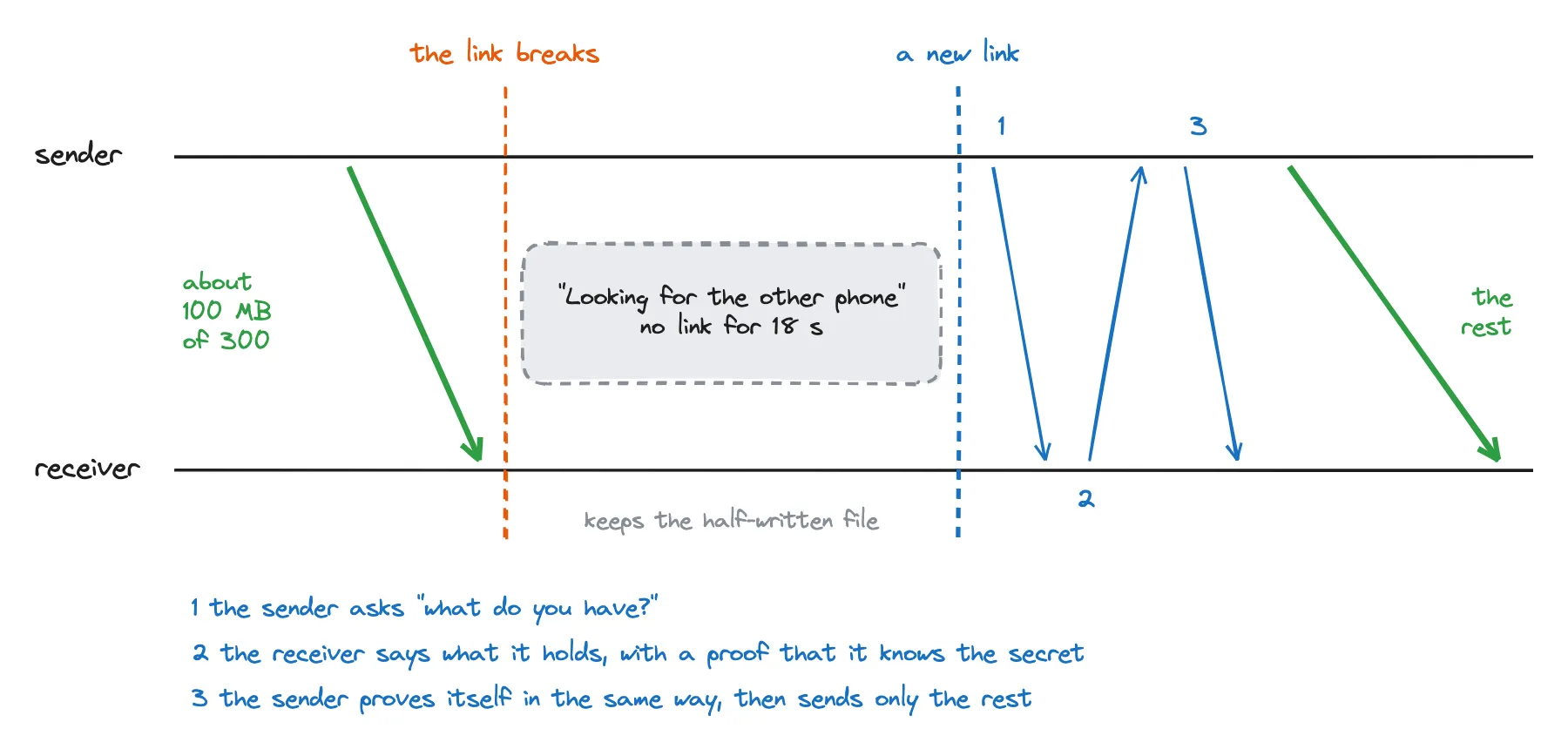
When a new link forms, the sender asks “what do you have?” and adds 16 fresh random bytes. The receiver answers with what it holds, 16 random bytes of its own, and a proof that it knows the secret. The sender checks the proof and then proves itself in the same way.
The proof is a keyed hash: a hash that only someone who knows the secret can compute.
private fun proof(token: ByteArray, from: Int, asked: ByteArray, answered: ByteArray, mark: ByteArray): ByteArray {
    val mac = Mac.getInstance(SEAL_MAC)
    mac.init(SecretKeySpec(token, SEAL_MAC))
    mac.update(from.toByte())
    mac.update(asked)
    mac.update(answered)
    mac.update(mark)
    return mac.doFinal()
}
It mixes four things. The first is the secret. The second is who is answering, so that a phone cannot prove itself by sending back the proof it has just received. The third is both sets of fresh bytes, so that a proof recorded on one link is worth nothing on another. The fourth, on a sealed link, is a value that only the two ends of that link can compute, so that nobody in the middle can forward a proof.
The sender continues only after that. It reads the file again from the start, because its own fingerprint needs every byte, but it sends only what the other phone does not have yet.
The waits needed real phones. The first version looked for 20 seconds, and on my phones the link took 16 and 22 seconds to come back in two tests with a short Wi-Fi break. Now the sender looks for 45 seconds and the receiver holds its half file for up to 75. When the link has been gone for more than 3 seconds, the screen says so: “Looking for the other phone. The transfer carries on when it is back.”
Then it was tried three times on the two phones. A 300 MB transfer was cut by switching off the receiver’s Wi-Fi at about 100 MB. The phones were without a link for 16, 41 and 18 seconds. Each time the proof passed, the rest crossed, and the fingerprint matched.
It is not finished. In all three runs the new link formed through the home router, and the rest of the file crossed at 1.0 to 1.2 MB/s. The next step is to switch to the direct link in the middle of a transfer. That is for another week.
One case is left: ending a transfer on purpose. If you leave the screen in the middle, the other phone should not wait up to 75 seconds for you. So a phone that stops on purpose says so with one last message, and the other phone forgets the secret at once.
What carries over
Take away the phones and the knock, and three ideas remain that fit other apps.
The first is to let a physical act stand for the choice of device. The knock replaced a list of nearby devices and the step of picking one. That only works because the rule behind it is strict: both phones must have a knock of their own, a fraction of a second apart at most, and the check runs before the first byte of a file is read.
The second is to give every piece of work that may be interrupted its own secret. Resuming is easy to build and easy to get wrong, because the phone that comes back may not be the phone that left. A secret made for one transfer, proved by both sides, is what makes the second half of a file safe to send.
The third is to measure where the time goes, and log why things fail. The measurement did come first here, and it still pointed at two possible causes. Only the test with the new protocol showed that the radio was the limit. The lost video was blamed on the wrong cause for the same reason: the app did not yet log why it had ended a link.
The two phones still lie a few centimetres apart. Most of the time now, the video crosses exactly that far.
Next week, a new quest.
P.S. Accessibility
A knock is not the only way to send. A flick of a finger up the screen counts as that phone’s knock. With TalkBack on, the phone that has files chosen also offers an action, “Send to the phone in reach”. Either one stands for that phone’s knock, and the other phone must still have a knock or a flick of its own within 0.7 seconds. The code of a sealed link is read digit by digit, not as one number. And the line that says the other phone is being looked for is announced when it appears.