27 Nov 2026 · Motion · 13 min
The line that felt stuck
A game played by tilting the phone and holding it still. This is why its line moved later than the hand, and what fixed it.
I wanted to build something that uses the sensors of the phone. We often forget what our phones can do.
I had built something like this before. When I worked in the micromobility industry, I built a screen that asked a rider to tilt the phone to an angle and hold it still. We used it to detect whether the rider was under the influence.
This time it is only a game.
You hold the phone upright, with the screen facing you. A solid line shows how far you have tilted the phone to the left or to the right. A dotted line shows an angle to reach, for example 52 degrees. You tilt the phone until the two lines meet, and you keep them together for about two seconds. Then a new angle appears on the other side, and you have to be more exact. After three of these you have won.
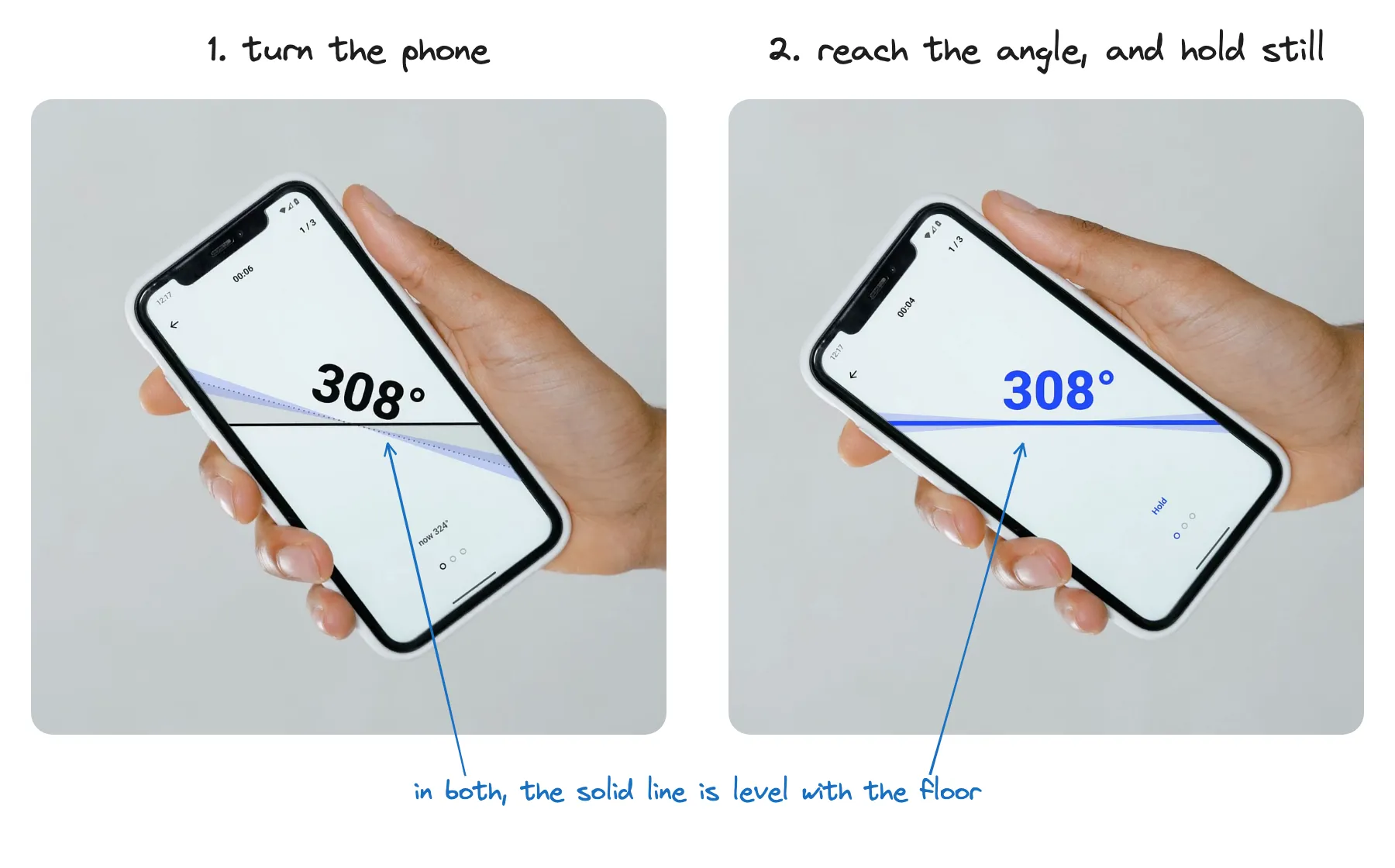
The first version had one problem. The line moved later than my hand. I tilted the phone, and the line arrived a moment after. When I tried to stop on the angle I went past it, because the line had not caught up yet. In my notes I wrote that the line feels stuck.
It took five steps to remove that delay.
This week’s quest
Every week I give myself a quest: one small thing that should feel like magic. Last week’s was a video that crosses from one phone to another with a knock. This week’s was one sentence long:
A game where the only control is how still you can hold your phone.
I call it Steady Hand.
The angle of the phone is the tilt. The angle to reach is the target. The two seconds are a hold.
The rules of the quest:
- Three holds, each harder. Every hold gives less time and less room for error, on three levels.
- Only a game. It says how still the phone was held, and nothing about the person holding it.
- The line moves with the hand. No delay you can see, in a slow correction or in a fast swing.
- A still hand reads still. When the phone is held steady, the line does not shake.
- Fair at the edge. Nobody loses a hold because of a movement they did not feel.
- Drawn on a Canvas, and measured. Every shape is drawn by code, and every claim about speed comes from a measurement on a phone.
The third, fourth and fifth rules come down to noise and delay. Noise means that the sensors shake even when the hand does not. Delay means that what the screen shows has already happened.
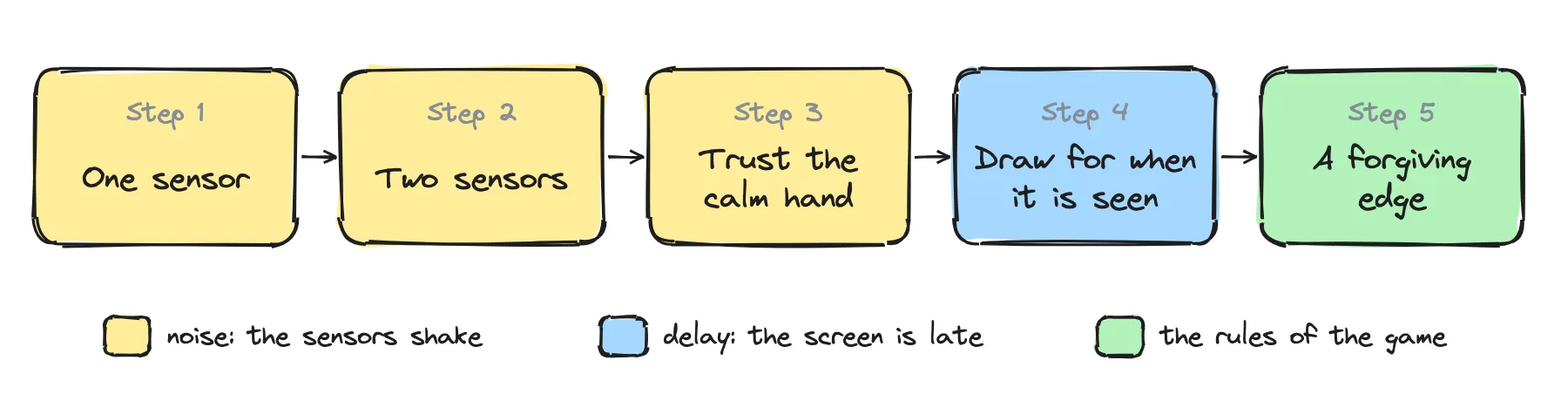
Step 1: One sensor is not enough
A phone has a sensor called the accelerometer. It measures every force that pushes on the phone. Gravity is one of those forces, and it always points down. So the accelerometer can tell where down is, and from that the code can work out how far the phone is tilted.
Its readings are never quite still. Even when the phone lies on a table, the numbers move up and down a little. Drawn directly, the line would shake.
It also measures every push, and it cannot tell them apart. When you move the phone sideways, that push is added to gravity. For that moment the sensor reports that down is in a different direction.
The usual way to stop the shaking is a filter. A filter replaces each reading with an average of the last few readings. The average is steadier than a single reading. But an average of past readings is always a little behind the present.
That is the choice a filter forces. More averaging gives a steadier line that is later. Less averaging gives a quicker line that shakes. In the first version the line was steady and about a tenth of a second late.
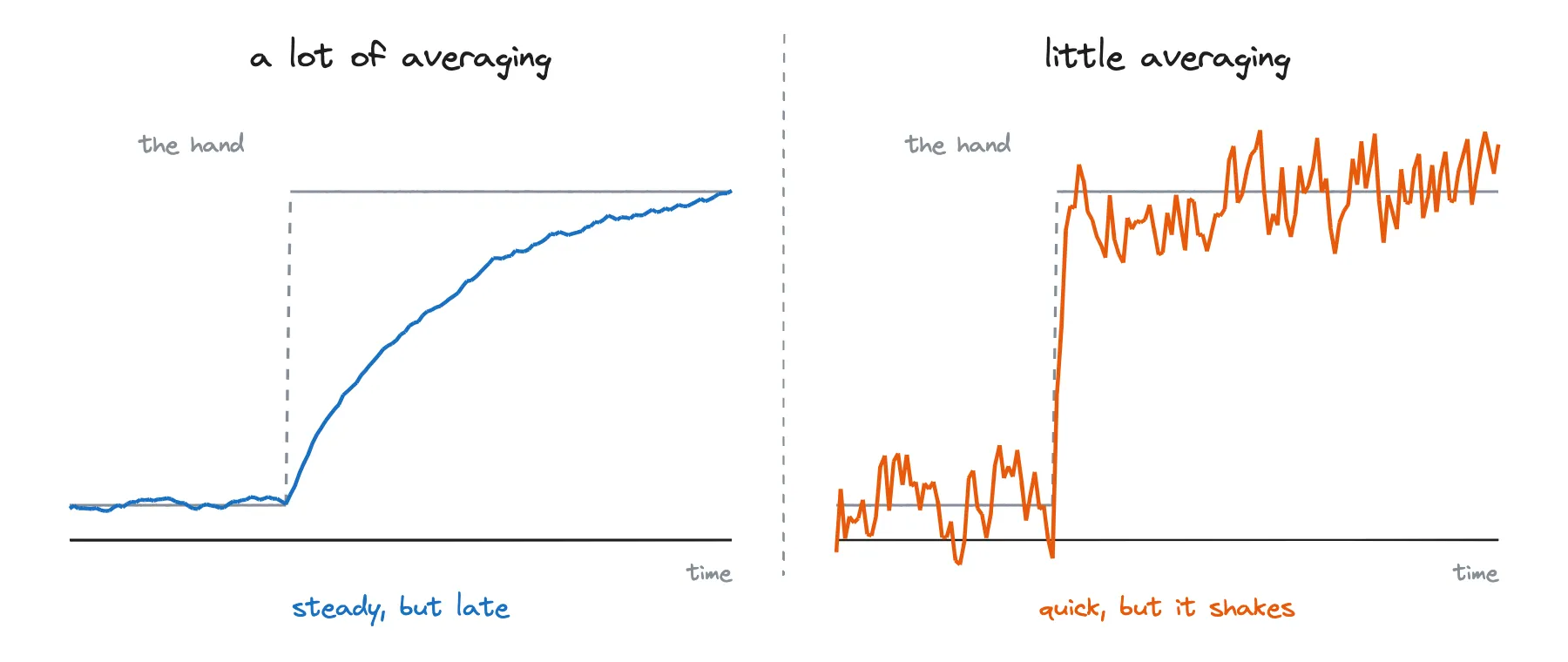
That tenth of a second was the delay I felt. I turned the phone by a degree and the line did not move yet. So I turned it more. Then both movements arrived on the screen and I had gone too far.
No amount of averaging removes both the shake and the delay. The game needed a second sensor.
Step 2: The gyroscope carries, the accelerometer corrects
The second sensor is the gyroscope. It measures how fast the phone is turning, in degrees a second. Its readings arrive at once and they are steady, so they need no filter.
To get the tilt from the gyroscope, the code adds up its readings. If the phone turned at 10 degrees a second for half a second, it turned 5 degrees.
The gyroscope has a weakness of its own. Every reading has a very small error. Because the readings are added up, the errors are added up too. After a while the tilt the code has worked out is no longer the real tilt. This is called drift.
The two sensors have opposite weaknesses. The accelerometer shakes but is right on average. The gyroscope is steady but slowly goes wrong. So they are used together.
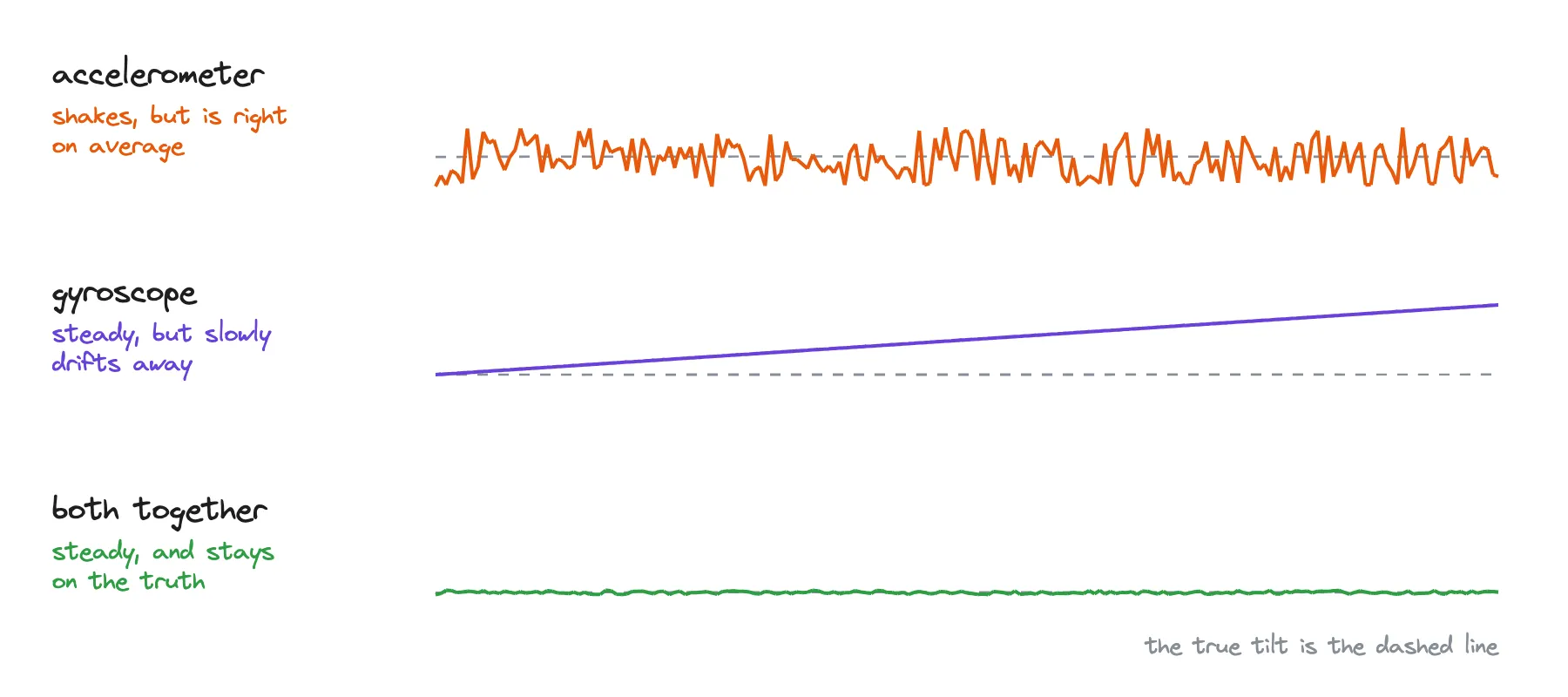
The gyroscope carries the tilt, and the accelerometer corrects it. The tilt on the screen comes from the gyroscope, so it is quick and steady. In the background, the accelerometer slowly pulls it back to the true value, over about a second. That removes the drift without bringing back the shake. This combination is called a complementary filter.
fun turn(nanos: Long, wx: Float, wy: Float, wz: Float) {
    val dt = since(turned, nanos)
    turned = nanos
    stamp = nanos
    if (!primed) return
    var speed = -wz
    if (upright) speed += z * (wx * x + wy * y) / strength
    speed *= DEGREES
    spin = speed
    angle += speed * dt
    val dx = (wz * y - wy * z) * dt
    val dy = (wx * z - wz * x) * dt
    val dz = (wy * x - wx * y) * dt
    x += dx
    y += dy
    z += dz
    strength = x * x + y * y
    val r = TWO_PI * RATE_HZ * dt
    rate += r / (r + 1f) * (speed - rate)
}
This function runs for every gyroscope reading.
The lines up to angle += speed * dt add the newest turn to the tilt.
The lines with x, y and z update the direction of down that the code remembers. When the phone turns, that direction has to turn with it.
The last two lines keep an average of how fast the phone is turning. Step 4 needs it.
The middle part was missing at first. The remembered direction of down fell behind when the phone turned fast, and the correction then pulled the tilt towards the wrong value. A unit test found it. A unit test is a small program that checks one piece of code. This one fed the code the readings of a simulated phone turning at 120 degrees a second, and the tilt came out 8 degrees behind.
The sensors are read on a separate thread. The gyroscope is read 200 times a second. A thread is a line of work that runs by itself. Because the sensors have their own, a slow frame on the screen does not hold up a reading.
With two sensors most of the delay was gone. In my hand it still did not feel right. After a fast movement the line kept moving for a moment, although my hand had stopped.
Step 3: Trust the calm hand
The line kept moving because of the correction from step 2.
To reach a target you swing the phone quickly. A swing pushes the phone sideways, and the accelerometer adds that push to gravity. A sideways push of 3 m/s² is enough to make down seem 17 degrees away from where it is.
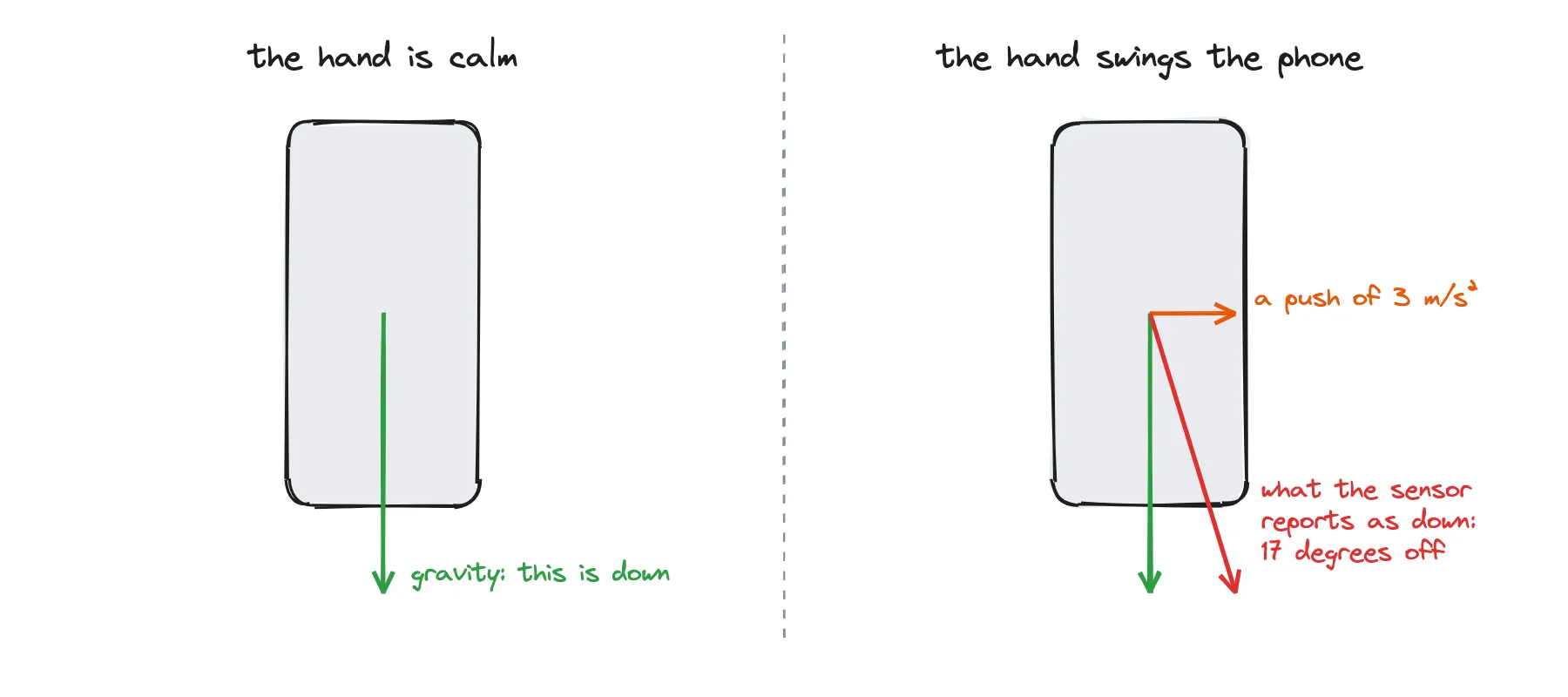
So during a swing the accelerometer is wrong. The correction trusts it anyway and starts to pull the tilt towards the wrong value. When the hand stops, the accelerometer is right again, and the tilt is pulled back. On the screen the line moves by itself just when the player is trying to hold still.
The fix is to believe the accelerometer only while the hand is calm. Every accelerometer reading gets a weight between 0 and 1, which says how much it may correct the tilt.
The weight is high when the size of the reading is close to gravity alone, which means nothing else is pushing the phone, and the phone is hardly turning. The weight falls to 0 in the middle of a swing.
During a swing the tilt therefore comes from the gyroscope alone. A swing is short, and the gyroscope does not drift much in that time.
After this change the sensors gave a tilt that was quick and steady. The delay that was left came from the screen.
Step 4: Draw the frame for the moment it is seen
A phone screen shows a new picture many times a second. Each picture is a frame. On my phone the screen shows 60 frames a second, so a new one every 16.7 ms.
A frame is not seen at the moment the code draws it. First the app draws it. Then the system combines it with the rest of the screen, such as the status bar. Then the display shows it. On my phone, which runs Android 13, a frame is expected on screen 33.3 ms after the app starts on it. That is two refreshes.
In most apps nobody notices 33 ms. In this game you can see it, because of how the line is drawn. The solid line stays level with the floor while the phone turns around it, like the bubble in a spirit level. If the line is drawn 33 ms late, it turns with the phone for a moment before it goes back to level. At 100 degrees a second, 33 ms is more than 3 degrees.
Virtual reality headsets have the same problem when the wearer turns their head, and they solve it by predicting. The same works here.
Draw the hand where it will be when the frame is seen. The gyroscope says how fast the phone is turning. The code multiplies that speed by the time until the frame is seen, and adds the result to the tilt.
override fun read(dt: Float, frameNanos: Long) {
    synchronized(lock) {
        upright = fusion.upright
        framed = frameNanos - skew
        val lead = if (gyroscope == null || !timed) 0f else ((framed + seenAfter - fusion.stamp) / TiltFusion.NANOS).coerceIn(0f, FARTHEST)
        tilt = fusion.at(lead)
        log?.note(TiltLog.FRAME, framed, tilt, lead, fusion.angle)
    }
}
This function runs once for every frame. It works out how far ahead to look: the time from the newest sensor reading to the moment the frame will be seen. That moment is the frame’s own start time, which the system provides, plus the 33.3 ms.
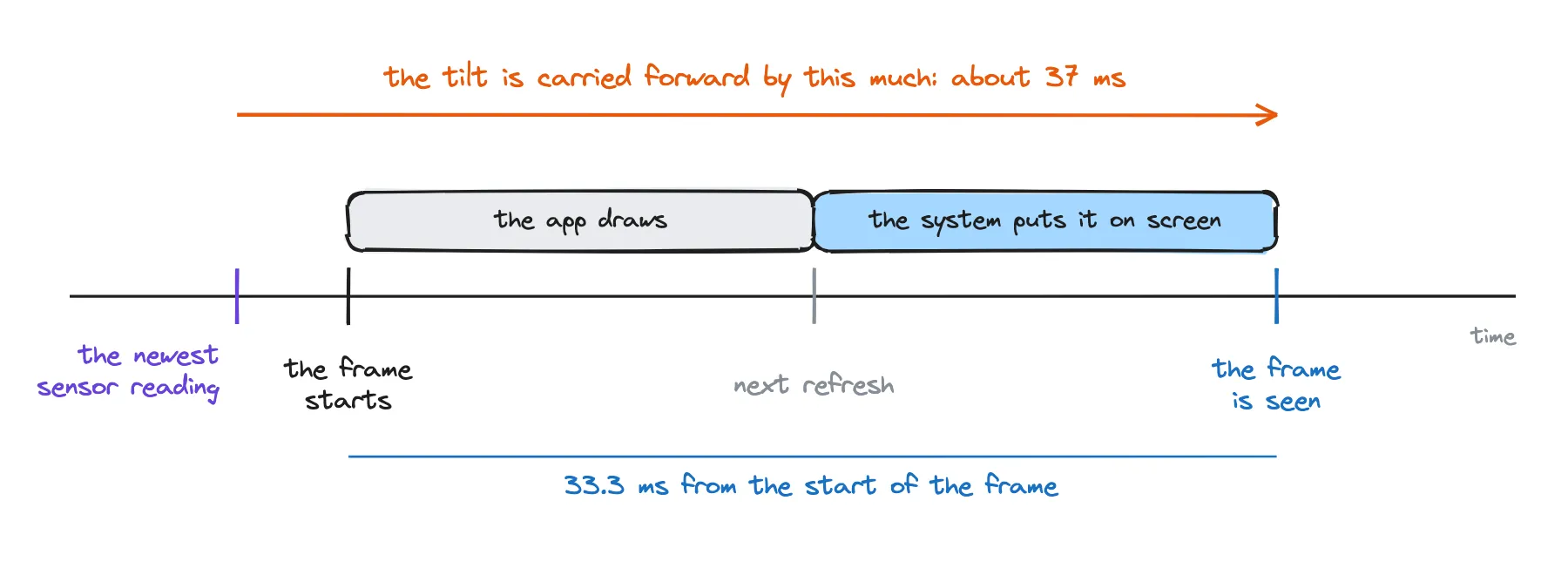
The start time comes from the system and not from a clock read inside the function. The function runs a little after the frame starts, and that small wait is different in every frame. Using it would make the line jump by a different small amount each frame.
Looking ahead has a cost. A hand that holds still is never fully still. It trembles, roughly ten times a second. A tremor changes direction so quickly that it may have turned back before the frame is seen. If the code predicts from the tremor’s speed, it draws the tremor larger than it is. The game would then punish a tremor that it had made larger itself.
So there is no looking ahead on a still hand. When the phone turns slower than 3 degrees a second, nothing is added. From 20 degrees a second, the full time is added. Between 3 and 20 the amount rises gradually. In the code these two speeds are called HELD and SWUNG.
fun at(lead: Float): Float {
    val t = ((abs(rate) - HELD) / (SWUNG - HELD)).coerceIn(0f, 1f)
    return angle + rate * lead * t * t * (3f - 2f * t)
}
Nothing is lost by this. When the line is not moving, a late frame and a frame on time show the same picture.
Step 5: A forgiving edge
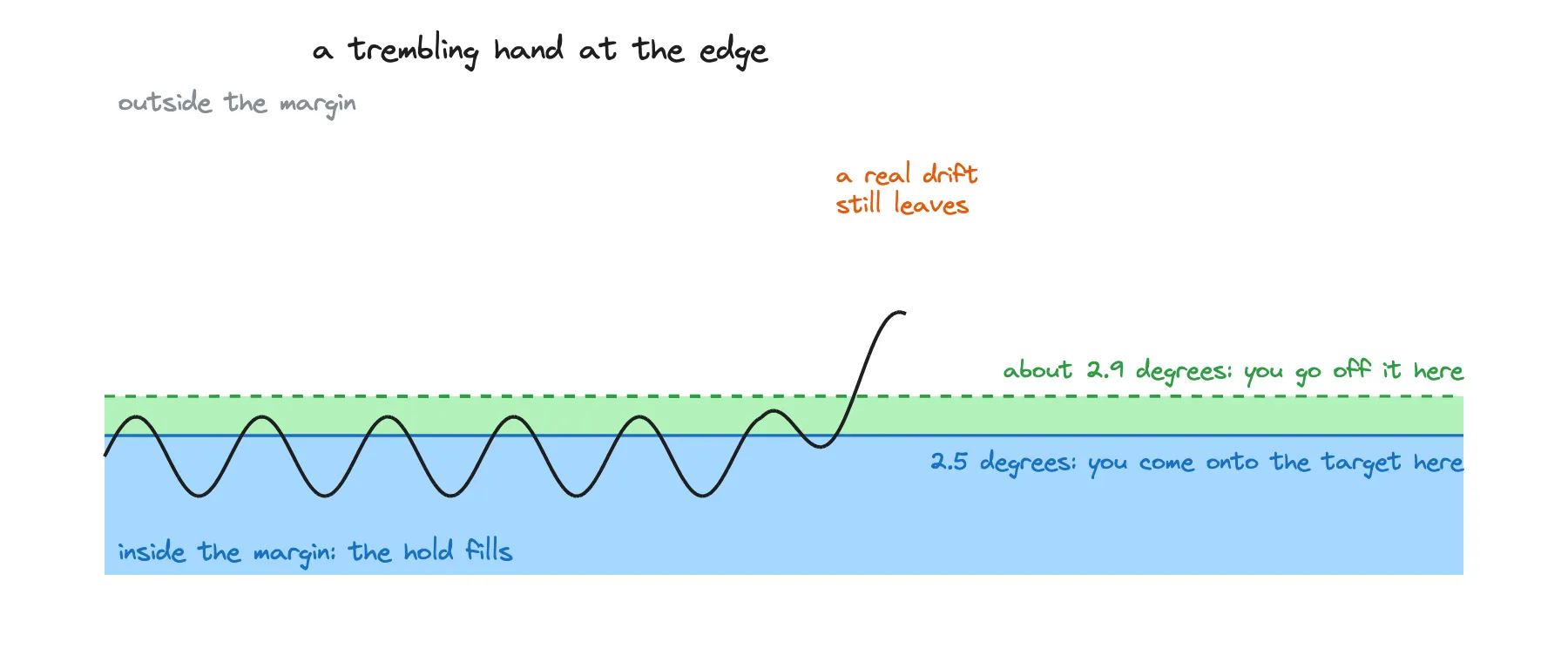
A player cannot hold the phone at exactly 52 degrees. So each target has a margin around it, for example 2.5 degrees to either side. While the tilt is inside the margin, the hold counts and fills up. Outside it, the hold does not count.
This causes a problem at the edge. A hand that trembles right at 2.5 degrees goes in and out of the margin many times a second. The hold starts and stops each time, and the colours on the screen flicker.
Many platform games are forgiving at the edge of a platform, so that a jump made a moment too late still works. The game is forgiving in the same way.
- Once you are on the target, you stay on it until you are 1.15 margins away. With a margin of 2.5 degrees, you come on at 2.5 and go off at about 2.9. In the code this is
LEEWAY. - When the tilt goes off the target, the hold is not changed for the first tenth of a second. In the code this is
GRACE.
private fun seek(dt: Float): Boolean {
    if (!upright) {
        onTarget = false
        return false
    }
    left = max(0f, left - dt)
    onTarget = abs(off) <= if (onTarget) rule.margin * LEEWAY else rule.margin
    if (onTarget) {
        slipped = 0f
        held += dt / rule.hold
        drift += abs(off) * dt
        driftTime += dt
        if (held >= 1f) {
            held = 1f
            seconds[index] = rule.seconds - left
            wobble[index] = drift / driftTime
            rest = LANDED
            return enter(RoundPhase.Landed)
        }
    } else {
        slipped += dt
        if (slipped > GRACE) held = if (rule.strict) 0f else max(0f, held - DRAIN * dt / rule.hold)
        if (held == 0f) {
            drift = 0f
            driftTime = 0f
        }
        if (left == 0f) {
            missedBy = abs(off)
            return enter(RoundPhase.Failed)
        }
    }
    return false
}
This function runs once for every frame while a target is up. The line that sets onTarget is the first rule. The line with slipped > GRACE is the second. The rest keeps the clock and the score.
With these rules, a small twitch that returns within a tenth of a second costs nothing. A longer drift still costs. The hold empties, and on the hardest level it is lost at once.
The number on the screen has a similar rule. The tilt is shown as a whole number of degrees. A hand resting at 44.5 would make it switch between 44 and 45 all the time. So the number changes only when the tilt is 0.7 degrees away from the number shown.
Roads not taken
One idea was to keep one sensor and change how much the filter averages. As step 1 explains, that only exchanges shake for delay.
Another idea was built and then replaced. The first version with two sensors also looked ahead, by a fixed 20 ms on top of the age of the newest reading. The amount was smaller than the real 33.3 ms. It was counted from the moment the code ran, which is different in every frame. And it was added to a still hand as well. Step 4 replaced it.
The hand feels it too
The game also vibrates, so the player can feel what happens without reading the screen.
The vibrations are started by the same code that draws each frame. A vibration therefore comes on the frame that shows its moment, and the two cannot drift apart.
A round has eight kinds of vibration:
- the count going down before the round starts,
- the start,
- the moment the phone comes onto the target,
- a tick each time another sixth of the hold is done,
- the hold being finished,
- a hold being lost,
- the round being won,
- the round being lost.
The game does not choose how strong a vibration is. It asks the system for a type, such as “keyboard tap”, and the phone decides how that feels. On my phone the types that were checked are played as three strengths.
private fun feel(beat: SteadyBeat): HapticFeedbackType = when (beat) {
    SteadyBeat.Count, SteadyBeat.On -> HapticFeedbackType.KeyboardTap
    SteadyBeat.Go, SteadyBeat.Landed -> HapticFeedbackType.VirtualKey
    SteadyBeat.Tick -> HapticFeedbackType.SegmentFrequentTick
    SteadyBeat.Lost -> HapticFeedbackType.GestureEnd
    SteadyBeat.Passed -> HapticFeedbackType.Confirm
    SteadyBeat.Failed -> HapticFeedbackType.Reject
}
During one hold the hand feels a tap when the phone comes onto the target, then five light ticks while the hold fills, then a stronger beat when the hold is finished.
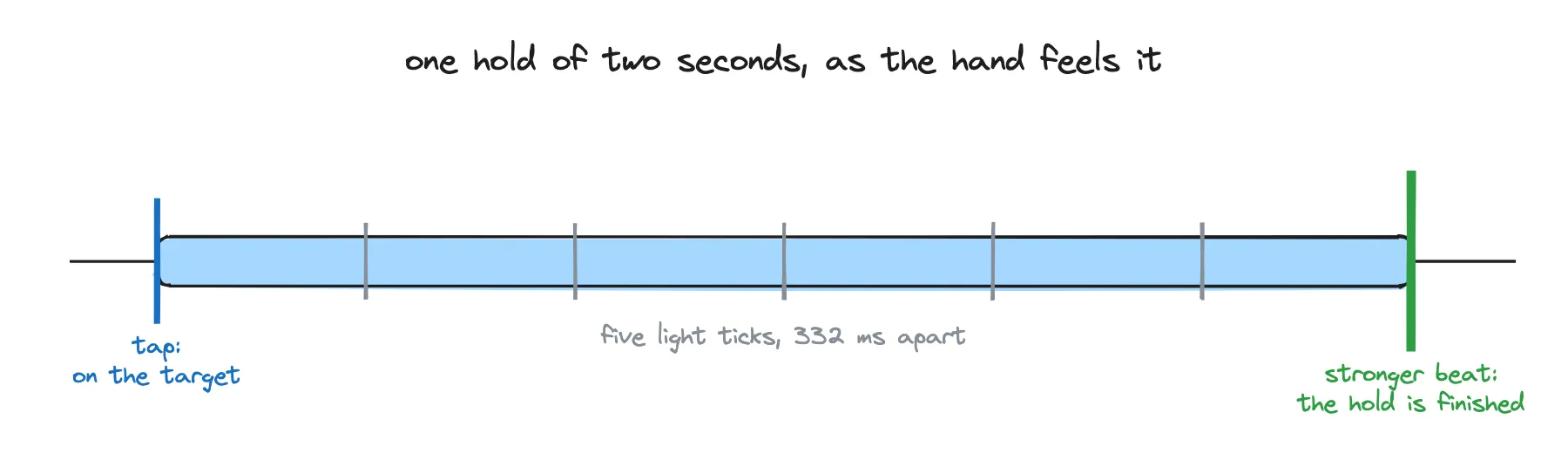
The tap is not repeated within 0.3 seconds. Without that limit, a hand trembling across the edge would make the phone rattle.
The phone keeps a log of the vibrations an app asks for. In a round that the game played by itself, the log showed the vibrations in the planned order. In a hold of two seconds the ticks came 332 ms apart, which is about a sixth of two seconds.
The ticks shake the phone a little, at the time the game is measuring how still it is. They are the lightest of the three strengths, but their effect on the reading has not been measured yet.
Drawn on a Canvas
The game is one screen made with Jetpack Compose. It uses no image files, no SVG and no Lottie animations. A Canvas is a surface that code draws on directly. While a round is played, every line, arc, circle and number is drawn that way. There are three looks, each in a light and a dark version.
The shapes are simple ones that the graphics chip draws quickly: rectangles, lines, circles and arcs.
The game’s own code that runs in every frame creates no new objects in memory. When code creates objects in every frame, the system has to stop now and then to clean them up, and a frame can be late because of it. A scan of the game’s compiled code found new objects only in code that runs when a round starts or the screen is laid out, and in code that handles errors.
How it was measured
A recorder in the game. The game can save a round to a file: every sensor reading, every frame and every target. Three rounds that I played gave these numbers.
| What was measured | Result |
|---|---|
| Time between two gyroscope readings | 5.0 ms |
| Time from the start of a frame to the moment it is expected on screen | 33.3 ms |
| How far ahead the tilt was drawn during a swing | about 37 ms |
| How much the tilt moved while a hold was won, on the two harder levels | 0.3 to 0.8 degrees (standard deviation) |
The standard deviation says how far the tilt usually was from its average during the hold.
The last row changed a rule. The hardest hold in the game allowed 1.5 degrees to either side and lasted 3 seconds. In the round I recorded on that level I won it, and the tilt was never more than 1.54 degrees from the target. The hold now allows 1 degree and lasts 3.5 seconds.
Three rounds from one hand are a small sample. The other settings in the steps above still have to be checked in the same way.
Macrobenchmark on the phone. Macrobenchmark is a Jetpack library. It runs the app on a real phone and records how long every frame took. A phone that lies on a desk cannot be tilted, so for these runs the game plays by itself: a scripted hand tilts to each target and holds, and every run is the same.
It played 24 rounds of about 919 frames each. Of every 100 frames, 99 were ready at least 1.5 ms before they were needed. Up to 11 frames in a round were still late. About six in ten of the late frames came in the first tenth of a second after the tap that starts the round. So the work on frames is not finished.
A trace of one frame. A trace is a recording of everything the phone does inside a frame, with the time each part takes. It showed that the dotted line was expensive.
The dotted line was drawn with one call that draws round points. The part of the system that draws, the renderer, has no round point. It drew each point as a small oval of its own, which made 191 ovals in every frame. Now the dotted line is drawn once into a picture, and each frame only places and turns that picture.
private fun dotted(c: Canvas, x: Float, y: Float, turn: Float, dots: Dots?, colour: Int) {
    dots ?: return
    sprite.color = colour
    c.save()
    c.translate(x, y)
    c.rotate(turn)
    c.drawBitmap(dots.bitmap, dots.left, dots.top, sprite)
    c.restore()
}
The rules and the sensor code also have 26 unit tests. The sensor tests use the simulated phone from step 2.
What carries over
These carry over to any app that follows the movement of a hand.
Use two sensors together. The accelerometer knows where down is, but its readings shake. The gyroscope reacts at once, but it slowly drifts. Each one covers the weakness of the other. With one sensor and a filter, you have to choose between a line that shakes and a line that is late.
Remember that the screen is late. What the code draws now is seen about 33 ms later on my phone. If the drawing follows a moving hand, draw it where the hand will be by then. When the hand is still, draw it where it is.
Record what a real hand does. The game saved every sensor reading from three rounds I played. The recordings showed how steady my hand was during a hold, and the hardest hold was made stricter to match.
Next week, a new quest.
P.S. Accessibility
A screen reader is not told the tilt in every frame. It is told each step of the round, for example “Hold 2 of 3. Tilt the phone to 52 degrees and keep it there.”, and then “Held.”